Example: changing the entertainment
source
1. Press the entertainment sources
button.
2. To select an entertainment source,
turn the knurled wheel.
3. Press the knurled wheel to confirm the se-
lected entertainment source.
Gear shift indicator
Principle
The shift point indicator recommends the gear
that best suits the current driving situation. Us-
ing the optimal gear supports an efficient driv-
ing style.
General information
Depending on vehicle equipment and national-
market version, the shift indicator activates in
sequential mode.
Display
Icon
Description
Shift up to the most fuel efficient
gear.
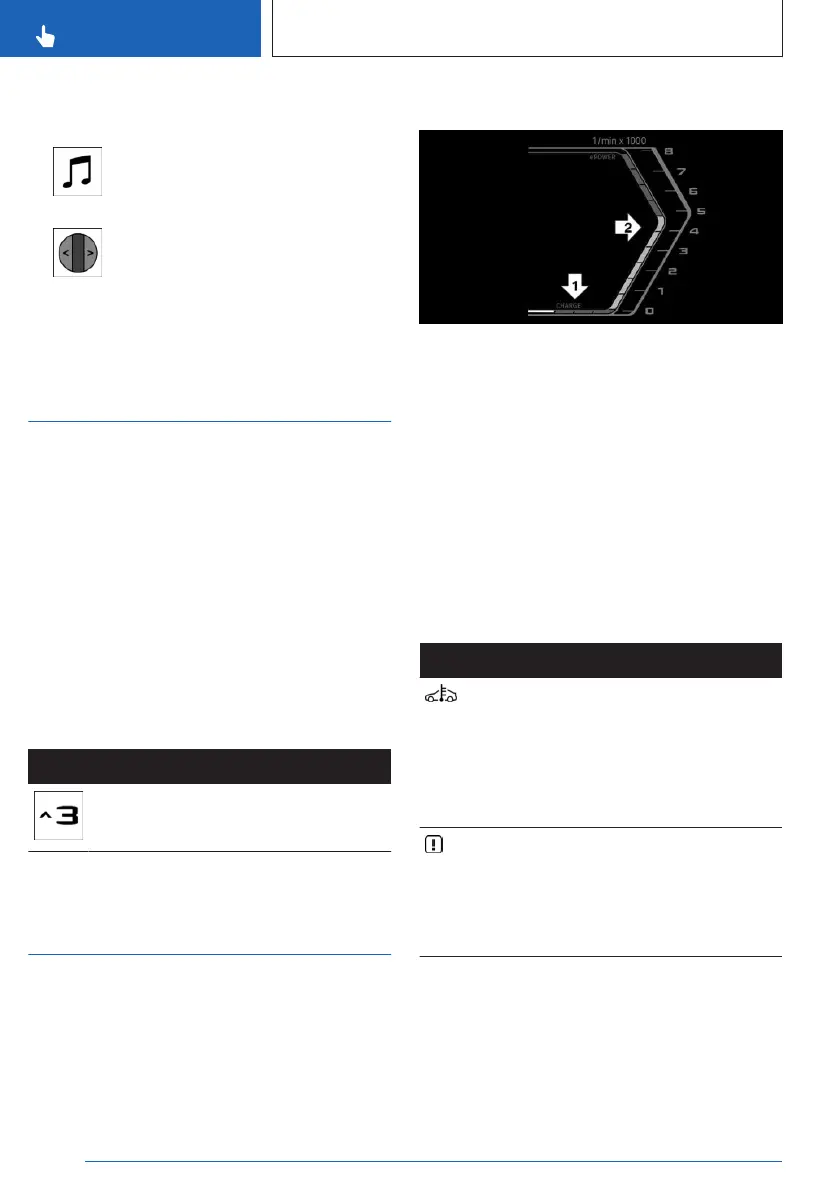
Power gauge for electric
motor
Principle
The power gauge indicates the current electric
drive power as a percentage.
Display
Arrow 1: display for energy recovery, e.g., dur-
ing deceleration.
Arrow 2: range for electric driving.
The electric driving range is variable and may
change depending on the driving situation.
Reduced drive power
The available power may be reduced due to
certain factors. The power gauge is automati-
cally adjusted accordingly.
In addition, the icons in the power gauge indi-
cate a reduced drive power.
Icon
Description
Blue icon: cold drivetrain.
White icon: increased drive sys-
tem temperature, for instance
due to sustained or high
power demand when driving
on mountain roads.
System-related functional limi-
tation.
A Check Control message is
displayed in addition where ap-
plicable.
Seite 148
CONTROLS
Displays
148
Online Edition for Part no. 01405A8A608 - VI/23



 To Next Page