Additional information:
▷ Cameras, refer to page 37.
▷ Radar sensors, refer to page 38.
G-Meter
General information
The G-Meter indicates the forces that are ap-
plied in longitudinal and transverse direction
on the vehicle occupants while driving.
The display can be configured on the central
display range of the instrument cluster.
The values are automatically reset whenever
you start a new drive.
Additional information:
Central display area, refer to page 151
Manually reseting G-Meter values
1.
Display the G-Meter on the instrument
cluster.
2. Press and hold the thumbwheel on
the steering wheel until the values are re-
set.
Date and time
Various settings can be applied for the date
and time display such as the date format.
Depending on vehicle equipment and national-
market version, the time zone can be set and
automatic time setting can be activated. With
automatic time setting, the time, date and, if
necessary, the time zone are updated auto-
matically.
1.
Apps menu
2. "Vehicle"
3. "System settings"
4. "Date and time"
5. Select the desired settings.
Fuel gauge and total range
Principle
The fuel gauge shows information on the cur-
rent fuel tank fill level and the total range on
the instrument cluster.
General information
Vehicle inclination may cause the display to
vary.
Additional information:
Refueling, refer to page 334.
Safety information
NOTICE
With a range below 30 miles/50 km, the
engine may no longer have sufficient fuel.
Engine functions are not ensured anymore.
There is a risk of damage to property. Refuel
promptly.
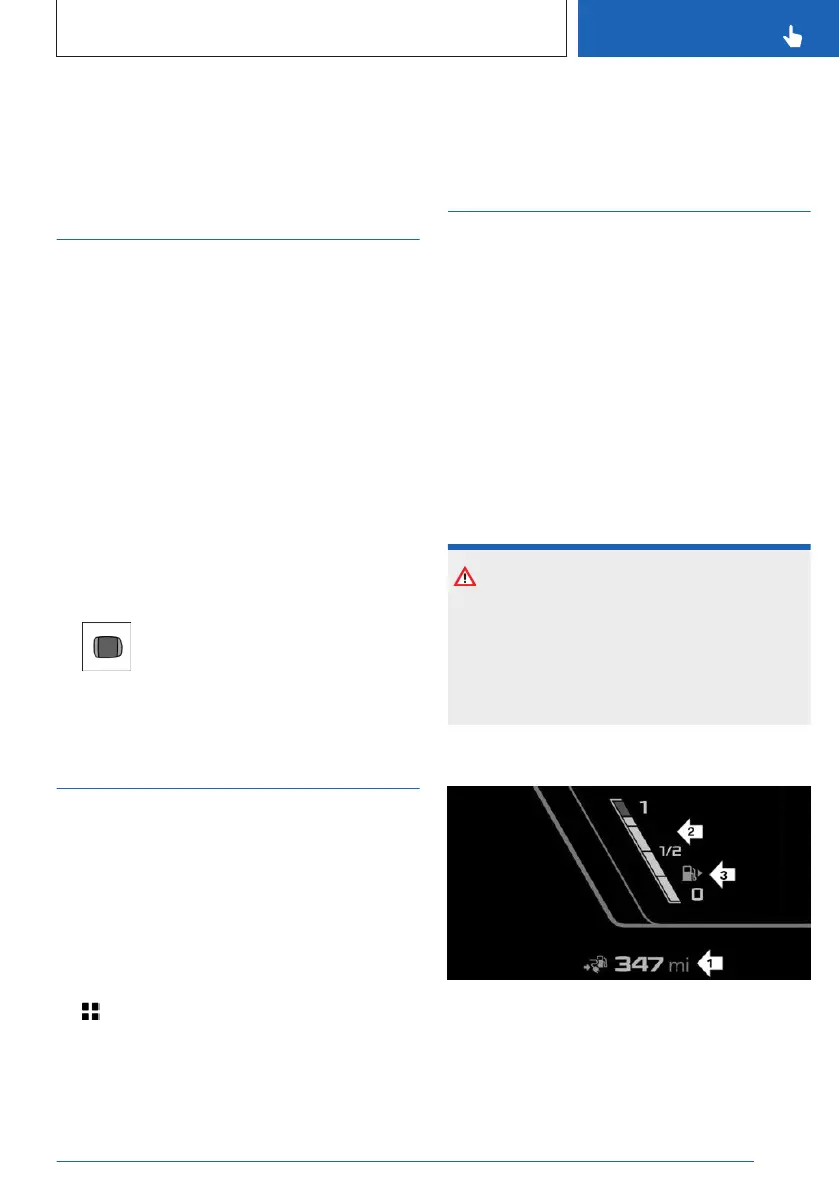
Display
Current total range, arrow 1.
Current fill level of fuel tank, arrow 2.
Arrow icon for the vehicle side on which the
fuel filler flap is located, arrow 3.
Seite 155
Displays
CONTROLS
155
Online Edition for Part no. 01405A8A608 - VI/23



 To Next Page