System limits
▷ The Personal Assistant provides informa-
tion about vehicle functions that may not be
installed in the vehicle.
This also applies to safety functions and
systems.
▷ Certain noises can be detected and may
lead to problems. Keep the doors and win-
dows closed.
▷ Noises from the front passenger or occu-
pants can impair the system. Avoid making
other noise in the vehicle while speaking.
▷ Major language dialects can cause prob-
lems with the speech recognition feature.
▷ A poor data connection affects the re-
sponse time of the Personal Assistant and
search function.
BMW Gesture Control
Principle
Several iDrive functions can be operated by
hand motion using BMW Gesture Control.
Overview
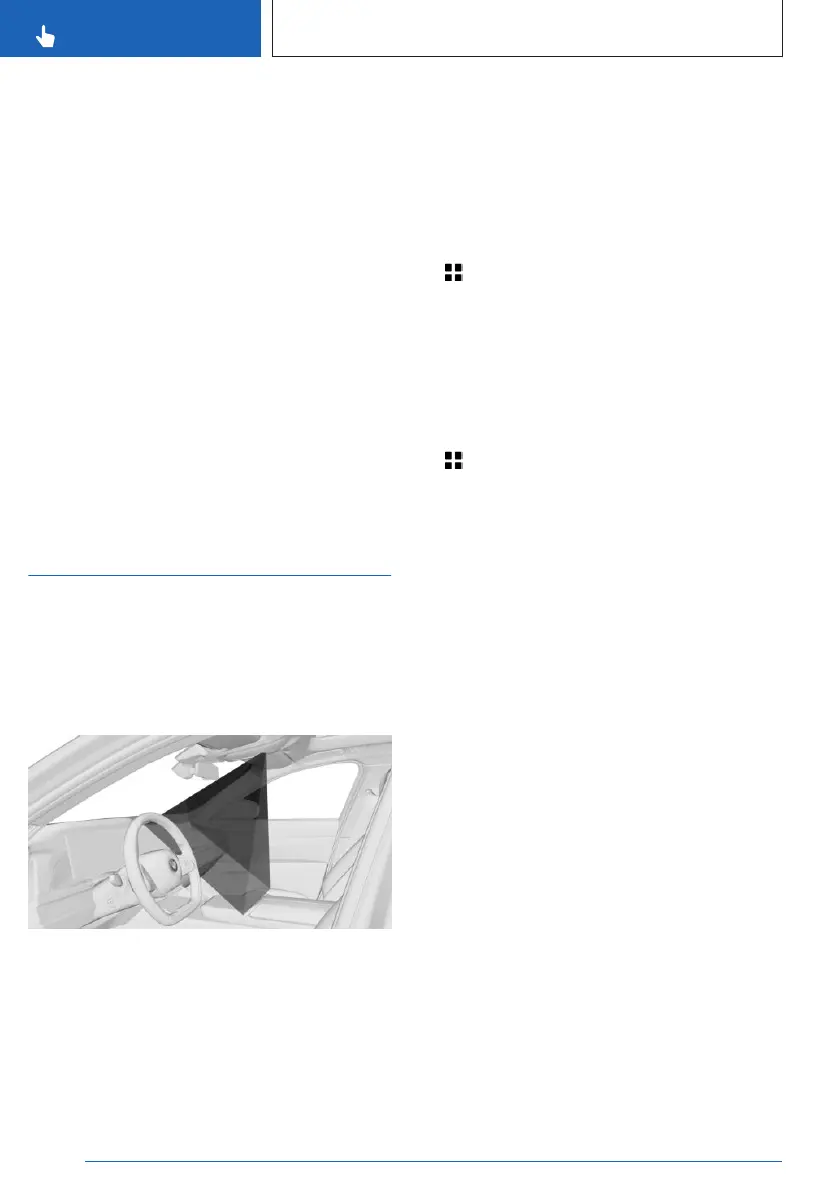
The camera in the headliner detects gestures
that are carried out in the area of the center
console at the height of the control display.
The camera of the gesture control uses an in-
visible Class 1 laser.
Activate/deactivate gesture control
1. Apps menu
2. "Vehicle"
3. "System settings"
4. "Gesture control"
5. "Gesture control"
Settings
1.
Apps menu
2. "Vehicle"
3. "System settings"
4. "Gesture control"
5. Select the desired setting.
Carrying out gestures
▷
Perform gestures underneath the interior
mirror and next to the steering wheel.
▷ Execute gestures clearly.
▷ The gestures can also be executed from
the front-passenger side.
Seite 60
CONTROLS
BMW iDrive
60
Online Edition for Part no. 01405A8A608 - VI/23



 To Next Page