The boAt PartyPal 185 is a portable party speaker designed for a smooth audio experience with minimal effort. It offers versatile connectivity options and various features to enhance your listening and party experience.
Function Description:
The PartyPal 185 serves as a portable Bluetooth speaker, capable of playing music wirelessly from smartphones or other compatible devices. It also supports music playback via USB drives and microSD cards, as well as through an Aux input for wired connections. The speaker is equipped with RGB lights that offer 7 different effects, adding a visual element to your music. It comes with a microphone, allowing for karaoke or public address functions. The device features a built-in rechargeable battery, making it suitable for portable use.
Important Technical Specifications:
- Model Name: PartyPal 185
- Bluetooth Version: 5.0
- Dimensions: 300x245x255mm
- Net Weight: 3.1kgs
- Working Range: Up to 10m
- Driver Size: 6.5" + 40mm
- Compatibility: Bluetooth (BT), USB, Aux
- Frequency: 30HZ-20KHZ
- Output Power: 50W
- Charging Time: Up to 4 hours
- Playing Time: Up to 6 hours @ 60% volume
- Battery: 3600 mAh @7.4V
Usage Features:
The speaker features a control panel with several buttons and ports:
- VOL "-" Button: Decreases volume.
- RGB Light: Controls LED light effects.
- Play / Pause / TWS Button: Plays/pauses music and activates TWS function.
- Backward and Fast Reverse Key: Skips to previous track or fast reverses.
- EQ key / Bluetooth reset Button: Selects equalization modes or resets Bluetooth.
- MENU key: Accesses menu functions (volume, bass, treble, microphone volume, echo effect) and changes modes.
- Forward / Fast Forward Button: Skips to next track or fast forwards.
- VOL "+" Button: Increases volume.
- DC 5V - 2A charging jack: For charging the device.
- Charging LED: Indicates charging status.
- USB port: For USB drive playback.
- microSD card slot: For microSD card playback.
- Aux Input: For wired audio connections.
- Microphone Input port 1 & 2: For connecting microphones.
- Power on/off button: Turns the device on or off.
Power On/Off/Standby:
To turn the product on or off, slide the On/Off switch to the ON or OFF position respectively. The speaker will automatically enter Standby mode if left idle for approximately 20 minutes.
Mode Change:
Long press the MENU button multiple times to switch between Bluetooth, USB, microSD, and Aux modes. The display will show "BLUE" for Bluetooth mode.
Volume Adjustment:
Adjust the volume using the VOL+ and VOL- buttons on the speaker or the remote control.
Equalizer:
Press the EQ key repeatedly to cycle through 6 available equalization presets.
Short press the MENU key to access adjustments for:
- u: Main volume
- b: Bass
- t: Treble
Use the VOL+ and VOL- keys to adjust these settings.
LED Light Effects Selection:
After turning on the speaker, short press the "LIGHT" key to change the LED light effect. There are 7 different effects. Long press the "LIGHT" key to turn off the LED lights.
Bluetooth Function:
- Turn on the speaker and select Bluetooth Mode (display shows "BLUE").
- Activate Bluetooth on your external device.
- Search for "PartyPal 185" and pair (enter "0000" if prompted).
- Once paired, start playback from your external device.
- Use the Play/Pause button to pause and resume playback.
- Compatibility with all devices cannot be guaranteed.
TWS Function (True Wireless Stereo):
If you have two PartyPal 185 speakers, you can pair them for stereo audio reproduction.
- Ensure both speakers are not paired with any external devices.
- Turn on both speakers and select Bluetooth mode.
- Long press the "Play/Pause/TWS" button on one speaker to initiate TWS pairing. A sound will confirm pairing.
- Once paired, the speakers will automatically pair with each other when turned on simultaneously.
- To deactivate TWS, long press the "Play/Pause/TWS" button on the speaker after pairing.
- Note: Speakers must be within 5 meters of each other in open spaces for TWS to work.
USB/MicroSD Function:
- Insert a USB stick or microSD card (containing MP3 songs) into the respective slot. Playback will start automatically.
- Short press "Play/Pause" to pause/resume.
- Short press "Forward" / "Backward" to go to the next/previous track.
- Long press "Fast Forward" or "Fast Reverse" to fast forward/reverse within the current song.
- Note: Compatibility with all storage devices is not guaranteed. External USB devices requiring more than 5V or 200mA are not supported. Use FAT16/FAT32 formatted storage devices.
AUX Function:
- Connect one end of a 3.5mm audio cable to the speaker's AUX input and the other to your external device.
- Press the MODE button several times to select the AUX source.
- Start playback directly from the connected external device.
- Note: Track skipping (Next/Previous Track) is not possible in AUX mode; control playback from the external device.
Using Microphones:
- Connect microphones to the input ports and turn them on.
- Short press the MENU key while a microphone is connected to adjust:
- N: Microphone volume
- E: Echo effect
- Use VOL- / VOL+ buttons to set the desired level.
- Double click the EQ button to activate/deactivate Microphone priority function, which increases microphone volume and decreases background music volume when the microphone is in use. The display will show "ON/of" when this function is activated/deactivated.
Maintenance Features:
Battery Charging:
The product has a built-in rechargeable battery. It is recommended to fully charge the battery before first use.
- During charging, the LED indicator will be on.
- Full recharge takes approximately 7-8 hours.
- The LED indicator will turn off when fully charged.
- Note: If the battery is completely discharged, leave the device off and recharge for at least an hour before using it.
- Battery life (up to 4 hours at medium volume) varies based on volume, song type, source, RGB light usage, and battery wear.
- Recharge times may vary based on the product's charge state and charger characteristics.
- A warning tone will periodically sound when the battery is low.

 Need help?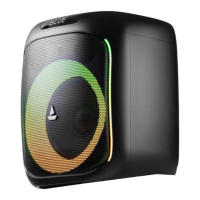

 To Next Page
 General