A
P–16616
3
2
1
Changing The Operator Password
Perform Password Entry at left using the owner password,
but do not start the engine.
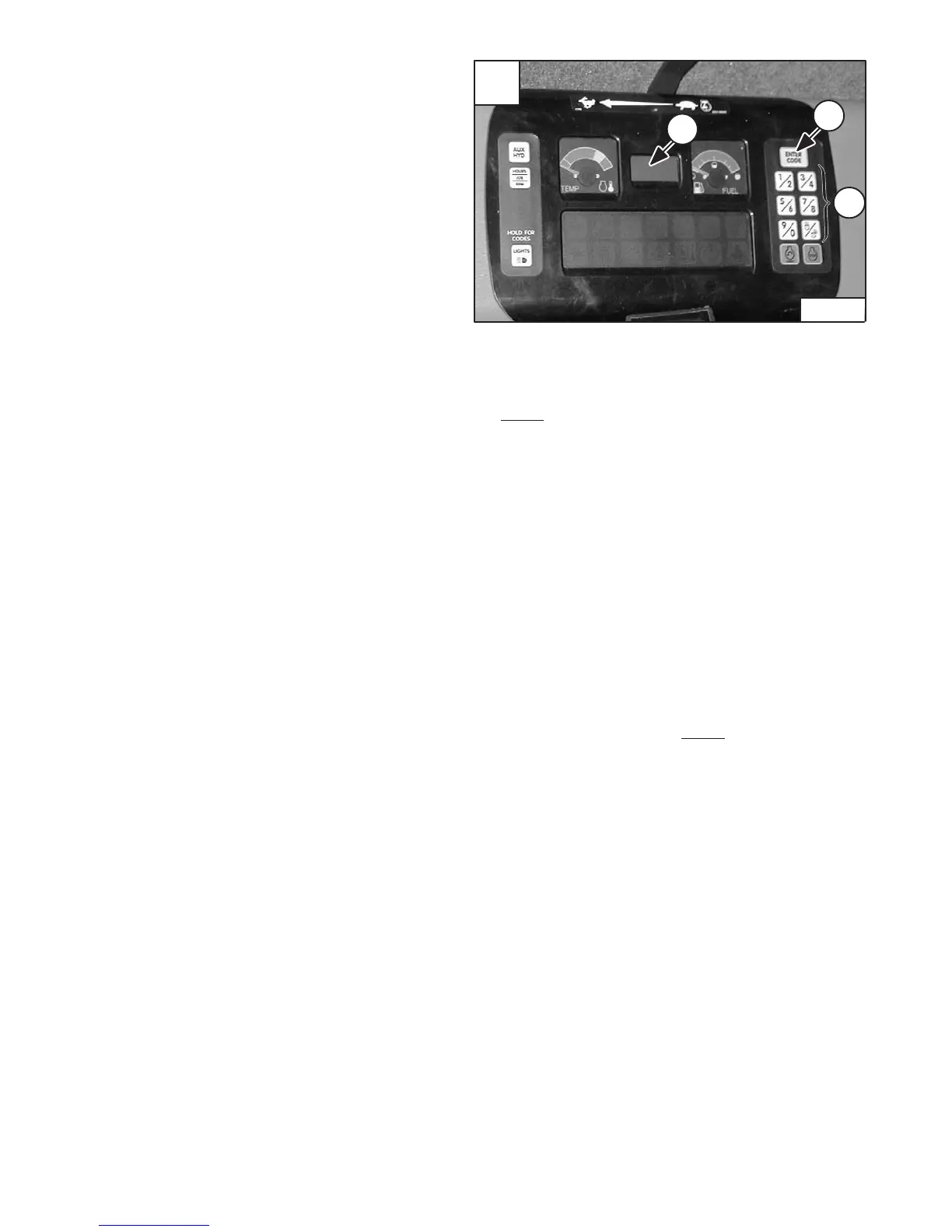
Press and hold the ENTER CODE Button (Item 1) [A] for
three seconds. CodE 0 will appear on the LCD (Item 2) [A].
Press the ENTER CODE Button until the desired Operator
Code (CodE 0, CodE 1, CodE 2, CodE 3) appears.
CodE 0 is Owner Password, the other codes are Operator
Passwords. You now have 40 seconds to use the keypad
(Item 3) [A] to enter each digit of a new four digit password.
Enter the new four digit password. After the fourth digit is
entered, there will be two short beeps and rPEAt will
appear.
Re–enter the new four digit password to verify. If the new
passwords match, there will be two short beeps, CodE will
appear for 1 second and then the LCD will return to
HOURMETER function.
NOTE: If the new passwords do not match, there will be
one long beep and Error will appear for 1 second
and then the LCD will return to HOURMETER
function.
Operation & Maintenance Manual62
331/331E/334 Excavator
KEYLESS CONTROLLER SETUP (CONT’D)
Software Version
With the key off, press and hold AUX HYD Button (Item 1)
[A]. The software version will be displayed in the LCD (Item
2) [A].
Passwords
All new machines with Deluxe Instrumentation arrive at
Bobcat Dealerships with the panel in locked mode. This
means that a password must be used to start the engine.
For security purposes, your dealer may change the
password and also set it in the locked mode. Your
dealer will provide you with the password.
• Master Password:
A permanent, randomly selected password set at the
factory which cannot be changed. This password is used
for service by the Bobcat dealer if the Owner Password
is not known; or to change the Owner Password.
Owner Password:
There is only one Owner Password (CodE 0). It must be
used to change the owner or operator passwords. See
below for changing the Owner Password.
Operator Password:
There can be up to three Operator Passwords (CodE 1,
CodE 2, or CodE 3). See below for changing the
Operator Password.
Password Entry (For Starting and Operating the
Machine)
Press ENTER CODE Button (Item 1) [A]. The panel will
become lighted and there will be two short beeps. CodE will
appear on the LCD (Item 2) [A].
NOTE: After you press ENTER CODE you have 40
seconds to use the keypad (Item 3) [A] to enter the
password. (If more than 40 seconds is used, the
process will abort and you will need to start over.)
Enter the password. For each digit that you enter, a dash
will appear on the LCD. If the password was entered
correctly, there will be one long beep.
NOTE: If the password was incorrect there will be three
short beeps and Error will appear on the LCD.
Press the ENTER CODE Button again and start
over. After three failed attempts, you must wait
three minutes to try again.
You are now ready to start and operate the machine.
If you will be changing passwords, do not start the engine.
(See Changing The Password at right.)


 To Next Page
 Loading...