JOB
RPM
A
B–15819
HYD
HOURS
LIGHTS
HOLD FOR
CODES
ENTER
AUX
CODE
STOP
START
TEMP
FUEL
JOBRPM ACD
1
3
24 5
63 Operation & Maintenance Manual
331/331E/334 Excavator
KEYLESS CONTROLLER SETUP (Cont’d)
Password Lockout Feature
This allows the operator to Unlock the password feature so
that a password does not need to be used every time you
start the engine.
Perform Password Entry (Page 60). (The engine can be
started or stopped.)
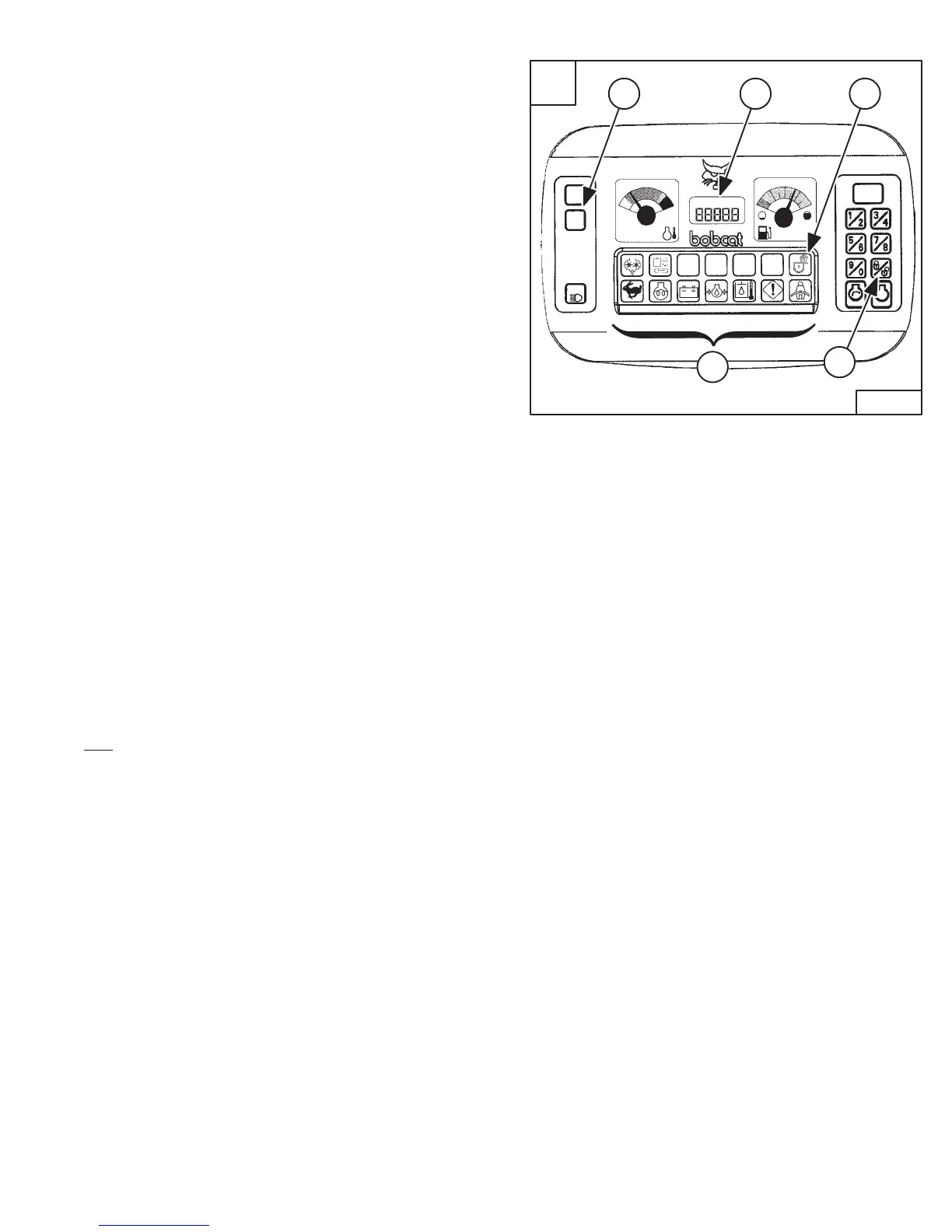
Press the Lock/Unlock Button (Item 1) [A]. The LCD will
continuously alternate from UnLoc to CodE for 1 second
periods.
Perform Password Entry again.
UnLoc will appear in the LCD (Item 5) [A], the Unlocked
Icon (Item 2) [A] will appear in the Icon Display Area (Item
3) [A] and there will be two short beeps.
To start an Unlocked system, press the ENTER CODE
Button and press the START Button.
When you stop the engine with the system unlocked, you
will hear one long beep every 3 seconds for 15 seconds.
To lock the system again, press the Lock/Unlock Button
(Item 1) [A] and enter the password during the 15 second
period.
Job Clock
The JOB CLOCK can be set to record accumulated hours
for a particular job.
Press and release the HOURS/JOB/RPM Button (Item 4)
[A] until JOB light is ON at the top, center of the LCD (Item
5) [A].
While the JOB light is ON, press and hold the
HOURS/JOB/RPM Button (Item 4) [A] until the LCD
retruns to zero.
This process will clear the accumulated hours and will
begin recording JOB CLOCK time again. (This does not
affect the HOURMETER which continues to record the
total operating hours of the excavator.)
Pressing the HOURS/JOB/RPM Button again or pressing
the START Button will return the LCD to HOURMETER
function.
RPM
The LCD (Item 5) [A] can be set to display engine RPM.
With the engine running, press and release the
HOURS/JOB/RPM Button (Item 4) [A] until RPM light is
ON at the top, left of the LCD (Item 5) [A].
Engine RPM is now displayed in the LCD.
Press the HOURS/JOB/RPM Button (Item 4) [A] again the
return to HOURMETER function.
ACD
The LCD (Item 5) [A] will flash ACD when there is an error
associated with an electrically controlled attachment.


 To Next Page
 Loading...