125 S130 Operation & Maintenance Manual
AIR CLEANER SERVICE
Replacing Filter Elements
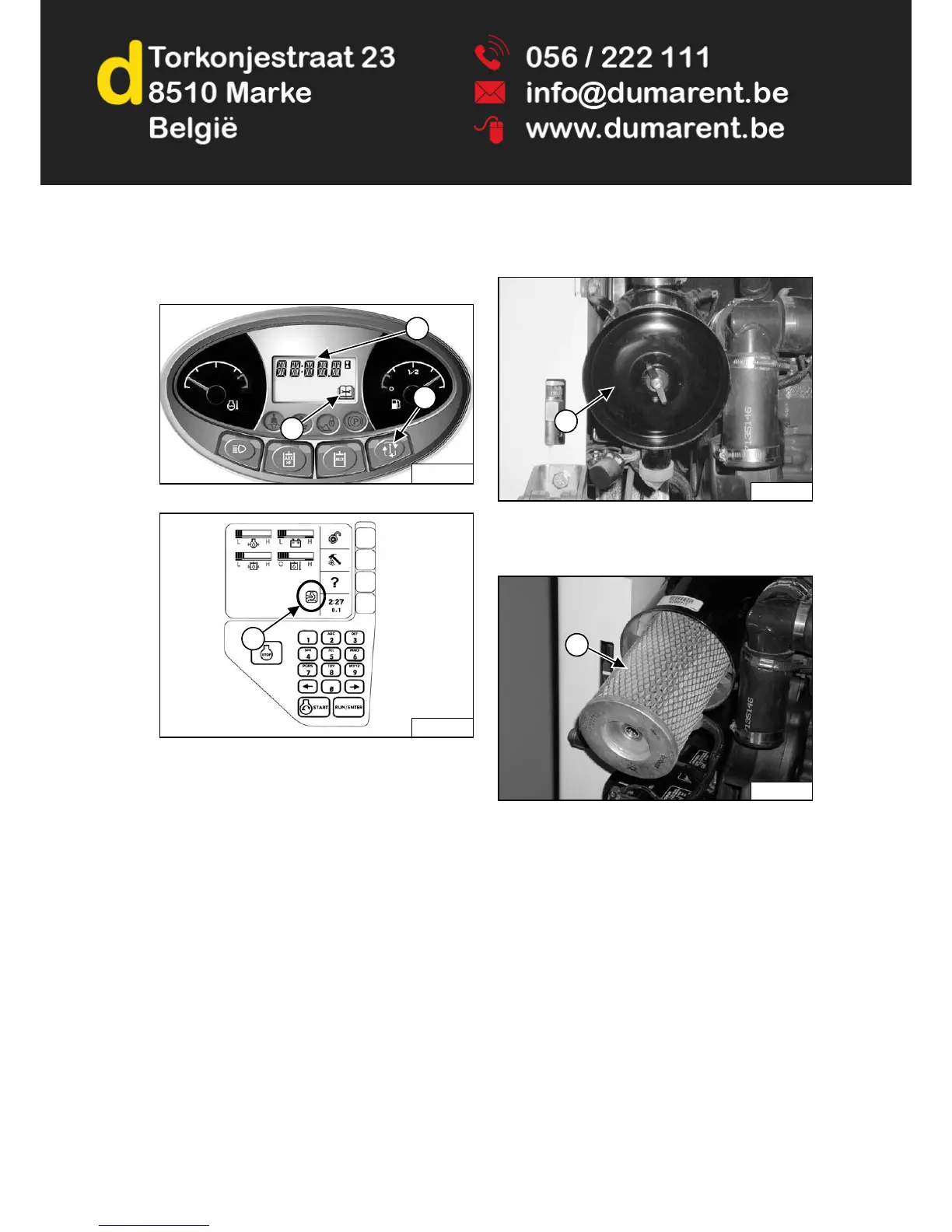
Figure 175
Figure 176
It is important to change the air filter element only when
necessary. The Service indicator (Item 1) will FLASH and
service code [M0117] (Air Filter Plugged) will show in the
Data Display (Item 2) when the Information button (Item
3) [Figure 175] is held for two seconds.
The Air Cleaner icon on the Deluxe Instrumentation
Panel, if equipped, will be ON (Item 1) [Figure 176].
Replace the inner filter every third time the outer filter is
replaced or as indicated.
Outer Filter
Figure 177
Remove the wing nut and remove the dust cover (Item 1)
[Figure 177].
Figure 178
Remove the wing nut and pull the outer filter element
(Item 1) [Figure 178] out and discard.
NOTE: Make sure all sealing surfaces are free of dirt
and debris.
Install new filter. Push all the way in until it contacts the
base of the housing. Install wing nut.
Install the dust cover and the wing nut [Figure 177].


 To Next Page
 Loading...