162 S130 Operation & Maintenance Manual
CONTROL PANEL SETUP (CONT’D)
Right Panel Setup (Deluxe Instrumentation Panel)
(Cont’d)
More Examples
Clocks
Press . . .
TOOL / SETUP
LOADER FEATURES
DISPLAY OPTIONS
CLOCKS
SET CLOCK
Use the keypad to set time.
Press RUN / ENTER to set clock.
Press EXIT to return to previous level menu.
RESET JOB CLOCK (Password required)
(Job Clock keeps a running total for job hours)
Press CLEAR to reset Job Clock to zero.
Press LOCK / UNLOCK to unlock.
Enter Password and press RUN / ENTER.
Languages
Press . . .
TOOL / SETUP
LOADER FEATURES
DISPLAY OPTIONS
LANGUAGES
Select the language, press RUN / ENTER.
Press EXIT to return to previous level menu.
Vitals
(Monitor the engine, hydraulic / hydrostatic,
electrical functions when engine is running.)
Press . . .
TOOL / SETUP
LOADER FEATURES.
VITALS
Press SELECTION ARROW to select METRIC or
ENGLISH (M / E) readouts
You can monitor real-time readouts of:
Engine Oil Pressure
Engine Coolant Temperature
Hydraulic Charge Pressure
Hydraulic Oil Temperature
System Voltage
Engine Speed
The Deluxe Instrumentation Panel is easy to use.
Continue to set your own preferences for running /
monitoring your Bobcat loader.
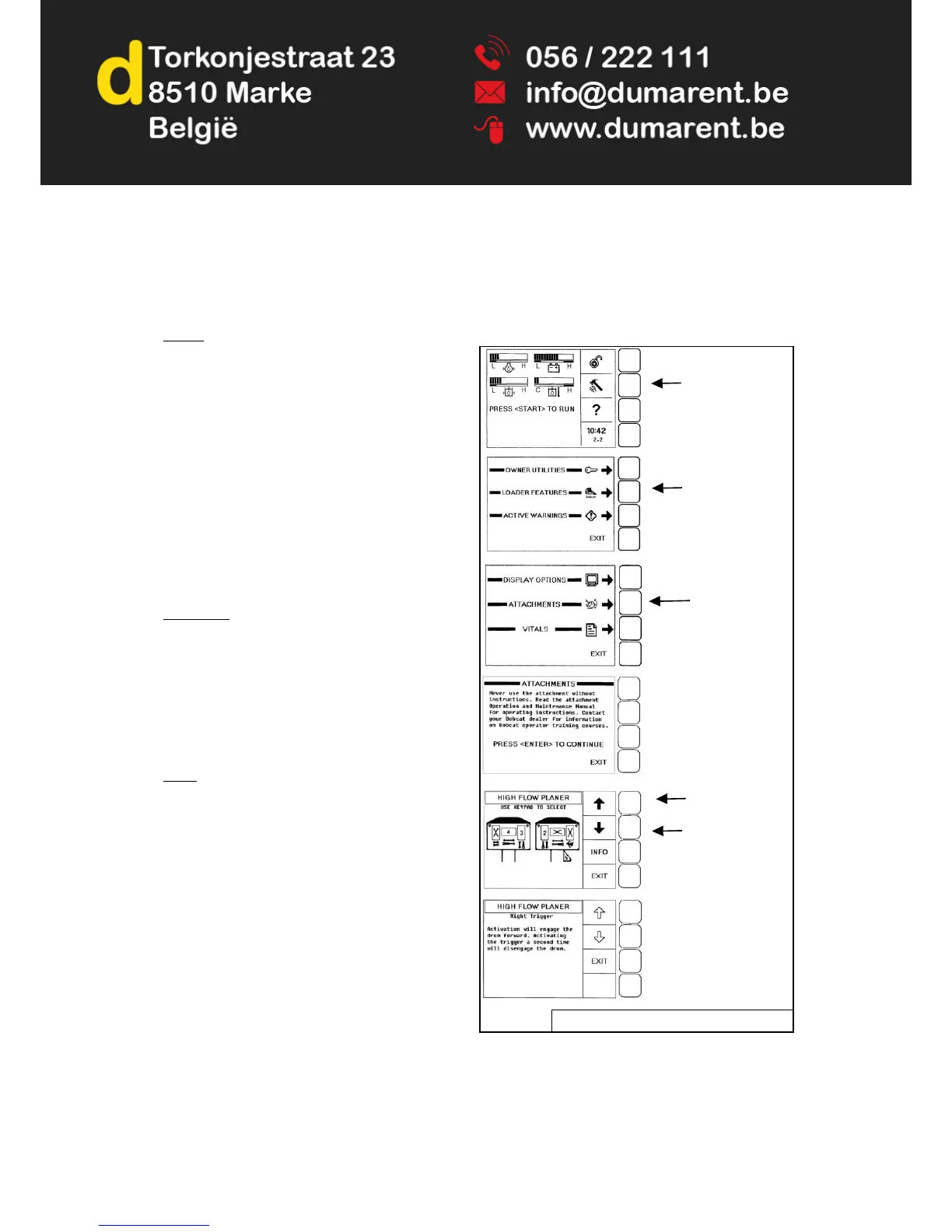
Attachment Control Information (Deluxe
Instrumentation Panel)
The Deluxe Instrumentation Panel allows the user to view
information concerning the operation of Bobcat
attachments.
Figure 240
Attachments are listed alphabetically [Figure 240]. Press
the exit button to return one screen or press the “0” (zero)
key to return to the home screen immediately.


 To Next Page
 Loading...