59 S130 Operation & Maintenance Manual
DRIVE RESPONSE (CONT’D)
Operation (Cont’d)
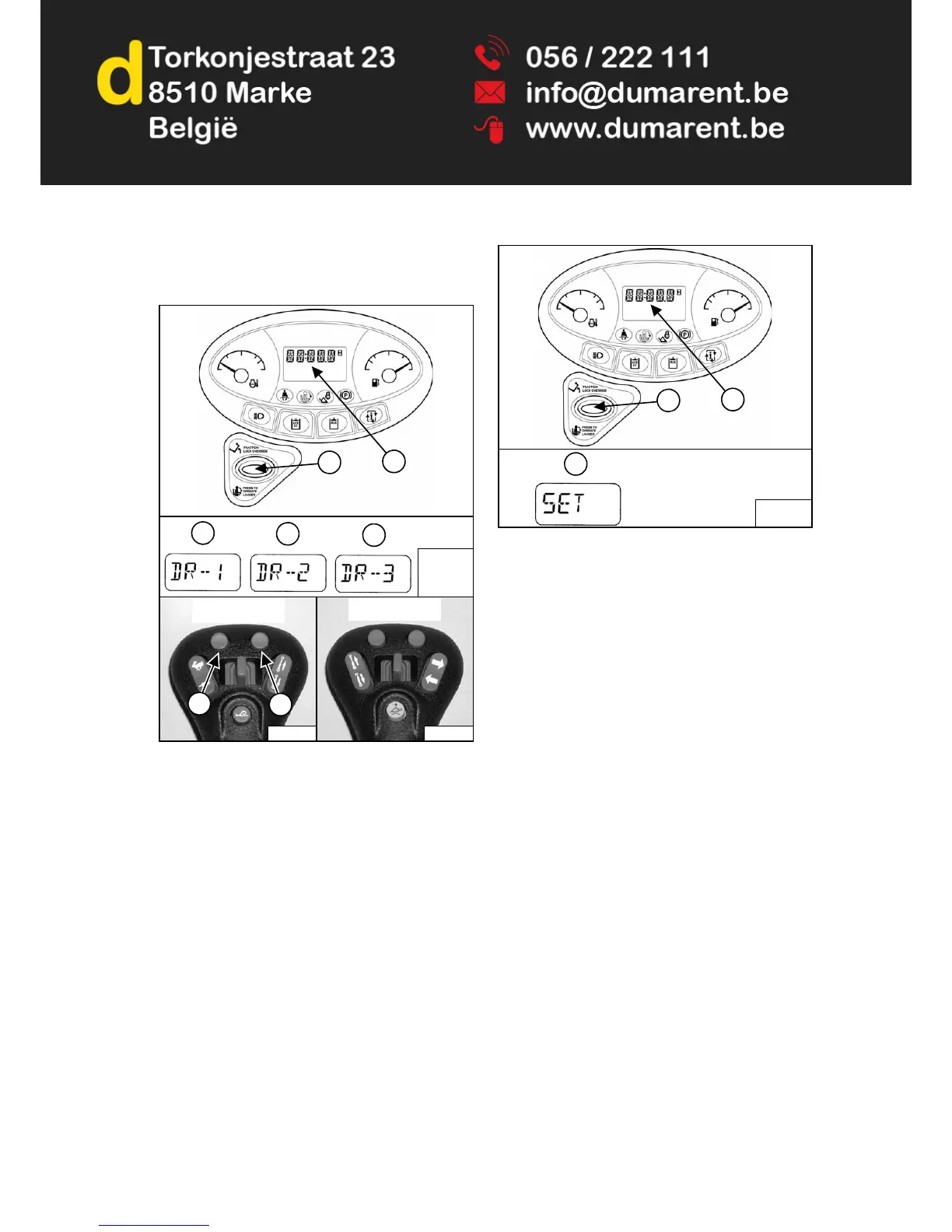
Figure 46
Press and hold the PRESS TO OPERATE LOADER
button (Item 1) for three seconds to adjust the loader
drive response setting. The current drive response
setting will appear in the data display (Item 2) [Figure
46].
Press the upper left button (Item 6) on the left joystick to
scroll down through the three settings. Press the upper
right button (Item 7) on the left joystick to scroll up
through the three drive response settings. The new drive
response setting (Item 3, 4 or 5) will appear in the data
display (Item 2) [Figure 46]. Adjustments to drive
response will be effective immediately.
Figure 47
Saving The Drive Response Setting:
The current drive response setting can be saved by
pressing and holding the PRESS TO OPERATE
LOADER button (Item 1) for three seconds. [SET] (Item
3) will appear in the data display (Item 2) [Figure 47] and
the machine will exit from the drive response adjustment
menu.
OR
Press the PRESS TO OPERATE LOADER button to exit
from the drive response adjustment menu without saving
the current setting.
The current steering drift compensation setting (See
STEERING DRIFT COMPENSATION on Page 60.) will
appear in the data display (Item 2) [Figure 47] and the
upper left and upper right buttons on the left joystick will
no longer make changes to drive response.
NOTE: The last displayed drive response setting will
remain in effect until the STOP button is
pressed or the key is turned OFF. The
machine will revert back to the last saved
drive response setting the next time it is
started.
Adjustments to steering drift compensation can now be
made (See STEERING DRIFT COMPENSATION on
Page 60.)
OR
Press the PRESS TO OPERATE LOADER button again
to exit from the steering drift compensation menu.


 To Next Page
 Loading...