174 S450 Operation & Maintenance Manual
ELECTRICAL SYSTEM (CONT’D)
Removing And Installing Battery
Removing
AVOID INJURY OR DEATH
Batteries contain acid which burns eyes and skin on
contact. Wear goggles, protective clothing and
rubber gloves to keep acid off body.
In case of acid contact, wash immediately with water.
In case of eye contact get prompt medical attention
and wash eye with clean, cool water for at least 15
minutes.
If electrolyte is taken internally drink large quantities
of water or milk! DO NOT induce vomiting. Get
prompt medical attention.
W-2065-0807
Stop the engine and open the rear door.
When installing the battery into the loader, do not touch
any metal parts with the battery terminals.
Figure 238
Open the top flap of the battery wrap to gain access to
the battery terminals [Figure 238].
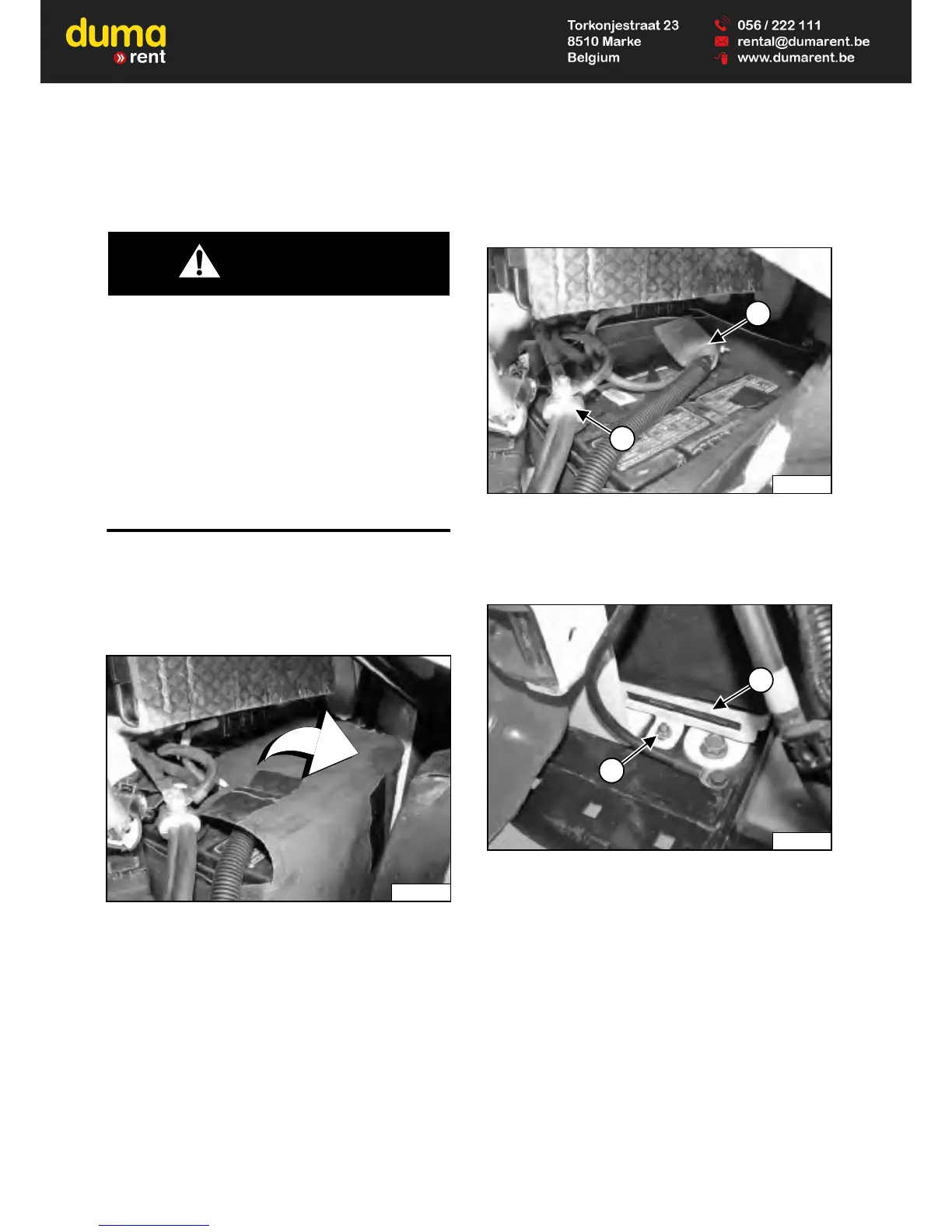
Figure 239
Disconnect the negative (-) cable (Item 1) [Figure 239].
Disconnect the positive (+) cable (Item 2) [Figure 239].
Figure 240
Slightly raise the battery wrap to gain access to the
battery clamp.
Remove the nut (Item 1) and the battery clamp (item 2)
[Figure 240].
Remove the battery from the loader.
If installing a different battery – Remove the battery
wrap from the battery.


 To Next Page
 Loading...