208 S450 Operation & Maintenance Manual
CONTROL PANEL SETUP
Right Panel Setup (Deluxe Instrumentation Panel)
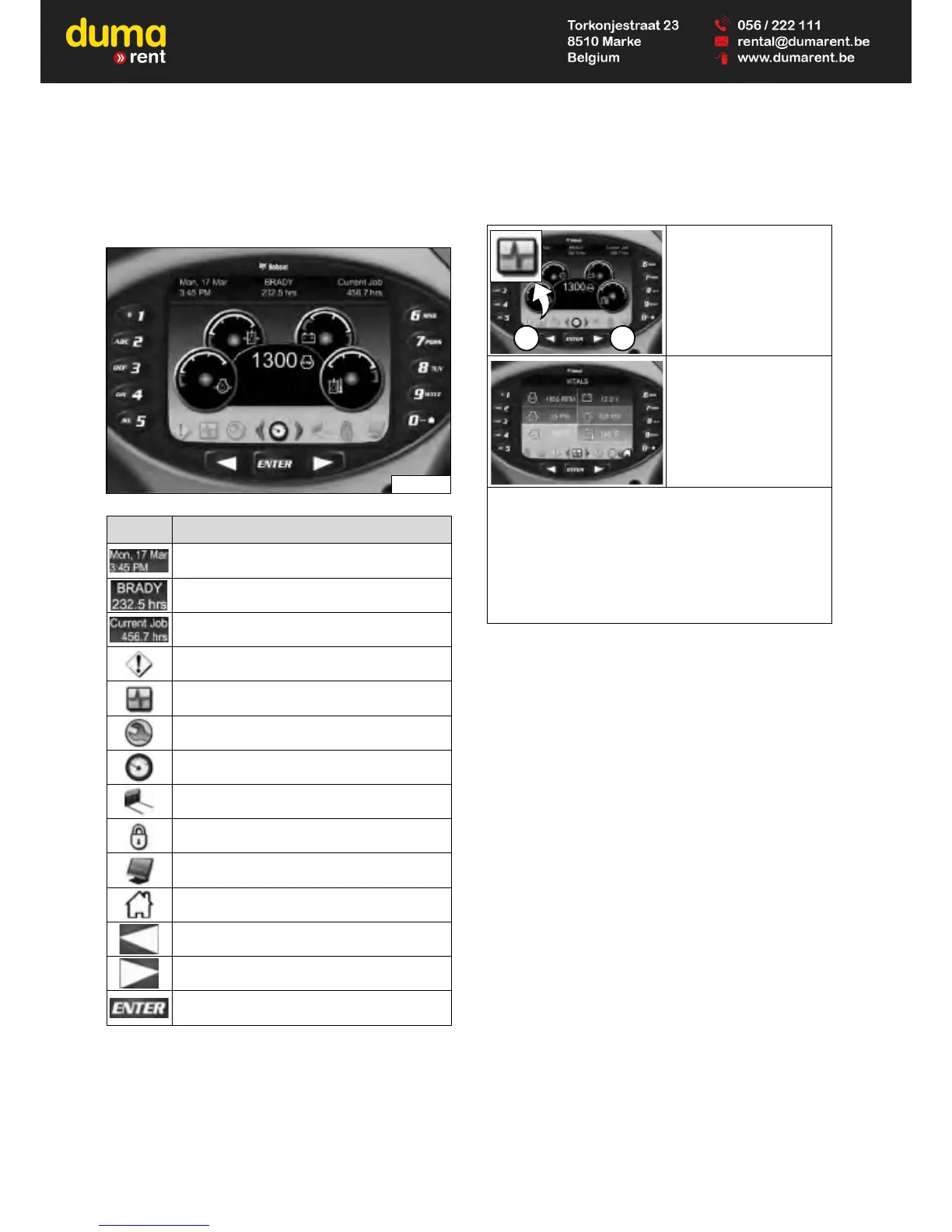
Icon Identification
Figure 298
Vitals
The Deluxe Instrumentation Panel is easy to use.
Continue to set your own preferences for operating /
monitoring your Bobcat loader.
ICON DESCRIPTION
DATE / TIME
USER / HOURMETER
CURRENT JOB HOURS
ACTIVE WARNINGS screen icon
VITALS screen icon
SERVICE screen icon
MAIN screen icon
ATTACHMENTS screen icon
SECURITY screen icon
DISPLAY screen icon
HOME icon (Return to MAIN screen)
LEFT SCROLL button
RIGHT SCROLL button
ENTER button
Press a scroll button (Item
1) repeatedly until the
Vitals screen icon (Inset)
is highlighted.
Displays select system
operating levels.
You can monitor real-time displays of:
• Engine Speed
• Engine Oil Pressure
• Engine Coolant Temperature
• System Voltage
• Hydraulic Charge Pressure
• Hydraulic Fluid Temperature


 To Next Page
 Loading...