53 S450 Operation & Maintenance Manual
INSTRUMENT PANEL IDENTIFICATION (CONT’D)
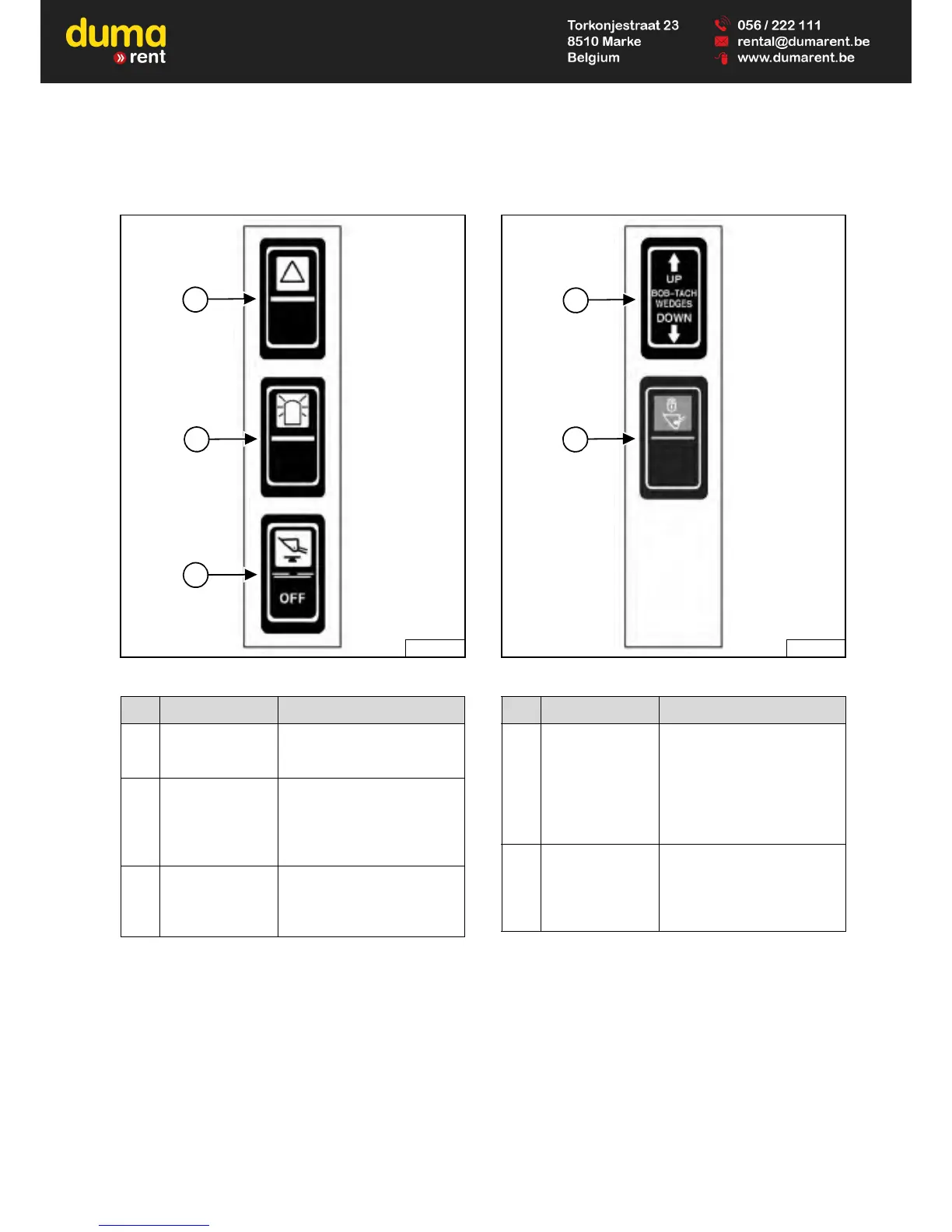
Left Switch Panel
Figure 18
Right Switch Panel
Figure 19
ITEM DESCRIPTION FUNCTION / OPERATION
1
FOUR-WAY
FLASHER
LIGHTS (Option)
Press the top to turn lights
ON; bottom to turn OFF.
2
ROTATING
BEACON (Option)
OR
STROBE LIGHT
(Option)
Press the top to turn light ON;
bottom to turn OFF.
3
HYDRAULIC
BUCKET
POSITIONING
(Option)
Press the top to engage
Hydraulic Bucket Positioning;
bottom to disengage.
ITEM DESCRIPTION FUNCTION / OPERATION
1
POWER
BOB-TACH
(Option)
Press and hold the up arrow
to disengage the Bob-Tach
wedges. Press and hold the
down arrow to engage the
Bob-Tach wedges into the
attachment mounting frame
holes.
2 TRAVEL LOCK
Press the top of the switch to
lock the lift and tilt hydraulic
functions for travel. Press the
bottom of the switch to turn
travel lock OFF.


 To Next Page
 Loading...