80 S450 Operation & Maintenance Manual
STEERING DRIFT COMPENSATION (CONT’D)
Operation (Cont’d)
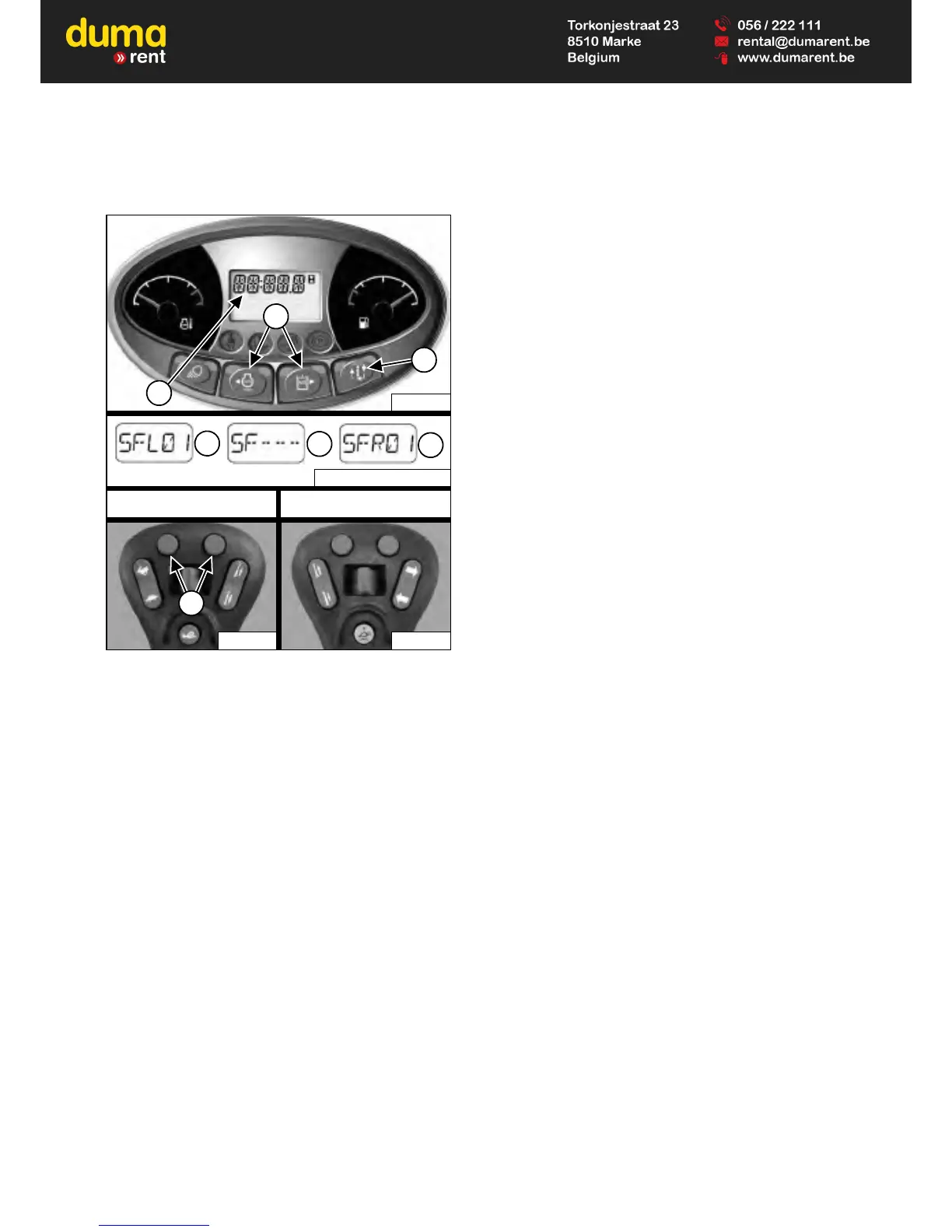
Figure 70
Press the Information button (Item 3) to cycle the data
display until the steering drift compensation menu is
displayed. The current steering drift compensation setting
will appear in the data display (Item 1) [Figure 70].
Press the left or right scroll button (Item 2) [Figure 70] on
the left panel to adjust the setting. Adjustments to
steering drift compensation are effective immediately and
saved automatically.
OR
Press the left or right button (Item 7) [Figure 70] on the
left control to adjust the setting. Adjustments to the
steering drift compensation are effective immediately and
saved automatically.
Press the left scroll button on the left panel or the left
button on the left control to adjust the machine left.
[SFL01] (Item 4) through a maximum of [SFL10] will
appear in the data display (Item 1) [Figure 70]. The
number will increase by one each time you press the
button. The higher the number, the greater the amount of
steering drift compensation to the left.
Press the right scroll button on the left panel or the right
button on the left control to adjust the machine back
toward centre. The display will decrease down to neutral
displayed as [SF---] (Item 5). Another press of the upper
right button will cause [SFR01] (Item 6) to appear in the
data display (Item 1) [Figure 70]. The number will
increase by one each time you press the button up to a
maximum of [SFR10]. The higher the number, the
greater the amount of steering drift compensation to the
right.
Forward steering drift compensation setting can be
adjusted with the steering controls in neutral or during
forward travel. Reverse steering drift compensation
setting can be adjusted during reverse travel. The letter
[R] will appear in place of the letter [F] in the data display
when setting reverse steering drift compensation.
(EXAMPLES: [SRL01], [SRR01], and [SR---].
Exiting The Steering Drift Compensation Menu:
Press the Information button (Item 3) [Figure 70] to exit
from the steering drift compensation adjustment menu.
OR
If no buttons are pressed for 10 seconds, the display
screen will change to the hourmeter.


 To Next Page
 Loading...