197 S650 Operation & Maintenance Manual
PASSWORD SETUP (DELUXE INSTRUMENTATION
PANEL) (CONT’D)
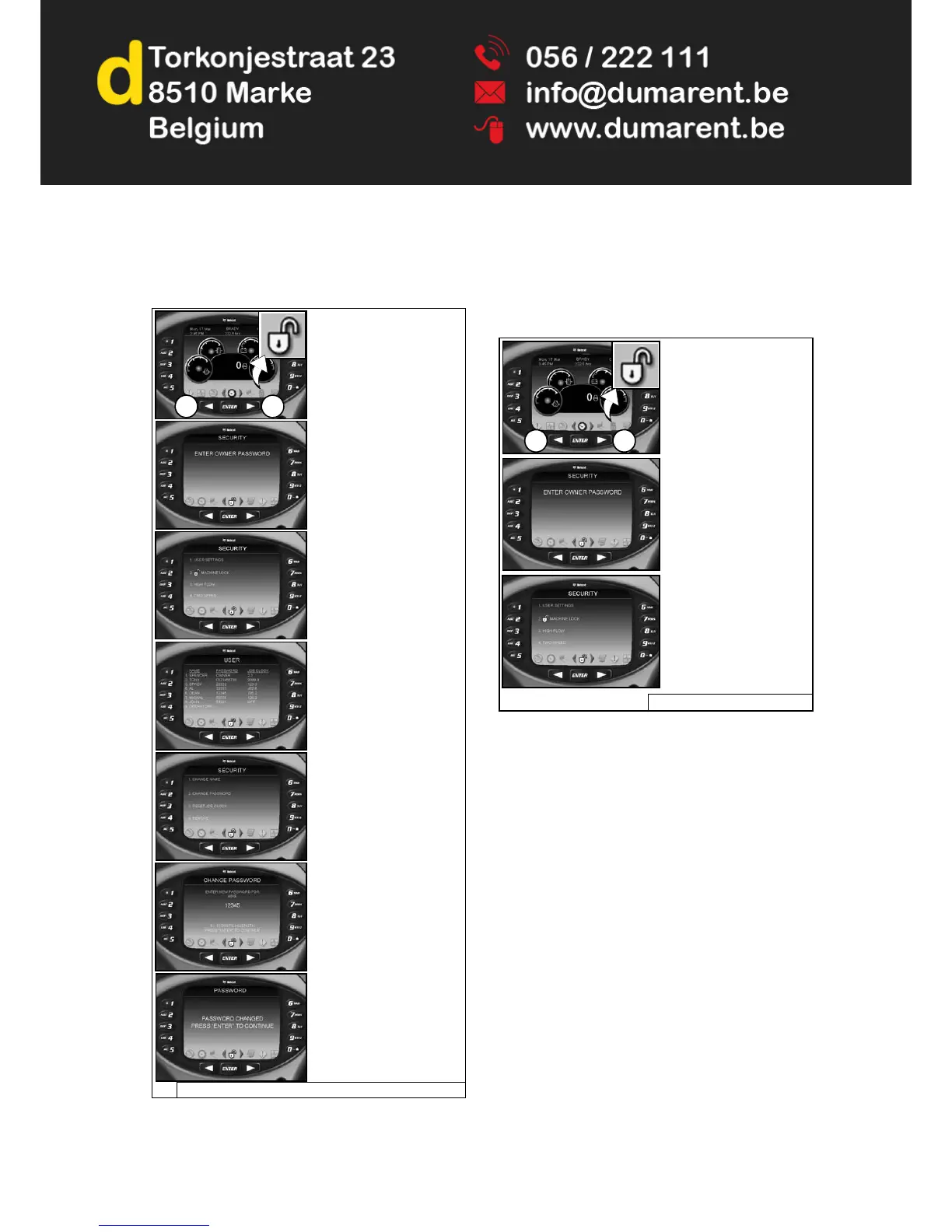
Changing The User Passwords
Figure 302
Password Lockout Feature
This feature allows the owner to unlock the password
feature so that a password does not need to be used
every time the engine is started.
Figure 303
NOTE: The procedure above can be followed to reset
the machine lock so that the machine requires
a password to start the engine.
P-90399/NA3025A/NA3016/NA3031/NA3033/NA3026/NA3010/NA3027
Press a scroll button (Item
1) repeatedly until the
Security screen icon
(Inset) is highlighted.
1 1
Enter owner password and
press [ENTER].
Select [1. USER
SETTINGS].
Select user.
Select [2. CHANGE
PASSWORD].
Enter new user password
and press [ENTER].
Press [ENTER].
P-90399 / NA3025A / NA3016 / NA3031
Press a scroll button
(Item 1) repeatedly until
the Security screen icon
(Inset) is highlighted.
1 1
Enter owner password
and press [ENTER].
Select [2. MACHINE
LOCK].



 To Next Page