35 S650 Operation & Maintenance Manual
MACHINE SIGNS (DECALS) (CONT’D)
No-Text Safety Signs (Cont’d)
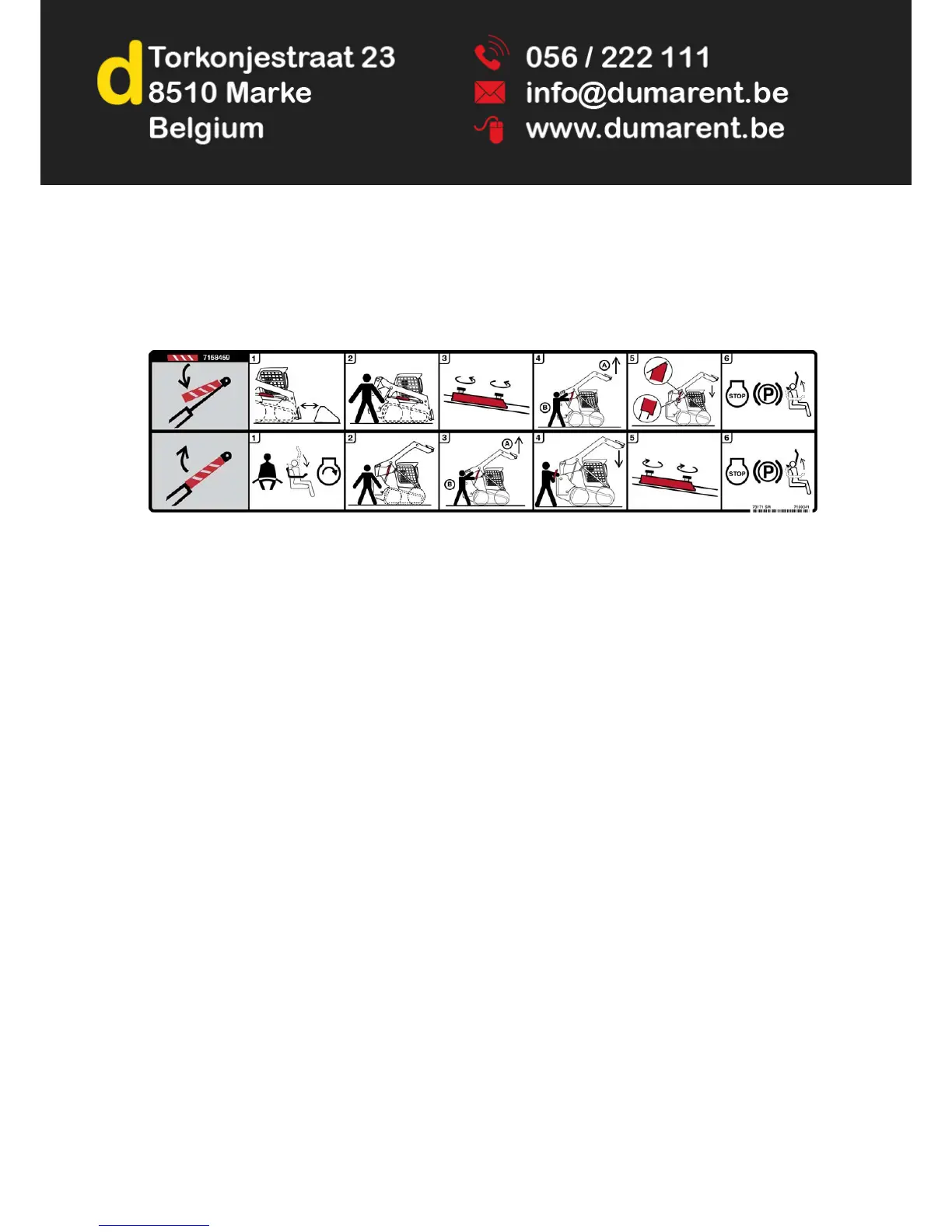
20. Lift Arm Support Device (7169341)
This safety sign is located on the outside of the operator cab on the lower right side.
To Install Approved Lift Arm Support:
1. Remove attachment from loader.
2. Stay in seat while second person removes lift arm support from storage position.
3. Remove clamping knobs and lift arm support.
4. Raise lift arms while second person positions lift arm support against cylinder rod.
5. Lower lift arms slowly until lift arm support is held securely between lift arm and cylinder.
6. Stop the engine, engage the parking brake and raise the seat bar.
To Remove Lift Arm Support:
1. Fasten seat belt and lower seat bar before starting the engine.
2. Stay in seat while second person removes lift arm support from cylinder rod.
3. Raise lift arms while second person removes lift arm support from cylinder rod.
4. Stay in seat until the lift arms are lowered all the way.
5. Return lift arm support to storage position and secure with clamping knobs.
6. Stop the engine, engage the parking brake and raise the seat bar.
NOTE: More illustrated and detailed information regarding Installing and Removing the lift arm support device is
located in this manual. (See LIFT ARM SUPPORT DEVICE on Page 135.)



 To Next Page