Part 3 The Time Settings Methods
Two methods for Setting:
Method 1
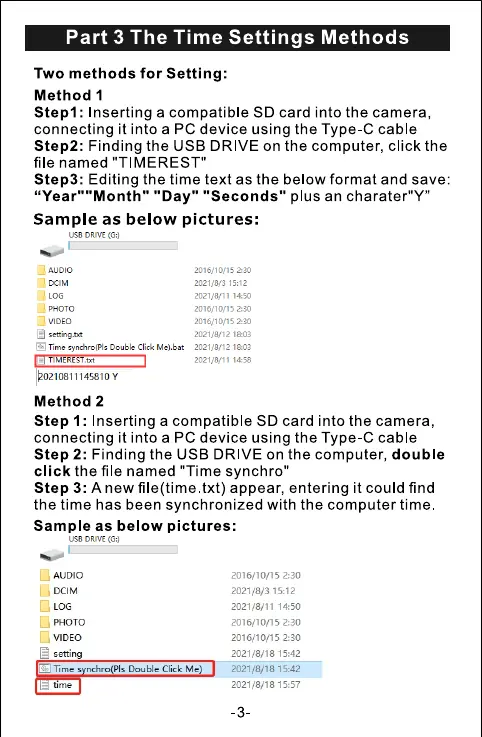
Stepl: Inserting a compatible SD card into the camera,
connecting it into a PC device using the Type-C cable
Step2: Finding the USB DRIVE on the computer, click the
file named "TIMEREST"
Step3: Editing the time text as the below format and save:
"Day" "Seconds" plus an charater"Y"
Sample as below pictures:
use DRIVE
LOG
setsng.t.t
Click
- TIMEREST.txt
Method 2
2:30
15:12
2021/8/11 1450
2016/10/15 2:30
Step 1: Inserting a compatible SD card into the camera,
connecting it into a PC device using the Type-C cable
Step 2: Finding the USB DRIVE on the computer, double
click the file named "Time synchro"
Step 3: A new file(time.txt) appear, entering it could find
the time has been synchronized with the computer time
Sample as below pictures:
usa DRIVE
AUDIO
LOG
VIDEO
Time s
t' me
pls Double Click Me
2016/10/15 2:30
2021/8/3 15:12
2021/8/11 1450
2016/10/15 2:30
2016/10/15 2:30
2021/8/18 15:42
2021/8/18 15:42
2021/8/18 15:57
-3



 To Next Page