Part 4 How to Select Camera Settings
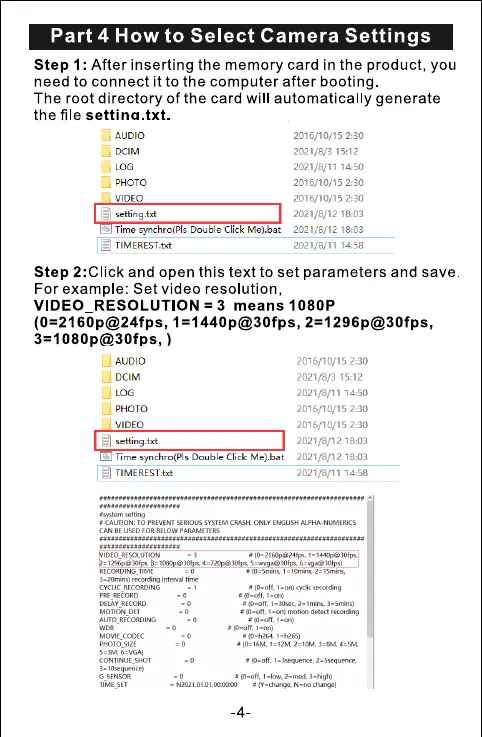
Step 1: After inserting the memory card in the product, you
need to connect it to the computer after booting
The root directory of the card will automatically generate
the file settina.txt.
AUDIO
D LOG
VIDEO
setting .txt
2016/10/15 2:30
2021/8/3 15:12
2021/8/11 14:50
2016/10/15 2:30
2016/10/15 2:30
2021/8/12 18:03
Time synchro(Pls Double Click Me).bat 2021/8/12 18:03
TIMEREST.txt
2021/8/11 14:58
Step 2:Click and open this text to set parameters and save
For example: Set video resolution,
VIDEO RESOLUTION = 3 means 1080P
AUDIO
D DCIM
u
LOG
VIDEO
setting.txt
Time synchro(Pls Double Click Me).bat
[21TIMEREST.txt
m wtting
CAUTION, ro PREVENT SERIOUS SYSTEM CRASH. ONLY
CAN FOR BELOW PARAMETERS
IDEO RESOLUTION
RTOROING
RECORO.w
PRE RrcoRD
DELAY_RECORO
MOIION_DO
ALITO_RECORDING
PHOro.s.ZE
G StNSOR
-4
2016/10/15 2:30
2021/8/3 15:12
2021/8/11 14:50
2016/10/15 2:30
2016/10/15 2:30
2021/8/12 18:03
2021/8/12 18:03
2021/8/11 14:58



 To Next Page