
 Need help?
Do you have a question about the BodyMedia FIT and is the answer not in the manual?
Set up your BodyMedia FIT® Armband using the Quick Start that was included with your Armband purchase.
Slide the Armband on, wait for power, and hold Display buttons until 'Hello' appears.
Hold Display next to Armband, press status button to synchronize.
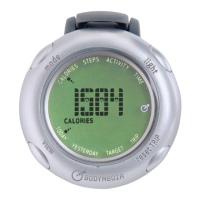
Lists the BodyMedia FIT® Display and its clip accessory.
Describes the weight management system's purpose and its use by physicians.
Discusses benefits like increased life expectancy and low risks like skin irritation.
Instructions on how to attach the Display using its clip to clothing material.
Guide to pairing the Display with the Armband, including initial power-on and synchronization.
Describes the Display's LCD and the four buttons: MODE, VIEW, LIGHT, RESET TRIP.
Details on CALORIES, STEPS, ACTIVITY, and TIME modes available on the Display.
Explains how to use the VIEW button to cycle through different data views.
How to use the LIGHT button for backlight and RESET TRIP button to reset trip data.
Step-by-step guide for replacing the coin cell battery in the Display.
Provides conversion between kcal and kJ for energy information display.
Details the Display's water resistance and daily cleaning instructions.
Defines symbols used on the device and in the manual for operational guidance.
Advises on potential skin irritation, metal allergies, and proper wear duration.
Cautionary advice on strap tightness, avoiding constriction, and preventing burns from heat exposure.
Warnings about flammable mixtures, medical electrical equipment, and prohibited locations.
Guidance on checking for damage, avoiding drops, and not making unauthorized modifications.
Instructions for disposing of the Display equipment as electronic waste.
Links to the EULA and mentions troubleshooting resources on the website.
Details device specs like battery, RF, size, materials, and accuracy metrics.
Describes the 1-year limited warranty for hardware defects and exclusions.
Information on RF emissions, harmonics, and flicker compliance for indoor use.
Immunity test levels and guidance for ESD, EFT, Surge, and Voltage Dips.
Details RF emissions compliance and recommended separation distances for communications equipment.
Table providing separation distances based on output power for RF communications equipment.
FCC Declaration of Conformity and Canadian ICES-003 compliance statements.
Lists patents, trademarks, and copyright information for BodyMedia products.
 General
| Brand | BodyMedia |
|---|---|
| Model | FIT |
| Category | Fitness Electronics |
| Language | English |

 To Next Page