8. Primary display zone. Local time, UTC time,
local date and UTC date are displayed here.
9. Functional display zone
• In stopwatch mode (indicated by ‘CHR’
displayed under the bottom digits), this
zone shows the elapsed time in minutes.
The maximum display value is 99.
• In timer mode (indicated by ‘ET’ displayed
under the bottom digits), this zone shows the
elapsed time in hours and minutes. The
maximum display value is 99:59.
• Starting the stopwatch when the en-route
timer is running will temporarily override
the timer display. The en-route timer
continues to function in the background.
When the stopwatch is turned off, en-route
timer display resumes in the functional
display zone.
10. Second hand in stopwatch and clock mode.
11. Photosensor. A light-sensible sensor that
automatically adjusts the brightness of the
display.
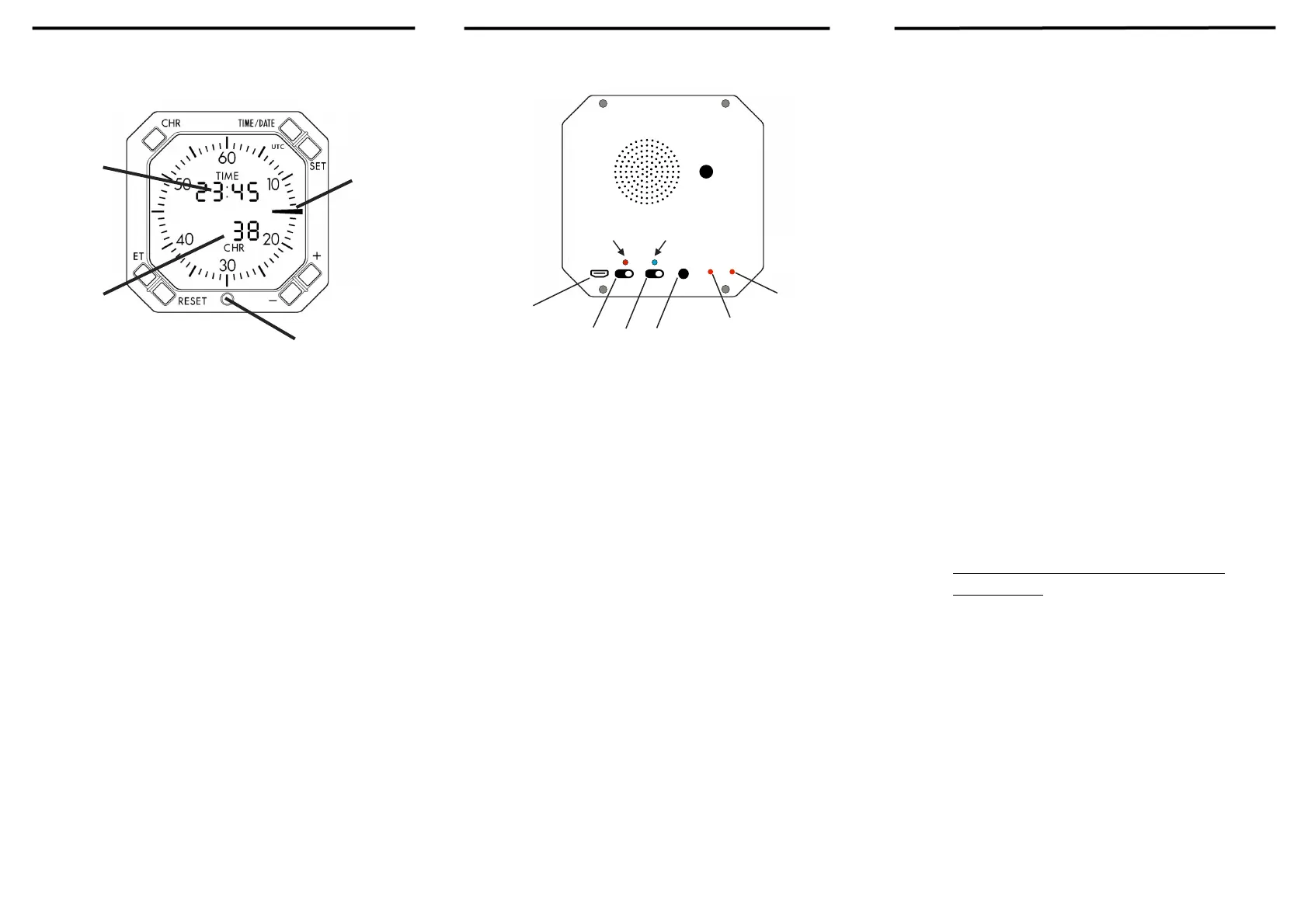
Refer to the next page for switches on the back of t
A. Micro-USB plug. Connect the clock to a power
source to ensure continuous function of the clock.
You will see light I glowing in red when the clock
is connected to power.
B. Power switch. To switch on the clock, turn the
power switch to “on” position. On the front display,
you will see the backlight flashing three times,
indicating the clock is initialising.
C. Alarm switch. To switch on the alarm function, turn
the alarm switch to “on” position. To set alarms,
refer to switch G on the next page.
• Only when the power switch and the alarm
switch are both at “on” position, the alarm
function functions properly. The clock functions
in alarm clock mode under this setting.
• When the power switch is at “on” position and
the alarm switch is at “off” position, the clock
functions in simulation mode. You will notice
the second hand on the front display stops at an
upright position.
E. 3.5mm AUX plug connects to audio sources via the
AUX cable included in the package. Alarms will
not be played when external audio is connected.
Continue to the next page
E. M1 functional switch. Under alarm clock mode
(when the power switch is on and the alarm clock
switch is on), press and hold M1 to set hourly
chimes.
• In hourly chime setting mode, you will see “HS”
on the primary display zone and “ON” or “OFF”
on the functional display zone.
• Press key 6 and 7 to switch on or off hourly
chime.
• Press and hold M1 to exit hourly chime setting.
F. M2 functional switch. Under alarm clock mode,
press and hold M2 to enter the alarm setting page.
• In the alarm setting page, the time of the alarm is
displayed on the primary display zone. On the
functional display zone, you will see two sets of
digits. The left digits indicate alarm sounds, the
right digits indicate the volume of the alarm.
• There is a total of 19 sets of sounds available in
the clock. You can refer to the Quick Reference
Handbook for the full list of soundtracks.
• The volume of the alarm has 31 settings, with 1
being the quietest and 31 being the loudest.
Make sure to test your alarm volume before
setting alarms.
• Press key 1 (CHR key) to enter alarm setting
mode. You will see the selected digits starting to
flash. Use key + and key - to change the value of
the selected digits. Press key 1 again to change
selected digits. Press key 1 until no digits are
flashing to exit alarm setting mode.
• Press and hold M2 to exit alarm setting mode.
• When alarms go off, press key 4 (TIME / DATE
key) to snooze for 10 minutes.
• 3 snoozes are available each time when the alarm
goes off.
• Press and hold key 3 (RESET key) to turn off the
alarm for the day.


 To Previous Page
 Loading...