01
02
03 04
05 06
07
08
(Above the " " key))
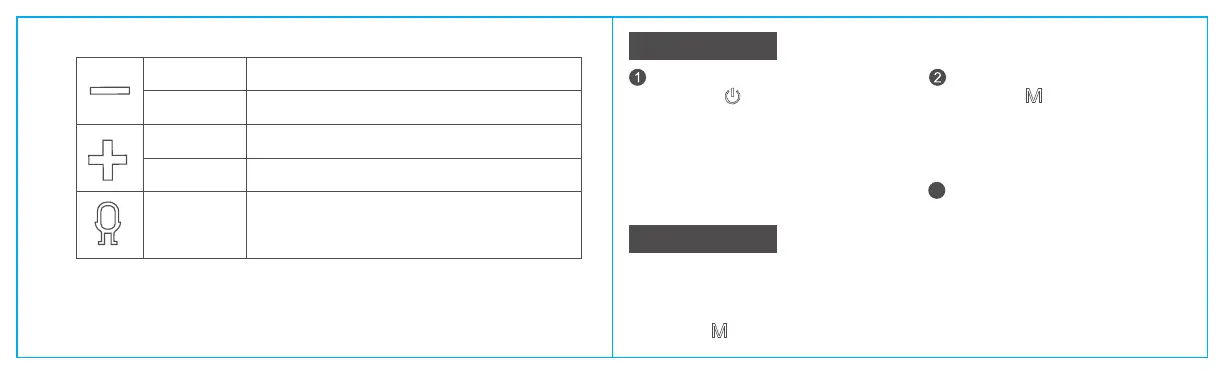
Short press
Long press
Short press
Short press
Long press
Volume down, total 16 levels
Previous track
Volume up, total 16 levels
Next track
Bluetooth connection status: short press to wake up phone viice
assistant
3
LED Indicator
TF Cable Playback
Status indicator
a. The blue light flashes quickly when Bluetooth is
ready to pair; The blue light is always on when
Bluetooth is connected.
a. Short Press to switch sound effects.
b. 3D: Without an indicator light
Super Bass: Green light
Vocal: White light
Red light: Charging
Goes off: Charging completion
b.When the AUX/TF card is playing, the blue light
flashes slowly.
1. Bluetooth speaker supports reading up to 64GB TF card Supports music format: APE/FLAC/WAV/MP3;
2. Insert the TF card into the card slot and automatically play the audio file after recognition;
3. AUX, Type-c cable can be inserted into the device to play; if it is connected with Bluetooth,please
long press the" "key to switch to the audio cable playback mode.
(Above the " " key)
Sound effect indicator
Charging


 To Next Page