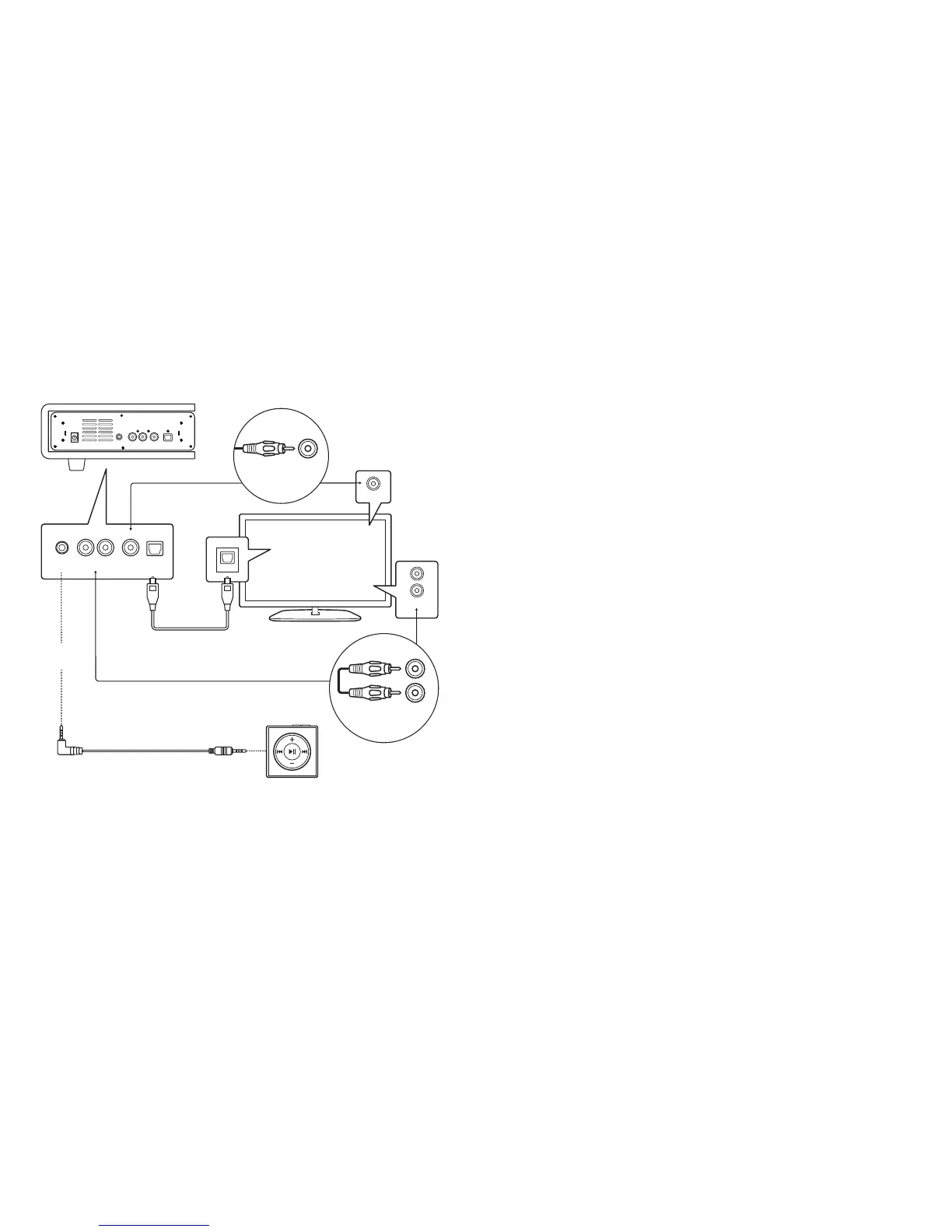
OPTICAL CABLE
BACK OF SOUNDBASE
TV MONITOR
MP3 PLAYER
3.5mm to 3.5mm
AUDIO CABLE
Connecting to the Soundbase
R
L
AUX
COAXIAL
OPTICAL
AUXRCA STEREO
AUDIO CABLE
COAXIALCOAXIAL
CABLE
AUX Connection
Line In
Connection
Optical
Connection
For Optical (SPDIF) Connection:
Note: Remove plastic protectors from ends of optical cable before use.
Connect the TV’s optical output port to the Soundbase’s OPTICAL
port with the included Optical Cable.
If there is no sound when using an optical cable:
*
†
Other devices may include Blu-Ray players, set-top boxes, etc.
Settings menu selections may vary depending on your device. Select the menu
setting that best resembles the ones mentioned.
1
2
3
4
Enter your TV’s* settings menu.
Select the Audio or Sound Settings option.
†
Select the Audio Out or Digital Out setting.
†
Change setting to PCM.
For AUX Connection:
Connect the TV’s Stereo RCA (L/R) Audio output socket to the
Soundbase’s AUX port with an RCA Stereo Audio Cable.
For Line In Connection:
Connect the audio device’s headphone socket to the Soundbase’s
LINE IN port with the 3.5mm to 3.5mm Audio Cable.
For Coaxial Connection:
Connect the TV’s coaxial output port to the Soundbase’s coaxial
port with a coaxial cable.
L--AUX IN--R COAXIAL OPTICALLINE INDC I N 18V
L--AUX IN--R COAXIAL OPTICALLINE IN


 To Next Page