26
The right sitting posture
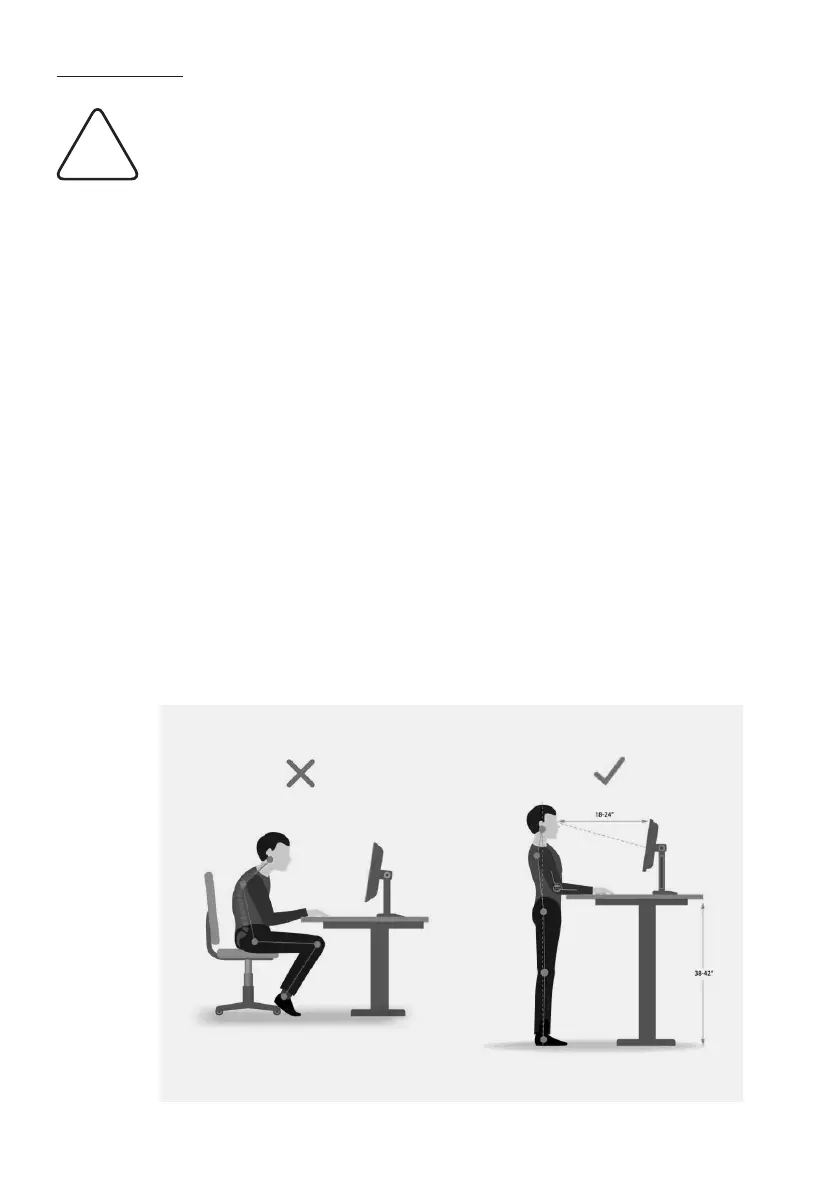
Sitting incorrectly can cause damage to joints, tendons and muscles.
To avoid this, the desk and oce chair must be adjusted. Irrespective
of the following instructions, an uncomfortable sitting posture must be
avoided. If you nd that one or the other of the following tips leads to
an uncomfortable sitting position, simply adjust the positioning to suit
your needs.
Desk
Only adjust the desk height once you have found the correct sitting
position. Your elbows should have an angle of 90° - 120° when your
forearms are resting on the desktop. The edge of the table should not
press against your forearms.
Monitor
Any light falling on your monitor (window or light source) should fall
onto the screen surface at an angle of 90°.
The monitor height should be set so that your gaze is directed slightly
downwards towards the centre of the screen. Keep a distance of ap-
prox. 60 - 70 cm to your monitor. The keyboard should be placed as at
as possible to ensure a comfortable wrist position.
Information
i


 To Next Page