English
- 6 -
- 7 -
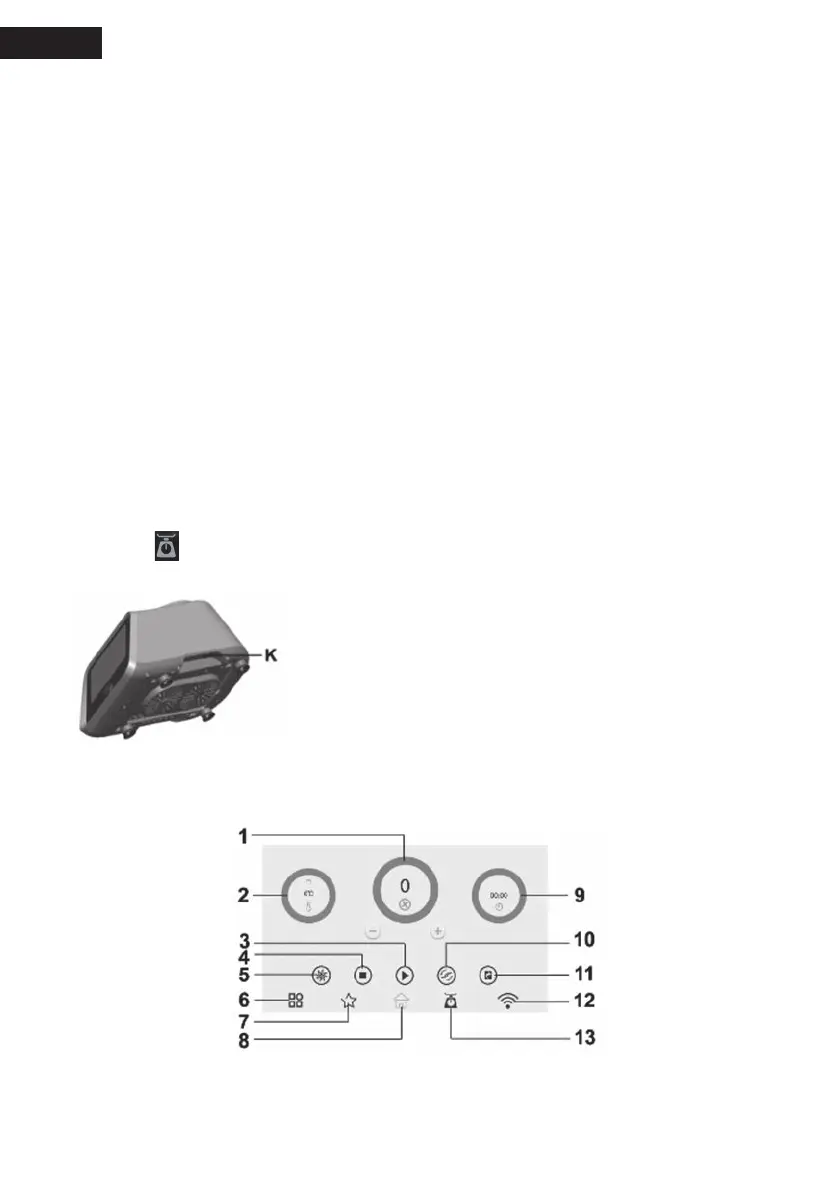
12: “WIFI” key.
You may follow the steps to use it:
1) Install APP on your mobile phone.
2) Click “WIFI” touch key to pop up account and password.
3) Open APP on your mobile, and then input the account and password. If “WIFI” logo changes
color, which means WIFI is well connected. Now you may operate the appliance via your
mobile phone.
Tips:
1. The appliance is only allowed to connect one mobile phone at each time.
2. Frequency range: 2.4-2.5GHz.
3. Software version: V1.0
4. Hardware version: V1.0
5. Maximum RF output power of the product: 12.5dbm
13: “weigh” key. (Weighing range: 0-5000g)
You may follow the steps to use it:
1. Click “weigh” key.
2. When LCD shows “0000”, put the food in bowl.
3. Read the number shows on the LCD. That is the net weight (Unit: g) of the food added.
4. Click “
” on pop-up dialog, the read number is cleared. And you may continue weighing the
food to be added.
14: Stand-by state.
Plug in and press “On/Off button (K)” to start the appliance, and
the appliance goes into stand-by state.
If you don’t do any operation to the appliance in 5 minutes under
stand-by state, the appliance will go into “sleep mode (black
screen)”. You may press “Start/Stop” button (L) to wake the
appliance.
If you don’t do any operation to the appliance in 10 minutes under the pause status, the appliance
will go into “sleep mode (black screen)”. You may press “Start/Stop” button (L) to wake the
appliance.


 To Next Page