EasyManua.ls Logo

BOJKE ER2-22N - User Manual

BOJKE ER2-22N
5 pages
Print Icon
To Next Page IconTo Next Page
Loading...
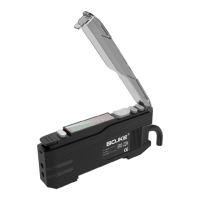
ER2-22N
Dual number display fiber optic
sensor
Operating instruction
----------------------------------
Operation panel description:
Note:
To ensure your safety, please follow the following rules:
1. This product is only for target detection. Do not use this
product protects the human body or body parts, etc.
2. This product may not be used as explosion-proof products.
Do not use this product in hazardous locations and/or
environments with potentially explosive gases.
3. The product is DC - powered sensor. Do not use AC power.
Otherwise, the product will explode or catch fire.
4. Do not wire the amplifier along the power line or high
voltage cable. Otherwise, the sensor will fail or be damaged
due to noise.
5. When using commercial switching regulators, Be sure to
ground the frame grounding terminal and the grounding
terminal.
6. Do not use it outdoors or where external light can enter
the light receiving surface directly.
Technical specifications:
Type ER2-22N ER2-22P
Type NPN output PNP output
Power supply
voltage
12-24 VDC±10%, below floating P-P 10%
Current
consumption
mA less than 40
Light source
Red ,4-element luminescent diode
Testing mode
Diffuse reflection, ejection (determined
by fiber type)
Detection
distance
P-1 diffuse reflection 200 mm, vs 700 mm
P-2 diffuse reflection 280 mm,1200 mm
Detection
output
NPN collector open
circuit output,
maximum input
current 100 mA,
external maximum
voltage 30 VDC,
residual voltage
less than 1 V
PNP collector open
circuit output,
maximum input
current 100 mA,
external maximum
voltage 30 VDC,
residual voltage
less than 2 V
Output
status
(D/L)5S for open/open switching
Delay
function
No delay / single output delay / pull high
delay / pull low delay, four output modes
are optional. Three time delays
adjustable :1 ms to 9999
Response
time
P--1: less than 100 uS P--2: less than
200 uS
LED display
red output indicator, threshold display (4
bits green LED), current value display (4
bits red LED)
Protection
circuit
Power supply polarity reverse protection;
output short circuit or overload
protection
Working
environment
brightness
Incandescent: maximum :20,000 lux,
daylight: maximum :30,000 lux
Vibration
Resistance
Double amplitude Hz,10 to 55:1.5 mm,X,Y,Z
axis 2 hours
Ambient
temperature
-℃25 to +55, no freeze
Question and Answer IconNeed help?

Do you have a question about the BOJKE ER2-22N and is the answer not in the manual?

Summary

ER22 N Dual Number Display Fiber Optic Sensor Operating Instructions

Technical Specifications

Details product type, voltage, current, light source, detection distance, output, status, delay, response, protection, environment, vibration, and temperature.

Operation Panel Description

Explains the output indicator, sensitivity settings, current value, and mode switch on the operation panel.

Important Safety Notes

Provides crucial safety warnings regarding product usage, environment, power, and wiring to prevent hazards.

Output Circuit Details

Correct Installation Methods

Instructions for mounting the sensor onto a DIN track and to a wall.

Connecting the Optical Fiber Module

Detailed steps for connecting the optical fiber module, including opening dust cover and inserting the fiber.

Product Function Settings

Quick Threshold Setting

Procedure for setting the initial threshold quickly using the set button.

Manual Threshold Adjustment

How to manually fine-tune the green threshold using the plus and minus keys.

Normally Open;Closed Switch

Instructions for switching between normally open (L-on) and normally closed (d-on) output modes.

P1 P2 Mode Selection

Explains P-1 and P-2 modes and how to switch between them for different product red value differences.

Output Mode Configuration

Details various output modes like TOFF, S-D, d-o, and o-d, and how to adjust delay times.

Light Intensity Adjustment

How to adjust light intensity levels (d-3, d-2, d-1) to optimize detection.

Detection Mode Selection

Guides on selecting between Standard (STd) and Area (AreA) detection modes.

Advanced Settings and Operations

Detection Frequency Selection

How to select operating frequencies (F1-F4) to avoid interference when detecting multiple products.

Return to Default Settings

Automatic return to default state after 30 seconds of inactivity in menu mode.

Restore Factory Settings

Procedure to reset the device to its original factory settings using the MODE and SET keys.

Key Lock and Unlock

Instructions for locking and unlocking the control keys to prevent accidental changes.

Digital Tube Display Flip

How to flip the digital display for easier viewing from different orientations.

Product Warranty and Usage

Warranty Details

Covers shelf life, repair responsibilities, and exclusions from warranty coverage.

Liability Limitations

Outlines limitations on the company's liability for indirect or consequential losses.

Suitable Use and Conditions

Specifies general industry use and prohibits applications impacting safety or requiring high reliability.

Service Scope

Clarifies that product price excludes dispatch of technical personnel; negotiation is required for such services.

BOJKE ER2-22N Specifications

General IconGeneral
BrandBOJKE
ModelER2-22N
CategoryAccessories
LanguageEnglish