Facto Restore Setting
When should I reset?
* When only one side play music.
* When you can't find "A6" on the device.
* When both earbuds fail to pair with each other or occur connection
related issues.
How to reset?
1. Delete "A6" from the menu for Bluetooth settings on your phone
and forget about it.
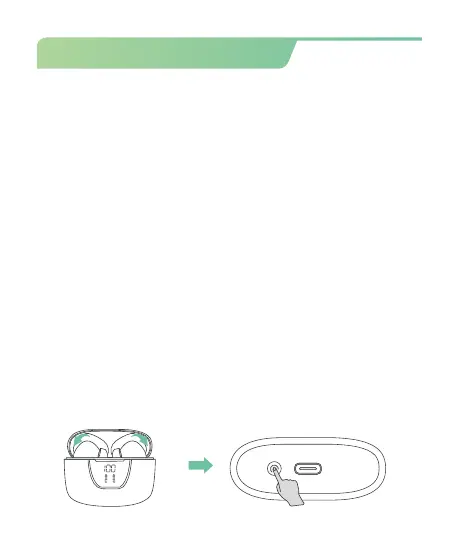
2 .Insert both earbuds into the charging case and close the lid.
3. Press & hold the "Reset" button for 5 seconds simultaneously to
clear the pairing record with the last paired device.
(* During this period, the LED Power Display will flash 3 times, then
get charge again.)
4. Now search and connect "A6", they should work properly.
(* If it still doesn't work, please repeat the steps to try again.)
10


 To Next Page