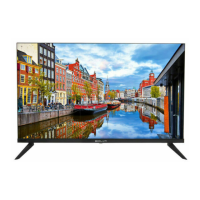
This document is a user manual for the BOLVA 43BF20 43" LED Television.
Function Description
The BOLVA 43BF20 is a 43-inch LED television designed for home entertainment. It functions as a display for various video and audio sources, including broadcast television, digital media players, gaming consoles, and personal computers. The TV features a built-in tuner for receiving antenna or cable signals and multiple input ports for connecting external devices. It also includes a USB port for playing back MP3 audio and JPEG image files. The television is controlled via an included remote control, which allows for power on/off, input selection, volume adjustment, channel changing, menu navigation, and various picture and sound settings.
Important Technical Specifications
- Display Type: LED
- Size (Diagonal): 43 inches
- Aspect Ratio: 16:9
- Resolution: 1920x1080
- Brightness (cd/m²): 180
- Dynamic Contrast Ratio: 4000:1
- Vertical Viewing Angle (degrees): 178°
- Horizontal Viewing Angle (degrees): 178°
- Maximum Colors (millions): 16.7M
- Digital Compatibility: 480i, 480p, 576i, 576p, 720p, 1080i, 1080p
- Power Consumption: 75 Watts
- Audio Power: 2 x 8 W
- Dimensions (without Stand): 37.6" (W) x 22.3" (H) x 3.8" (D)
- Weight (may vary ± 10%): 13.6 lbs
- Input Connections:
- Composite Video: 1
- Y Pb Pr (Component): 1
- HDMI: 3 (HDMI1(ARC), HDMI2, HDMI3(MHL))
- RF (Antenna/Cable): 1
- SPDIF Digital Audio Output: 1
- PC/VGA: 1
- PC Audio IN: 1
- Headphone Jack: 1
- USB: 1
- Wall Mount Pattern: VESA 200x100 (M5 x 8 screws)
Usage Features
Installation and Setup:
The TV can be placed on a solid surface using the included pedestal base, which requires no screws for assembly. Alternatively, it can be wall-mounted using a VESA 200x100 bracket (not included). The initial setup wizard guides the user through language selection, antenna/cable options, and automatic channel scanning.
Remote Control:
The remote control operates on two AAA batteries and has an effective range of approximately 16 feet within a 30° angle of the IR sensor. It features buttons for power, display information, playback controls (for USB), channel list, program guide, favorite channels, freeze frame, picture mode, color temperature, navigation arrows, ENTER, exit, return, sleep timer, menu, aspect ratio, volume, last channel, mute, channel up/down, number keys, input selection, audio mode, MTS (Multi-channel Television Sound), and CCD (Closed Caption Display).
Input Sources:
The TV supports a variety of input sources:
- Antenna/Cable: Connects to a rooftop or indoor antenna, or a cable outlet for broadcast TV.
- HDMI (1, 2, 3): For digital AV equipment like set-top boxes, gaming consoles, and Blu-ray players. HDMI3 also supports MHL (Mobile High-Definition Link) for connecting compatible smartphones and tablets.
- Component (YPbPr): For AV devices with component video and audio outputs.
- Composite (AV): For older AV equipment with composite video and audio outputs.
- VGA: For connecting a personal computer, with a recommended resolution of 1920x1080@60 Hz. A separate PC Audio IN is available for sound.
- USB: For playing MP3 audio and JPEG image files from a USB flash drive or hard drive.
Picture Settings:
Users can adjust various picture parameters to suit their preferences and ambient lighting conditions. These include:
- Picture Mode: EnergySaving, User, Standard, Dynamic, Mild.
- Contrast: Adjusts the difference between light and dark areas.
- Brightness: Controls the overall luminance.
- Color: Adjusts color intensity.
- Tint: Adjusts colors towards green or reddish tint.
- Sharpness: Controls the crispness of image edges.
- Color Temperature: Cool, Normal, Warm.
- Blue Screen: On/Off option.
Audio Settings:
The TV offers several audio adjustments and features:
- Sound Mode: Music, Movie, User, Standard.
- Bass/Treble: Adjusts low and high frequency intensity.
- Balance: Adjusts sound output between left and right speakers.
- Surround Sound: On/Off.
- Auto Volume: On/Off.
- SPDIF Type: PCM, RAW, Off. For digital audio output to a compatible amplifier/receiver.
- Audio Languages: For selecting different audio tracks (Digital TV mode only).
- MTS: Stereo, SAP, Mono (Analog TV mode only).
- Accessibility: Includes VoiceGuide and VideoDescription options.
Date & Time Settings:
- Sleep Timer: Sets a timer for the TV to automatically turn off (5 to 240 minutes, or Off).
- Time Zone: Eastern, Central, Mountain, Pacific, Alaska, Hawaii, Atlantic.
- Daylight Saving Time: On/Off.
- Time Format: 12-hour or 24-hour.
- Auto Clock: On/Off.
- Clock: Automatically set after initial channel scan.
Setup Settings:
- Menu Languages: English, Français, Español.
- Transparency: On/Off for menu display.
- Zoom Mode: Adjusts the duration of the zoom mode menu.
- Restore Default: Resets all adjustments to factory settings.
- HDMI CEC (Consumer Electronics Control): Allows connected HDMI devices to communicate and control each other. Features include Auto Standby, Auto TV On, HDMI ARC (Audio Return Channel), Device Control, and Device List.
- Closed Captions: Activates and customizes on-screen text subtitles, including CC Mode (Off, On, CC On Mute), Basic Selection (CC1-4, TEXT1-4), Advanced settings (Service 1-6), and Option for customizing text fonts, colors, and opacities.
TV Settings (Channel Menu):
- Favorite: Add or delete channels from a personalized favorites list.
- Show/Hide: Select or skip channels in memory.
- Channel Label: Name or rename broadcast channels.
Parental Control:
- System Lock: Requires a 4-digit password (default "0000") to access parental control settings.
- Password Change: Allows users to set a new password.
- US Rating: Blocks TV and movie programming based on US TV ratings (TV-Y, TV-Y7, TV-G, TV-PG, TV-14, TV-MA) and MPAA movie ratings (G, PG, PG-13, R, NC-17, X).
- Canadian Rating: Blocks TV and movie programming based on Canadian TV ratings (E, C, C8+, G, PG, 14+, 18+ for English; E, G, 8 ans+, 13 ans+, 16 ans+, 18 ans+ for French).
Maintenance Features
Cleaning:
The manual advises unplugging the TV before cleaning and using only a soft, slightly damp cloth. Liquid or aerosol cleaners should not be used.
Battery Replacement:
The remote control requires two AAA batteries. The manual instructs users to replace batteries when needed, ensuring correct polarity. It also advises removing batteries if the remote will not be used for an extended period to prevent chemical leakage.
Troubleshooting Guide:
A dedicated troubleshooting section provides solutions for common issues such as:
- Cannot receive certain channels: Perform channel scan, readjust antenna, check signal strength.
- No color: Check video installation of external A/V equipment.
- Video noise or choppy picture: Readjust antenna, keep TV away from noise sources.
- TV blocked on certain channels: Perform channel scan, check if channel was deleted, verify parental control settings, restore default settings.
- Cannot use certain functions: Item may be grayed out in the current input.
- No sound: Check audio cable connections, verify correct audio source, ensure mute is off.
- Black box on screen: "Text" option may be enabled, press CCD button to turn off.
- No power: Replace remote batteries, re-attach AC plug to wall outlet.
- No picture: Check digital TV channel signal, verify desired input, re-connect antenna/cable, restore default settings.
- Remote control does not function: Replace batteries, check polarity, point remote directly at IR receiver.
Servicing:
The manual emphasizes that servicing should only be performed by qualified service personnel. Users are warned not to open the TV enclosure due to risk of electric shock and to avoid voiding the warranty. It specifies conditions requiring service, such as damaged power cords, liquid spills, exposure to rain/moisture, abnormal operation, drops, or cabinet damage.
Replacement Parts:
When replacement parts are required, only authorized service technicians should use parts specified by the manufacturer or parts with the same characteristics as the original to avoid fire, electric shock, or other hazards, and to maintain warranty validity.

 Need help?

 To Next Page
 General