The Four Seasons™ FS200 is a versatile combination appliance that functions as a space heater, humidifier, air purifier, and fan, designed to offer multiple benefits in a single, space-saving unit.
Function Description
The FS200 integrates four essential functions for indoor climate control:
- Heater: Provides warmth using a self-regulating PTC heater with overheat protection. It offers three heating power levels: LOW, MEDIUM, and HIGH.
- Humidifier: Utilizes evaporative humidification, which eliminates the issue of "white powder" often associated with other humidification methods. It has an empty water sensor for automatic power shutoff of the humidifier function.
- Air Purifier: The air purifier feature is always active, regardless of the selected mode (heater, humidifier, or both). It effectively removes smoke, pollen, dust, animal dander, and dust mites from the air using a durable, washable cloth wick filter.
- Fan: Circulates air with three fan speed settings: LOW, MEDIUM, and HIGH.
The unit features three independent control settings, allowing users to operate the Heater, Humidifier + Fan, or Heater + Humidifier modes. A tip-over sensor provides smart automatic shutoff control for the entire unit, enhancing safety.
Important Technical Specifications
- Type designation: FS200
- Power consumption: 2000 W
- Power supply voltage: 220-240V ~ 50Hz
- Capacity of Humidification: 347 g/h
- Volume of air flow: 136 m³/h at high setting
- Dimensions: 230 x 260 x 650 mm
- Weight: 5.2 kg
- Filter type: FS200F (replacement filter)
Usage Features
- Control Panel: The device is operated via a control panel located on the top of the unit.
- Power Button: Used to turn the unit on and off.
- Mode Knob: Allows selection of desired functions: heater, humidifier, or heater and humidifier together. The air purifier feature is always active.
- Fan Speed Button: A slide button to adjust air flow to low, medium, or high.
- Heating Power Levels: When in heater or heater + humidifier mode, users can select low, medium, or high heat output.
- Refill Light: An LED indicator light signals low water levels, prompting the user to refill the water tank.
- Safety Features:
- Temperature Limiting Thermostat: The heater is equipped with a thermostat that stops heating if an overheat condition is sensed. It requires a manual reset after cooling down.
- Tip-over Sensor: Automatically shuts off the unit if it is accidentally tipped over.
- Empty Water Sensor: Automatically shuts off the humidifier when the water tank is empty.
- Preparation for Operation:
- Unpack the unit and place it upright.
- Remove the humidifier wick frame by pressing the release tab and pivoting it outwards, then lifting it out.
- Remove the water tank by sliding it out.
- Fill the water tank with clean water up to the maximum water level marking. Avoid overfilling and ensure water is only poured into the tank, keeping the rest of the unit dry.
- Reinsert the water tank and then the humidifier wick frame.
- Resetting the Heater: If the heater stops due to overheating, unplug the unit, wait 10 minutes for it to cool down, then plug it back in and follow the normal operating instructions.
Maintenance Features
- Replacing the Filter (FS200F):
- Ensure the unit is off and unplugged.
- Press the release tab on the cover frame and pull the frame outwards to remove it.
- Pull the old filter out from the unit.
- Insert a new FS200F filter.
- Place the cover frame back into position.
- Cleaning the Humidifier Wick Frame:
- Always unplug the unit before cleaning.
- Remove the humidifier wick frame as described in the "Assembly and use" section.
- Gently bend each side of the wick frame to release the bottom roller.
- Carefully bend back the frame bracket and remove the top roller axle from its hole to release the top roller.
- Remove the wick from the rollers.
- The wick can be washed in a washing machine on a gentle cycle or by hand with a mild detergent. Rinse with clean water and ensure it is completely dry before reinserting.
- Reinsert the wick into the rollers, then insert the humidifier wick frame back into the unit.
- Cleaning the Water Tank:
- Remove the humidifier wick frame.
- Remove the water tank.
- Rinse the tank thoroughly with clean water and a mild detergent. Hand wash only.
- Do not wash the tank in a dishwasher.
- Storage:
- Loop the power cord around 15-20 cm and wrap it with a cord tie.
- Place the unit in its original box and store it in a cool, dry place.
- Troubleshooting: The manual provides suggestions for common issues such as the unit not operating, reduced air flow, or the humidifier feature not working, including checking power connections, filter installation, fan speed, and water tank status.

 Need help?
 General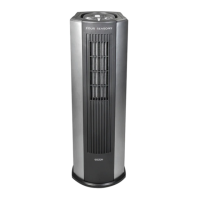

 To Next Page