2
Handling your new Boom MIDI
• Do not rotate the lens or holder manually
• Do not expose to rain, moisture, temperatures, or humidity outside the normal range or use power
supplies not designed for this product.
• Do not open the case. Installation and maintenance should be carried out by a qualified technician.
• Wipe the lens gently with a soft, dry cloth to clean. Do not use strong or corrosive detergents to avoid
damaging the lens.
• Installation and use must comply with electrical safety standards
• Avoid damage to the product by heavy pressure, strong vibration or immersion during transport,
storage and installation.
• Place on a stable desktop or horizontal surface.
• Do not expose the product to any liquid gas or solids which may corrode the shell.
• Do not power on before installation is complete.
• Do not disassemble the product. Any damage caused by dismantling the product without permission is
not covered by warranty.
• Electromagnetic fields at specific frequencies may affect the image. This product is Class A. It may
cause radio interference in household application.
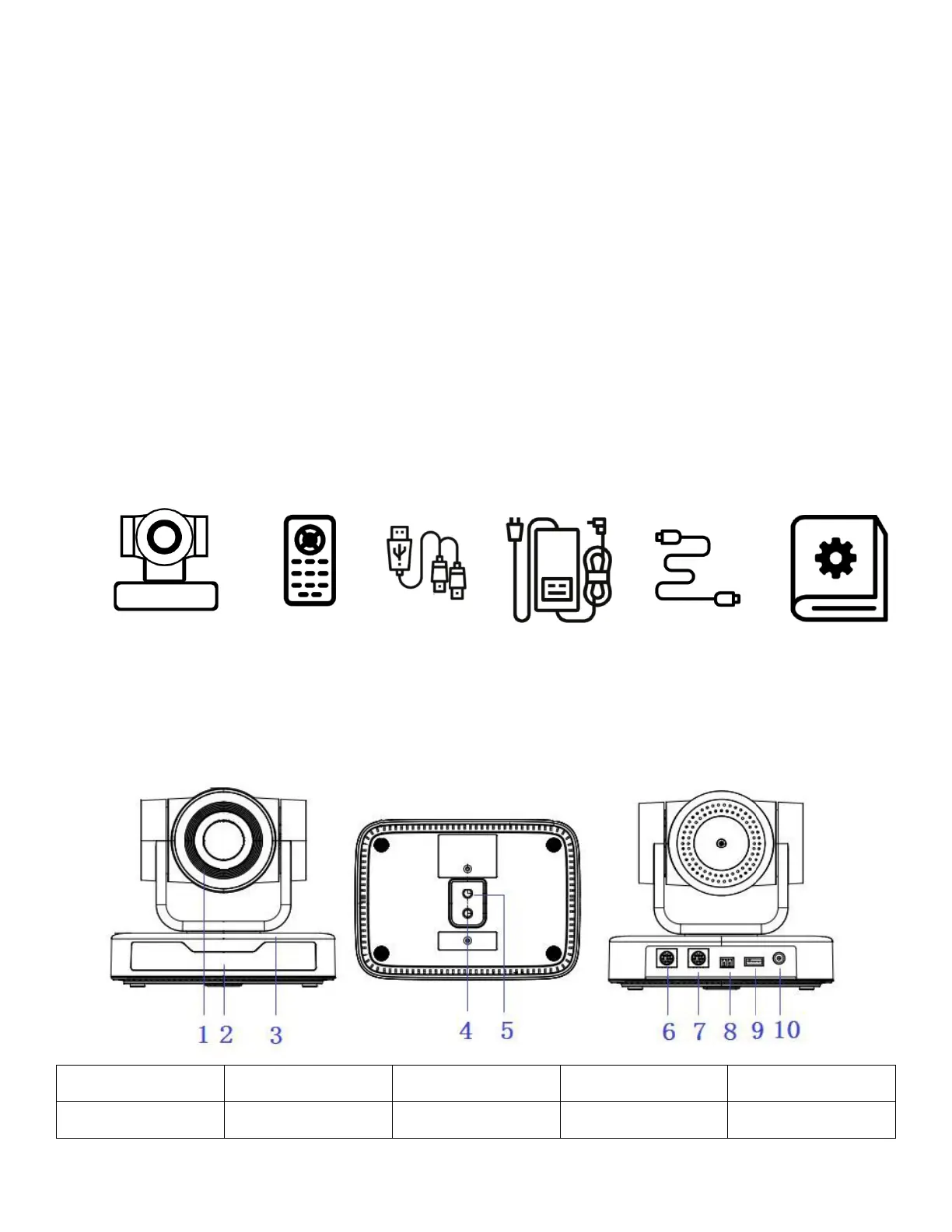
What’s in the box?
Boom MIDI camera Remote control USB Y cable Power adapter RS232 cable User Guide
Interfaces and connections
Front View Bottom View Rear View


 To Next Page