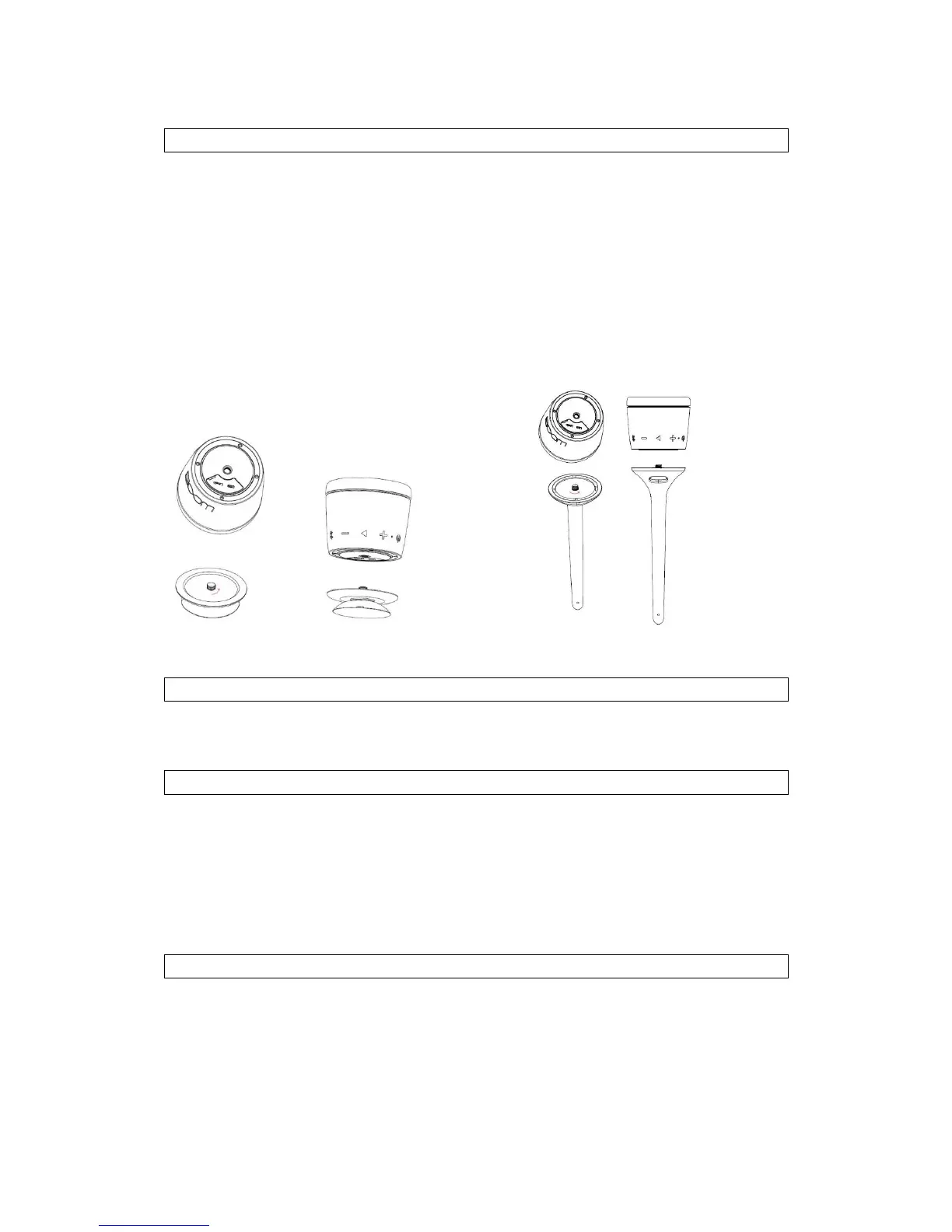
The Swimmer from Boom provides two different attachment methods to suit the
location the Speaker will be used in;
1. Suction cup. The suction cup screws to on the top of the Speaker, then you can attach
the speaker on the glass or other smooth dry surface to use the speaker by pushing
firmly.
2. Flexible attachment Tail. The tail screws on to the the top of the Speaker, then bend or
twist the tail so you can attach the speaker to places such as pipe, bicycle or other similar
positions to use the speaker
Note: Please fully charge the battery before 1
st
time use. This can be performed using the
Provided USB Cable and any powered USB Port.
Switch the Swimmer Speaker ON/OFF
Turn the Swimmer ON:Long press the ON/OFF button for 2 seconds to power on, green LED
flashes 3 times quickly with an indication tone “Power On”. Then green LED remians on.
Turn the Swimmer OFF:In the On state, Long press the ON/OFF button for 2 seconds, green
LED flashes 2 times quickly and all LED off with an indication tone“Power off”.
Connecting with Bluetooth
To connect the Swimmer Speaker with Bluetooth enabled device please follow this
procedure;
Ensure the speaker is ON. The LED will flash red and blue alternately
Refer to the operating instruction manual of your Bluetooth device to start the
connection process. Typically, this is performed by going to a “Settings” or “Setup”


 To Next Page
 Loading...