Need help?
Do you have a question about the BoomToneDJ DMX 192 and is the answer not in the manual?
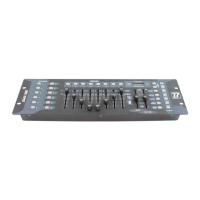
Details the function of each control on the front panel, including buttons and faders.
Step-by-step guide on how to program a scene, including adjustments and saving.
Instructions on how to save a programmed scene to a specific bank and scene number.
How to modify previously programmed scenes using faders and buttons.
Guide to copying the settings of one scene to another scene.
Instructions for deleting a specific scene, resetting its channels to zero.
Procedure to erase all scenes stored in all banks.
How to operate scenes manually, selecting banks and scenes.
Steps to program chases by sequencing scenes, allowing up to 240 scenes per chase.
How to remove a specific step from an existing chase.
Instructions to delete an entire chase while keeping its scenes intact.
Guide to operating chases, including manual and automatic modes.
Instructions on copying the contents of one bank to another bank.
Steps to delete a selected bank of scenes.
How to copy all scenes from a bank into a chase.
How to activate and operate the controller using MIDI signals.
Notes on MIDI channel selection and receiving MIDI Note On signals.
 General
| DMX Channels | 192 |
|---|---|
| Weight | 2.5 kg |
| Number of Fixtures | 12 |
| Number of Channels per Fixture | 16 |
| Number of Programmable Banks | 30 |
| Rack Units | 1U |
| DMX Connectors | 3-pin XLR |
| Control Modes | DMX |
| Power Input | DC 9-12V 300mA |

 To Next Page