Home
Boox
eBook Reader
Leaf2
Page 10 (Main Interface Overview)
Boox Leaf2 - Main Interface Overview
72 pages
Manual
Save Page as PDF
To Next Page
To Next Page
To Previous Page
To Previous Page
Loading...
4.2
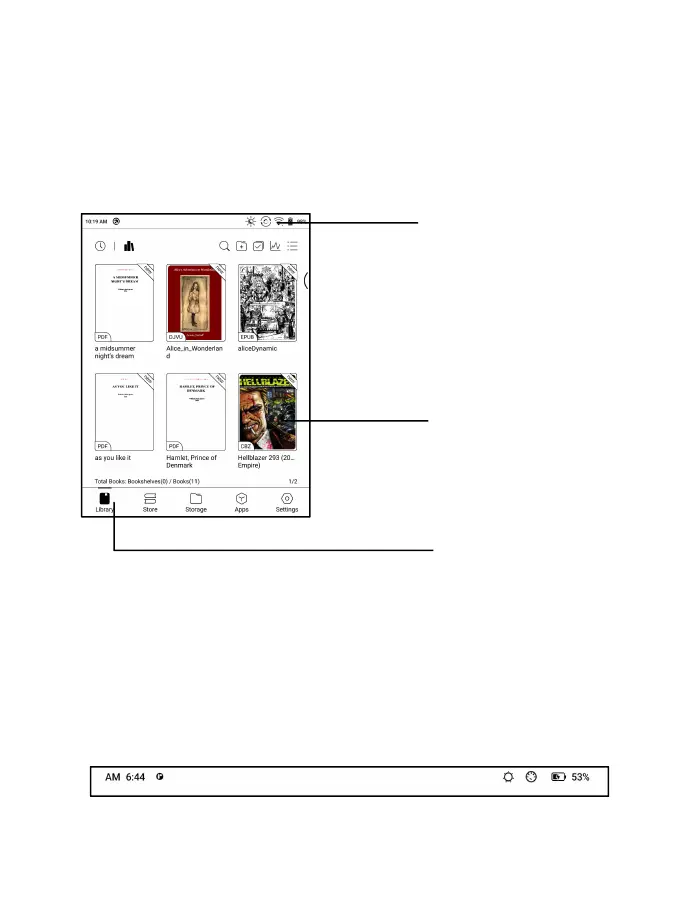
Main
Interface
Double-click
icons
in
function
area
can
return
to
the
main
page
of
the
specific
module.
System
Bar
The
area
displays
the
current
status
of
the
device,
incl
uding
Time,
Notifications,
Refresh
M
ode,
Wi-Fi,
battery
sta
tus,
etc.
Content
Area
Function
Are
a
System
Bar
9
11
Table of Contents
Main Page
Table of Contents
2
Copyright Declaration
3
Product Details
4
Safety Guide
6
Quick Start
9
System Functions
18
Library
20
Neoreader
28
Store
43
Storage
45
Apps
47
Settings
59
Thank You for Your Support
72
Related product manuals
Boox Color Series
167 pages
Boox Palma
74 pages
Boox TabX
105 pages
Boox A60
119 pages



 To Next Page