
 Need help?
Do you have a question about the BorMann Elite DS3010 and is the answer not in the manual?
Indicates a system fault, requiring contact with after-sales service station.
Displays '---------' when the scale's weight reading exceeds limits.
Flashing indicator means low battery power; use briefly and charge soon.
Display shows 'LO' when battery is too low to work; requires immediate charging.
Weight window shows '----' during charging; full charge in approximately 2 hours.
Status icon flashes during charging; full charge in approximately 2 hours.
The scale will not switch into standby mode while it is charging.
Keep scale away from rain, water, high temperature, and humidity.
Avoid striking, shocking, overloading, and reversing battery polarity.
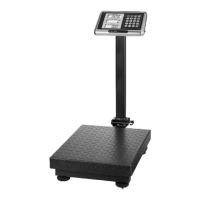
Platform Scale 300kg/100g, LCD, built-in battery, AC/DC charger, waterproof keyboard.
Platform Scale 500kg/100g, LCD, built-in battery, AC/DC charger, waterproof keyboard.
Place scale on a flat surface, adjust feet for horizontal level, use plate if needed.
Avoid long-term TARE mode usage to ensure automatic zero point tracking.
Turns the scale on/off. Starts weighing when 'Zero' and 'stable' symbols appear.
Resets the weighing reading to zero.
Resets weighing reading to zero, displaying the 'Tare' symbol.
Used for inputting digit values.
Used for inputting the decimal point of the unit price.
Clears the unit price or the calculated amount.
Adds amount during weighing or views total add-on amount.
Clears memorized add-on results and exits add-on mode.
Activates money change function or unit conversion (press 3s).
Turns LCD backlight ON/OFF or adjusts LED brightness.
Displays battery voltage (press) or toggles Animal Weighing mode (press & hold).

 To Next Page
 General