2
WARNING INDICATORS
1."EEr" means system parameter fault, please contact aer-sales service staon.
2. When total amount exceeds 9999.99, display amount as "--------".
3. When scale is overloaded, display weight reading as "--------- ".
4. Low power indicator ashes, means baery power is low. The scale can be used for a short period of me. Please charge as soon as possible.
5. Display "LO" when switching on, means baery power is too low to work. Please charge as soon as possible.
HOW TO CHARGE
Low power indicator " " ashes, means baery power is low and charging is required. Connect the adaptor plug to power source and the other end connect
DC socket of the scale.
1. Charging when scale power o.
Weight window ashes as "----" during charging, when it stops ashing and the display shows "----" stably means the baery will be fully charge aer 2 hours.
2. Charging when scale power on.
Status icon " " ashes during charging, when it stops ashing it can be assumed that the baery will be fully charged aer 2 hours.
3. The scale will not switch into standby mode during charging.
CARE & MAINTENANCE
1. Keep the scale away from rain and avoid water geng inside the scale in order to protect the internal of the scale (except waterproof model).
2. DO NOT store the scale in high temperature or high humidity area.
3. DO NOT strike, shock or overload the scale.
4. DO NOT reverse polarity of the storage baery (Connect red wire to red port, and blue wire to blue port).
TECHNICAL SPECIFICATIONS for Μodels DS3010 & DS5010
OPERATION
Place the scale on a at and solid plaorm; adjust the 4 feet screws to make sure the scale is horizontal; place on specialized plate (if necessary) and switch
on the scale. Do not use under TARE mode, for long me or the scale can not trail zero point automacally.
Key illustraon
1. [ON/OFF] Switch on/o. Start weighing when "Zero", "stable" symbols appear. Press this key to switch o the scale aer use.
2. [Zero] Reset weighing reading to zero.
3. [Tare] Reset weighing reading to zero ("Tare" symbol appears)
4. [Key 0 ~ 9] Input digit.
5. [ . ] Input decimal of the unit price
6. [C] Clear the unit price or amount
7. [M+]
a. During weighing, press this key to add on amount. "add on symbol" appears, weight reading display window shows "Add", unit price display window shows
add on mes, amount display window shows total amount. If amount is zero, this key is not applicable. Press any digit key to exit current add on operaon
(but the add on result will be memorized) and back to weighing mode.
b. If no weighing, press this key to see the add on amount. Weight reading display window shows "tot", unit price display window shows total add on mes,
amount display window shows total amount. Press any digit key to exit current add on operaon (but the add on result will be memorized) and back to weighing
mode.
8.[MC] Clear memorized add on result. Exit add on mode, "add on symbol" disappears.
9.[Give change/kg.lb] Acvate money change funcon. Weight reading display window shows "-CHA-", amount display window shows "-------". Press digit keys
to input the amount of received money (press [ C ] to clear input), and amount display window will show the amount of change. Press [Give Change/kg.lb] key
again to exit Change funcon and back to weighing mode. *Under weighing mode, press this buon for 3 seconds. The scale will beep, meaning unit conversion
is acvated. LCD shows the current weight unit.
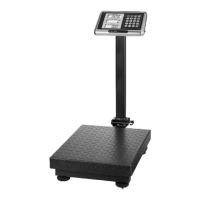
A. DS3010: Plaorm Scale 300 kg/100g (steel), LCD screen with white backlight, price compung funcon, built-in 4V/4Ah rechargeable baery, AC/DC charg-
er, waterproof keyboard, plaorm size 49 x 39 cm.
B. DS5010: Plaorm Scale 500 kg/100g (steel), LCD screen with white backlight, price compung funcon, built-in 4V/4Ah rechargeable baery, AC/DC charger,
water-proof keyboard, plaorm size 60 x 45 cm.


 To Next Page
 Loading...