FUNCTIONS
This speaker has multi-functions:
Bluetooth Mode
Aux Mode
FM Mode
USB Mode
Micro SD Card Mode
PA / Karaoke Function
CHARGING THE SPEAKER
Note: When charging the unit for the first time, charge it for more than 12 hours to ensure
you have a FULL initial charge.
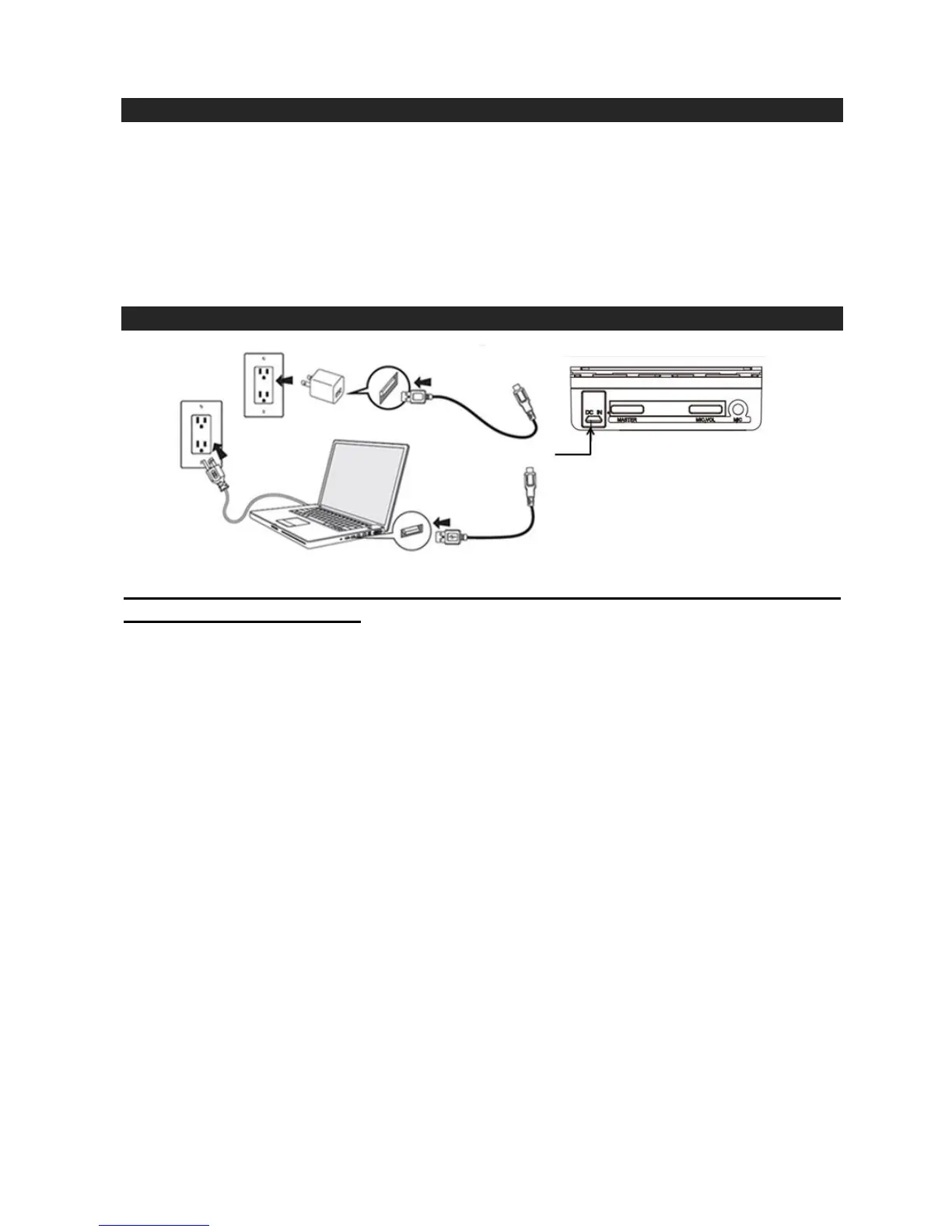
Using the Charging Cable provided, plug the Micro USB Tip into the Micro USB Charging Port
(Fig. 5) and plug the other end (USB Tip) into a USB port on your computer or USB wall charger (not
included).
The LED Charging Indicator Light (Fig. 6) on the back the unit will illuminate while charging and turn
off when completed.
When the battery level is low, the speaker will say “Low Power” and this is an indication that you
need to recharge the speaker.
A full charge will take approximately 5 to 6 hours.
Product and Battery Disposal
This product contains a built-in lithium battery and should not be disposed of in normal household
waste. The battery in this device is not intended to be removed by the individual or end user. For
disposal and recycling, please contact your local waste management authorities. The recycling and
processing of electronic waste will make a significant contribution towards helping protect the
environment.
Warning: To reduce the risk of fire and burns, do not disassemble, crush, puncture, short external
contacts or dispose of in fire or water.


 To Next Page