SET UP
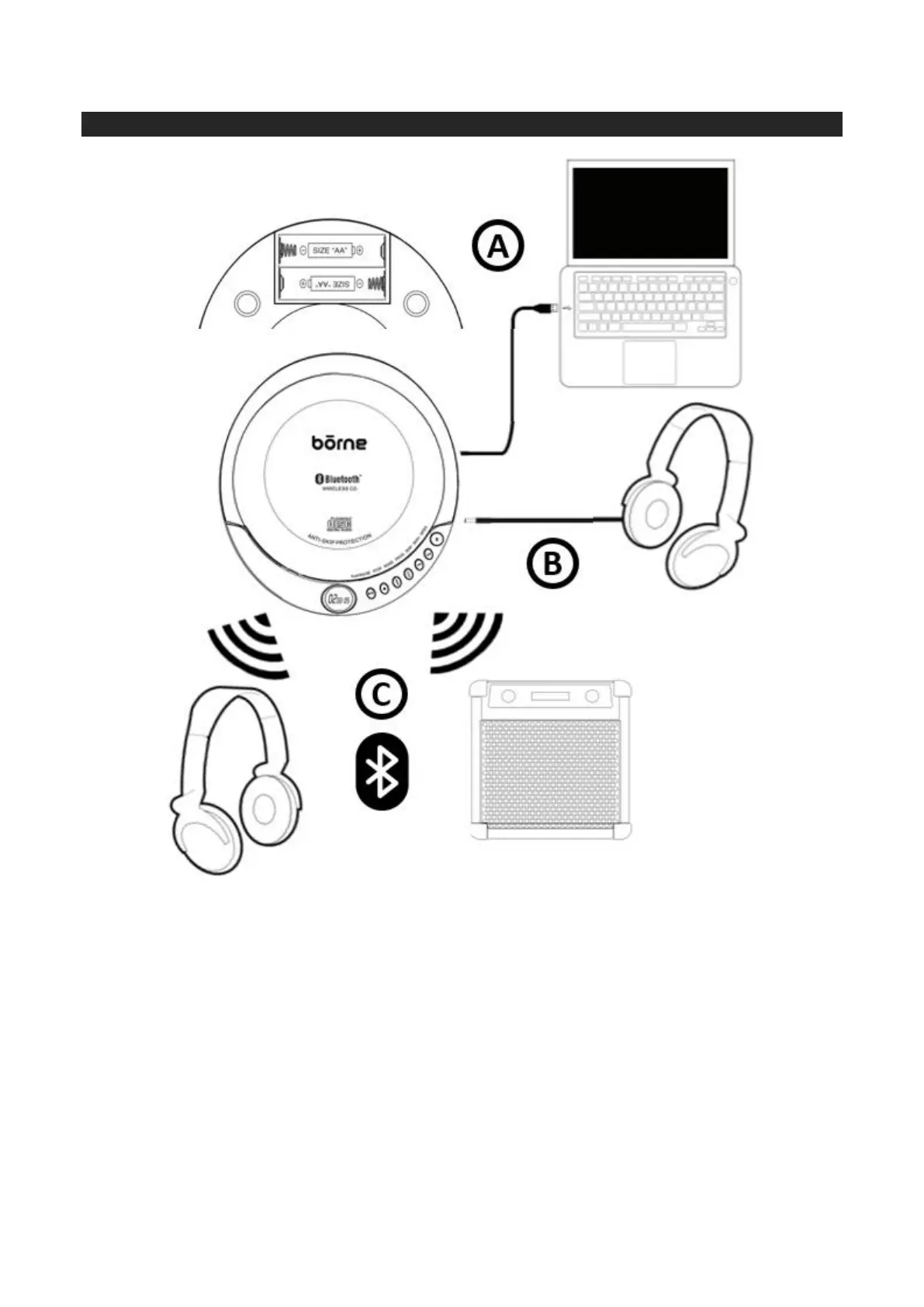
A. The Portable Bluetooth CD Player may be powered by batteries (not included) or by using the
provided USB to Barrel Power Cable and plugging it into your computer or a USB wall charger (not
included).
• For battery operation, open the Battery Compartment Cover on the backside of the unit by
sliding the cover open and gently lifting the cover. Install 2 x “AA” size batteries (not included)
according to the correct polarity (+/-) diagram in the battery compartment or as shown in the
above diagram. Gently lower the cover and slide the cover back into the closed position.
• To use the unit with the provided USB to Barrel Power Cable, connect the barrel end into the
DC Power Input Jack located on the side of the unit and the other USB end into an available
port on your computer or a USB wall charger (not included).
B. To listen to your music, plug in either headphones or earphones (not included) into the 3.5mm
Earphone Jack located on the side of the unit.
C. This unit is Bluetooth enabled and can transmit your music wirelessly to your Bluetooth headphones/
earphones or Bluetooth speaker (not included). Please see further below on pairing instructions.


 To Next Page