Need help?
Do you have a question about the Bosch ARD-FPBEW2-H3 and is the answer not in the manual?
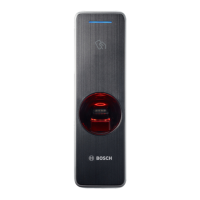
The ARD-FPBEW2-H3 Fingerprint Reader, Multiclass, is a sophisticated access control device designed for secure entry and exit management using a combination of biometric and card authentication. This installation manual provides comprehensive instructions for its setup, operation, and maintenance, emphasizing safety and optimal performance.
The ARD-FPBEW2-H3 serves as a multi-factor authentication reader, integrating fingerprint recognition with RF card authentication. It is capable of reading various RF card types, including MIFARE classic (Bosch data record), MIFARE DESFire EV1 (Bosch data record), iCLASS, iCLASS SE, EM 4102, HID Prox, Seos, HID Corporate-1000, and MIFARE DESFire EV2. The device features a fingerprint authentication unit for biometric verification and an RF card authentication unit for card-based access. An LED lamp indicates the operational status, while a separate LED lamp shows the network connection status. For enhanced security, the use of encoded cards like MIFARE DESFire or iCLASS SE is recommended. The reader supports both 1:1 matching (fingerprint compared to a specific stored template) and 1:N matching (fingerprint compared against all stored templates).
The device is designed for straightforward installation and operation. A drilling template is provided to ensure accurate mounting of the bracket. The product can be connected to a network via TCP/IP (Ethernet) or integrated into an access control system using Wiegand or RS485 interfaces. For network connections, it supports both direct PC connection (using a straight CAT-5 cable due to automatic MDI/MDIX) and connection to a hub.
Fingerprint enrollment is a critical aspect of its usage. Users are advised to place their finger gently and completely on the sensor, ensuring the center of the fingerprint aligns with the sensor's center. Up to 10 fingerprints can be registered per user, and for improved authentication rates, the same finger can be enrolled twice. The manual provides specific cautions for enrolling fingerprints, such as avoiding smudged or blurry prints and using the index or middle finger. In cases of recognition failure, troubleshooting steps include drying wet fingers, blowing on dry fingertips, or re-registering the fingerprint.
The device also includes a reset button for network settings and a factory defaults restoration function. Resetting network settings involves pressing the button until the device restarts, after which default TCP/IP and RS485 settings are applied. Restoring factory defaults deletes all data and the root certificate, requiring three quick presses of the reset button followed by another press when the yellow LED blinks.
Maintenance primarily involves proper handling and cleaning. The product should be wiped with a soft, dry cloth, and users are cautioned against using water, benzene, or alcohol. It is important to avoid dropping the product, applying impact, or contaminating the fingerprint contact unit with foreign substances. The device should only be operated with the specified power source.
For data security, the manual strongly recommends using the OSDP v2 protocol via the RS485 connection for secure encrypted data exchange, as the Wiegand interface is not recommended for this purpose. If PoE is used for power supply, the power connector cables should be isolated. In case of malfunction, users are instructed to contact Bosch After-Sales Service and not attempt repairs themselves, as this would void the warranty. Old electrical and electronic equipment, including the product and its battery, must be disposed of separately from household waste in accordance with local laws and regulations to facilitate reuse and recycling. Data stored in the reader can be deleted by the operator through the host system if required.
 General
| Brand | Bosch |
|---|---|
| Model | ARD-FPBEW2-H3 |
| Category | Card Reader |
| Language | English |

 To Next Page