en | 47
7 620 000 111/ 7 620 002 112 | 12.2019Robert Bosch Car Multimedia GmbH
en
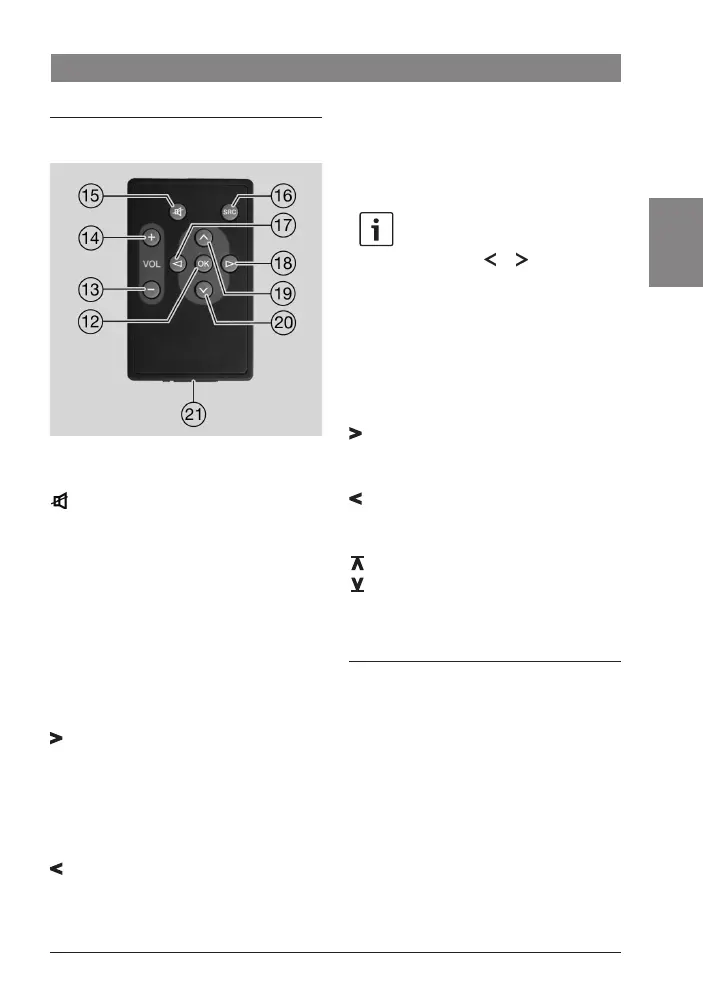
Functions of the remote control
General:
Button Function
⑮ Long press: Switch the device
on/off
Short press: Volume mute
SRC ⑯ Switch between sources
VOL + ⑭ Increase the volume
VOL – ⑬ Decrease the volume
OK ⑫ Open or close the menu
In radio mode:
Button Function
⑱ Short press: Automatic station
seek tuning / PTY seek tuning /
manual station tuning / scan
stored station presets
Long press: Change the
frequency quickly
⑰ Short press: Automatic station
seek tuning / PTY seek tuning /
manual station tuning / scan
stored station presets
Long press: Change the
frequency quickly
Note:
The function that is activated when
you press the or button ⑥
must be selected in the menu
(please refer to the section entitled
"Button function programming" in
the "Radio mode" chapter).
USB (MP3) mode
Button Function
⑱ Short press: Select the next
track
Long press: Search forwards
⑰ Short press: Select the previous
track
Long press: Search backwards
⑲ Play the next directory
⑳ Play the previous directory
OK ⑫ Activate the scan (long press)
Changing the battery
To change the battery in the IR remote control,
uunlatch the battery compartment ㉑ by
pressing the release lever on the battery
compartment.
uRemove the battery compartment ㉑ from
the housing.
uRemove the old battery and insert the
new battery (CR2025, 3 V) in such a way
that the positive pole faces towards the
rear of the housing when the battery
compartment ㉑ is pushed in.
IR remote control
02_DAF_Basic_Luxury_EN_2019.indd 47 12.12.19 12:56



 To Next Page