OPENING THE DOOR
OPERATION
DESCRIPTION
Unlock Mode Press S switch, enter master PIN code when
prompted by the voice guide, and press #.
Activate safe mode: Enter 5, 1, 1
Deactivate safe mode: Enter 5, 1, 2.
Change
Language
Press S switch, enter master PIN code when
prompted by the voice guide, and press #
Chinese: Enter 5, 2, 1
English: Enter 5, 1, 2
Activate One
Touch Security
Press 2, 2, #
Deactivate One
Touch Security
Press 4, 4, # followed by master PIN code and
press #
Long Distance
Call *(optional
function)
Press 6, 6, #
Activate Force
Lock
Short press “I” key
Deactivate
Force Lock
Enter master information. Open the door for once.
Active Child's
Lock
Press for 3-5 seconds to active the child’s lock
Deactivated
Child's Lock
1. Deactive by presssing the unlock buttom from inside
2. Press for 3-5 seconds again to deactive the
child’s lock.
Deactivate
Network
*(optional
function)
Press S switch, enter master PIN code when
prompted by the voice guide, and p
ress #
followed by 4, 2
Successfully deactivated.
SYSTEM SETTINGS
INSTANT FUNCTION SETTINGS
OPEN WITH PIN CODE
Touch the number pad >>> Enter your registered PIN code
>>> Press # to open door
OPEN WITH MECHANICAL KEY
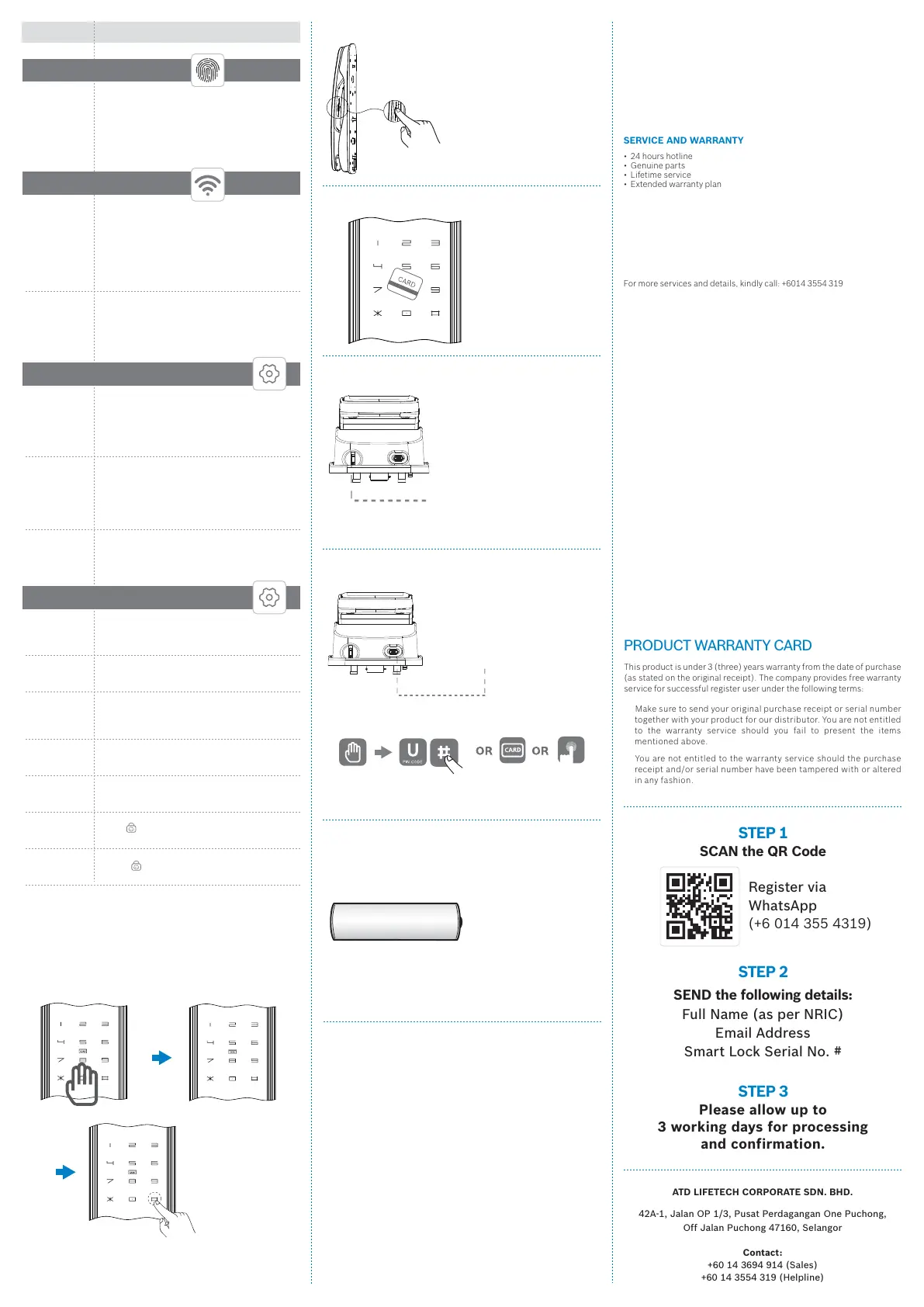
TO REPLACE BATTERY
This product uses four 1.5V alkaline AA batteries. It is sustainable for 1
year if used 10 times a day. (Users are advised to use genuine alkaline
batteries.)
Make sure to replace all 4 batteries in the following manner:
* Upon hearing the low battery reminder;
* Using or replacing wrong type of batteries, which may cause
an explosion;
* Dispose of old batteries responsibly;
1.5V alkaline AA battery
ALARM AND USUAL FUNCTION
BREAK IN / DAMAGED ALARM
• Board anti-pry alarm: Alarm will go off when the front board is being
pried.
• Handle anti-pry alarm: System will lock down when the handle is
being pried.
• One touch security alarm: In single mode, alarm will go off when
someone is breaking the lock. In network mode, alarm will go off
when someone is breaking the lock and will be reported to
the
terminal (network version requires the purchase of network
components separately).
• Key open sensor alarm: Alarm will go off when the mechanical key is
being used.
• Main bolt alarm: Alarm will go off when the main bolt is not locked.
• SOS alarm (only for network version): Both single mode and network
mode alarm will not go off, but will be reported to the terminal (network
version requires the purchase of network components separately).
3-MINUTE SYSTEM LOCK
• System will lock down for 3 minutes after 3 failed attempts. The
number pad w
ill indicate the countdown time.
FORCE LOCK
• Short press I key and the voice guide will say “Force lock activated”.
Then you can use your master PIN code or master fingerprint or
mechanical key to unlock the door to which you will hear “Force lock
deactivated”.
IC CARD FEATURE REMINDER
• Other IC cards using the NFC feature may not function on other devices
once it is registered on Bosch Smart Lock.
SERVICE AND WARRANTY
• 24 hours hotline
• Genuine parts
• Lifetime service
• Extended warranty plan
PRODUCT STANDARD
This smart lock series is certified with the following national standards:
GA701-2007
General specifications for burglary-resistant fingerprint locks
GB21556-2008
General safety-technique requirements of locks
For mor
e services and details, kindly call: +6014 3554 319
OPEN WITH FINGERPRINT
OPEN WITH EMERGENCY POWER SUPPLY
Connect with power bank
during emergency
Touch the number pad >>> Enter your registered PIN code
and press # OR enter registered card OR
scan your registered fingerprint
Tap registered card key
OPEN WITH CARD KEY
FRIENDLY REMINDER
In the event that your smart lock has malfunctioned, kindly contact your
reseller or customer service and provide the following information:
Address and contact number. Description of malfunction, purchase
date and received date, product model and product code. The
information above will help us serve you better and save you
unnecessary costs.
TERMS OF WARRANTY
The warranty service applies to manufacturing defects and regular-use
coverage only. It does not cover the following:
• Any damage caused by the user(s);
• Incorrect installation, testing and/or use other than instructed
by user manual;
• Unauthorized repair and/or modification to the product;
• Any accidental, misuse and/or intentional damages that
causes malfunction;
• Damage caused by acts of nature;
• Any loss
and/or damage caused by the product’s environment
such as electricity, temperature, moisture, magnetic field
and/or any other unavoidable reasons.
• Any other reason except for product quality.
This product is under 3 (three) years warranty from the date of purchase
(as stated on the original receipt). The company provides free warranty
service for successful register user under the following
terms:
Make sure to send your original purchase receipt or serial number
together with your product for our distributor. You are not entitled
to the warranty service should you fail to present the items
mentioned above.
You are not entitled to the warranty service should the purchase
receipt and/or serial number have been tampered with or altered
in any fashion.
WARRANTY AND SERVICES
PRODUCT WARRANT
Y CARD
SCAN the QR Code
SEND the following details:
Register via
WhatsApp
(+6 014 355 4319)
Full Name (as per NRIC)
Email Address
Smart Lock Serial No. #
Please allow up to
3 working days for processing
and confirmation.
STEP 1
STEP 3
STEP 2
ATD LIFETECH CORPORATE SDN. BHD.
42A-1, Jalan OP 1/3, Pusat Perdagangan One Puchong,
Off Jalan Puchong 47160, Selangor
Contact:
+60 14 3694 914 (Sales)
+60 14 3554 319 (Helpline)
* (optional function) Network version requires the purchase of
network components separately.
Activate
Network
*(optional
function)
Press S switch, enter master PIN code when
prompted by the voice guide, and press #
followed by 4, 1
Network requires the support of network
components. Refer to network components user
guide for details.
ADD
NETWORK
Delete All
Fingerprint
Press S switch, enter master PIN code when
prompted by the voice guide, and press #
followed by 3, 5. Press #. Successfully deleted.
Master fingerprint cannot be deleted before the
default setting is restored.
ADD USER
FINGERPRINT
Enter the registered
fingerprint (Inside)
Key Hole
Use your mechanical key
when unable to use the door
lock. E.g. forgot PIN code /
electrical failure.



 To Previous Page
 Loading...