EasyManua.ls Logo

Bosch MUM Series - User Manual

Bosch MUM Series
144 pages
Go to English
Print Icon
To Next Page IconTo Next Page
Loading...
Regis
t
e
r
you
r
new
d
ev
ic
e
on
M
yBosc
h
now and
get
free
b
enefit
s:
bos
ch-home
.com/
w
e
lcome
MUM Serie | 2
MUMS2....
[de]GebrauchsanleitungUniversal-Küchenmaschine7
[en]Information for UseUniversal kitchen machine23
[fr]Manuel d'utilisationRobots pâtissiers37
[it]Manuale utenteMacchina da cucina universale54
[nl]GebruikershandleidingKeukenmachine70
[da]BetjeningsvejledningKøkkenmaskine86
[no]BruksanvisningKjøkkenmaskin100
[sv]BruksanvisningKöksmaskin114
[fi]KäyttöohjeYleiskone128

Table of Contents

Question and Answer IconNeed help?

Do you have a question about the Bosch MUM Series and is the answer not in the manual?

Summary

Safety

General Information

Read this instruction manual carefully. Note additional instructions for accessories.

Intended Use

Use only with genuine parts for mixing, kneading, beating in domestic environments.

User Group Restrictions

Appliance use by persons with reduced capabilities requires supervision; children must not play with it.

Safety Instructions

Warnings about electric shock, fire, injury, crushing risks. Follow all safety guidelines.

Environmental Protection and Energy Saving

Disposing of Packaging

Packaging materials are recyclable. Sort components and dispose of them separately.

Unpacking and Checking

Unpacking Appliance and Parts

Remove appliance and all parts from packaging. Remove any stickers or film.

Package Contents

Check all unpacked parts for damage and delivery completeness.

Appliance Setup

Place the appliance on a stable, level, clean, and flat work surface.

Familiarising Yourself with Your Appliance

Appliance Overview

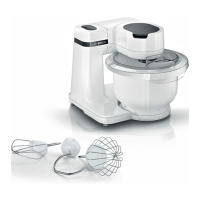
Get an overview of the different parts of your appliance.

Rotary Switch Operation

Learn how to use the rotary switch to start, stop, and select processing speed.

Swivel Arm Adjustment

Understand how to adjust and fix the swivel arm in different positions.

Drive Types and Uses

Overview of appliance drives and their specific purposes for tools and accessories.

Tool Overview and Usage

Find out about the different tools and how to use them appropriately.

Automatic Parked Position

Learn about the automatic parked position and causes of incorrect positioning.

Appliance Safety Systems

Overview of safety systems like start lock-out, restart lock-out, and overload protection.

Before Using for the First Time

Initial Appliance Preparation

Steps to prepare the appliance before its first use, including cleaning.

Basic Operation

Cable Length Adjustment

Adjust the length of the power cable to your needs using the cable storage.

Moving the Swivel Arm

Instructions on how to move the swivel arm to different positions.

Inserting the Bowl

How to correctly place the bowl in the base unit.

Removing the Bowl

Instructions for lifting and removing the bowl from the appliance.

Inserting Tools

Select and insert the required tool into the main drive until it engages.

Removing Tools

How to pull the tool completely out of the drive.

Attaching the Bowl Lid

Requirements and steps to attach the bowl lid correctly.

Removing the Bowl Lid

Steps to detach and remove the bowl lid from the appliance.

Processing Ingredients

Recommended speeds and steps for processing food, including adding ingredients.

Drive Cover Management

Instructions for removing and fitting protective covers for drives 2 and 3.

Cleaning and Servicing

Suitable Cleaning Products

Information on which cleaning products are suitable and unsuitable for your appliance.

Cleaning Overview

How to best clean the appliance and its parts, including tips for discolouration.

Special Accessories

Sample Recipe

A sample recipe for heavy fruit cake with ingredients and processing instructions.

Troubleshooting

Appliance Not Working

Solutions for when the appliance is not working, checking plug and circuit breaker.

Appliance Fails to Start

Troubleshooting steps if the appliance does not start processing.

Processing Interrupted or Stops

Reasons and solutions for processing stopping or the appliance switching off.

Swivel Arm Jammed with Tool

How to resolve issues with the swivel arm being jammed due to a tool.

Disposal

Disposing of Old Appliance

Instructions for safely and environmentally disposing of the old appliance.

Customer Service

Product and Production Number Identification

How to find the product (E-Nr.) and production (FD) numbers on the appliance.

Summary

Safety

General Information

Read this instruction manual carefully. Note additional instructions for accessories.

Intended Use

Use only with genuine parts for mixing, kneading, beating in domestic environments.

User Group Restrictions

Appliance use by persons with reduced capabilities requires supervision; children must not play with it.

Safety Instructions

Warnings about electric shock, fire, injury, crushing risks. Follow all safety guidelines.

Environmental Protection and Energy Saving

Disposing of Packaging

Packaging materials are recyclable. Sort components and dispose of them separately.

Unpacking and Checking

Unpacking Appliance and Parts

Remove appliance and all parts from packaging. Remove any stickers or film.

Package Contents

Check all unpacked parts for damage and delivery completeness.

Appliance Setup

Place the appliance on a stable, level, clean, and flat work surface.

Familiarising Yourself with Your Appliance

Appliance Overview

Get an overview of the different parts of your appliance.

Rotary Switch Operation

Learn how to use the rotary switch to start, stop, and select processing speed.

Swivel Arm Adjustment

Understand how to adjust and fix the swivel arm in different positions.

Drive Types and Uses

Overview of appliance drives and their specific purposes for tools and accessories.

Tool Overview and Usage

Find out about the different tools and how to use them appropriately.

Automatic Parked Position

Learn about the automatic parked position and causes of incorrect positioning.

Appliance Safety Systems

Overview of safety systems like start lock-out, restart lock-out, and overload protection.

Before Using for the First Time

Initial Appliance Preparation

Steps to prepare the appliance before its first use, including cleaning.

Basic Operation

Cable Length Adjustment

Adjust the length of the power cable to your needs using the cable storage.

Moving the Swivel Arm

Instructions on how to move the swivel arm to different positions.

Inserting the Bowl

How to correctly place the bowl in the base unit.

Removing the Bowl

Instructions for lifting and removing the bowl from the appliance.

Inserting Tools

Select and insert the required tool into the main drive until it engages.

Removing Tools

How to pull the tool completely out of the drive.

Attaching the Bowl Lid

Requirements and steps to attach the bowl lid correctly.

Removing the Bowl Lid

Steps to detach and remove the bowl lid from the appliance.

Processing Ingredients

Recommended speeds and steps for processing food, including adding ingredients.

Drive Cover Management

Instructions for removing and fitting protective covers for drives 2 and 3.

Cleaning and Servicing

Suitable Cleaning Products

Information on which cleaning products are suitable and unsuitable for your appliance.

Cleaning Overview

How to best clean the appliance and its parts, including tips for discolouration.

Special Accessories

Sample Recipe

A sample recipe for heavy fruit cake with ingredients and processing instructions.

Troubleshooting

Appliance Not Working

Solutions for when the appliance is not working, checking plug and circuit breaker.

Appliance Fails to Start

Troubleshooting steps if the appliance does not start processing.

Processing Interrupted or Stops

Reasons and solutions for processing stopping or the appliance switching off.

Swivel Arm Jammed with Tool

How to resolve issues with the swivel arm being jammed due to a tool.

Disposal

Disposing of Old Appliance

Instructions for safely and environmentally disposing of the old appliance.

Customer Service

Product and Production Number Identification

How to find the product (E-Nr.) and production (FD) numbers on the appliance.

Bosch MUM Series Specifications

General IconGeneral
BrandBosch
SeriesMUM Series
CompatibilityBosch MUM Series
Accessories IncludedVaries by package
TypeVarious (depending on the specific accessory)
FunctionsVarious (depending on the specific accessory, e.g., Slicing, Grating, Mixing, Blending, Pasta Making)

Related product manuals