40
en Troubleshooting
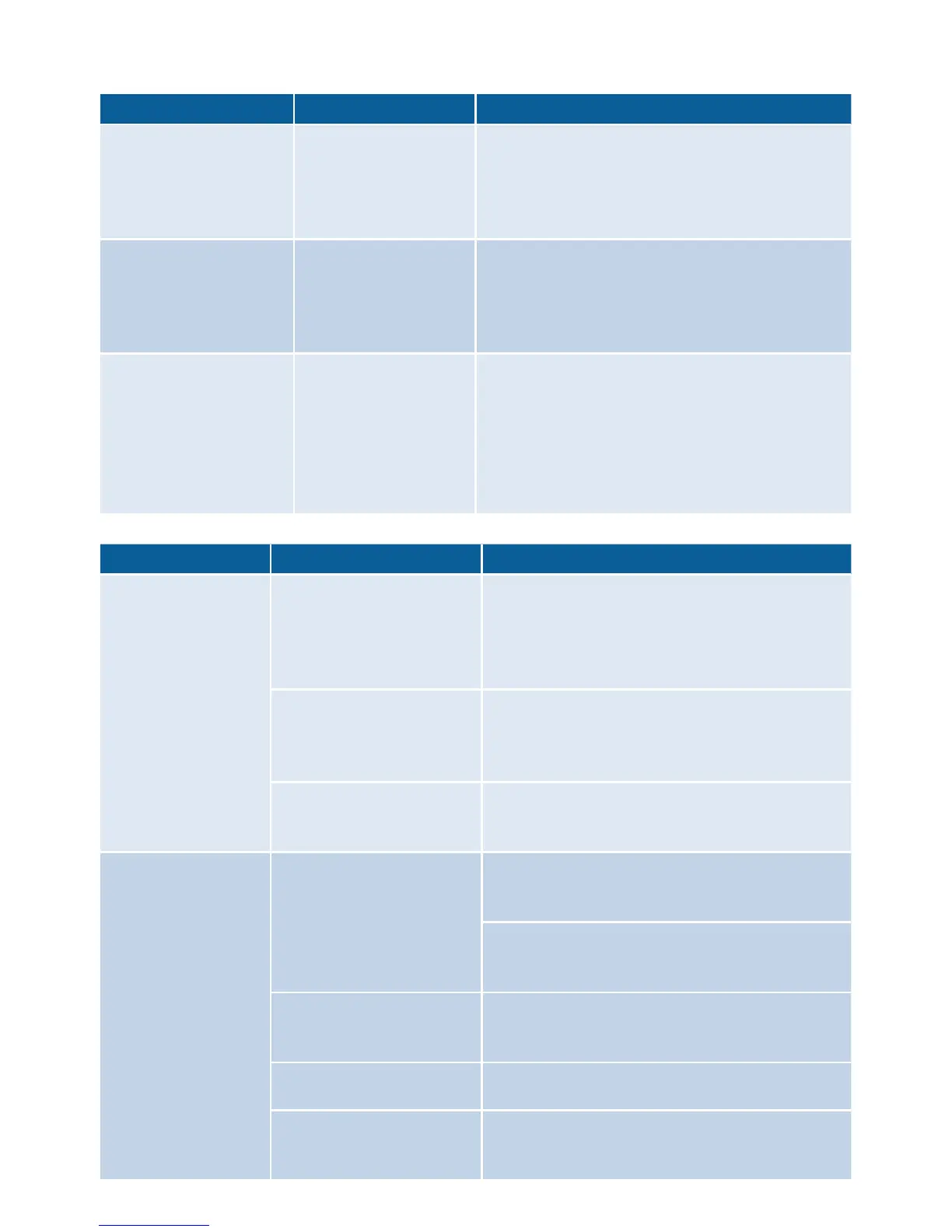
Problem Possible cause Remedy
The scales do not
show any change in
weight even though
ingredients are being
added.
The quantity of
added ingredients
is less than 5 grams
(0.01 lb).
Add at least 5 grams (0.01 lb), otherwise
the scales will not provide correct
measurement results.
The appliance does
not start the selected
SensorControl Plus
program and switches
off again.
The rotary switch
was not held down
for long enough in
the position ü.
SensorControl Plus
cannot be started.
“ADD INGREDIENTS”
appears even though
the ingredients have
already been added.
Models with scales:
ingredients were
added before
the scales were
activated.
Empty the bowl.
Select programme again.
Do not add ingredients until the program
has been selected and the scales
indicate “0g” or “0.00lb” (depending on
setting) or “ADD INGREDIENTS” appears
on the display.
Display Possible cause Remedy
ERROR
MOTOR OVERLOAD
Too much food has been
processed either at the
same time or for too
long a period.
Turn the rotary switch to y. Disconnect
the mains plug.
Reduce the processing quantity.
Allow the appliance to cool down to
room temperature.
The appliance or one
of the accessories is
blocked.
Turn the rotary switch to y. Disconnect
the mains plug.
Check appliance/accessories and rectify
the blockage.
Motor defective. If the message appears continuously, the
motor may be defective. Please contact the
customer service.
ERROR
SCALE
The scales do not work
properly.
To reset the scales, hold down one of
the function buttons (D/A/C) until
“OptiMUM” appears on the display.
Turn the rotary switch to y. Disconnect
the mains plug.
Try again after approx. 30 min.
Scales defective If the message appears continuously, the
scales may be defective. Please contact the
customer service.
The scale is exposed to
vibrations.
Do not use the appliance on worktops when
e.g. a dishwasher is running underneath.
The appliance has been
slid on the work surface
before using the scales.
Lift the appliance and set down again.
Reset the scales and try again.


 To Next Page