aus Rinse aid system
28
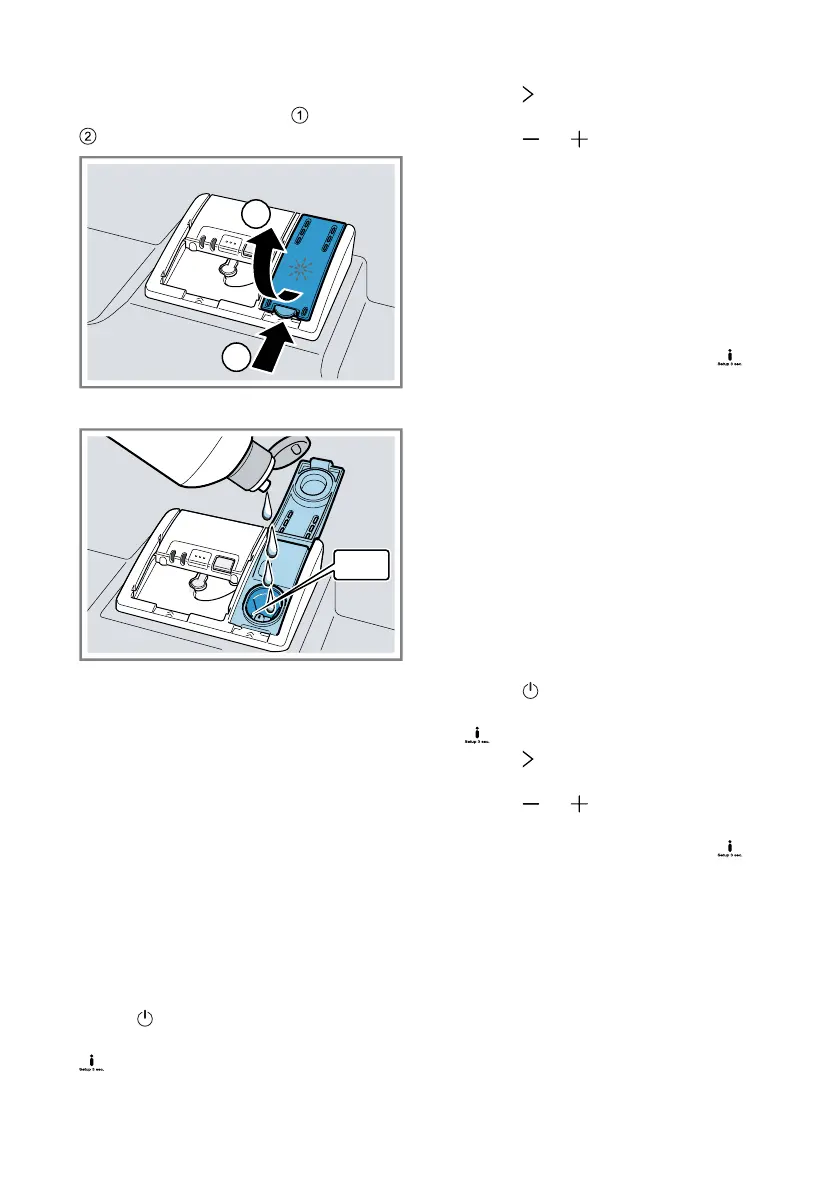
1. Press the catch on the lid of the
dispenser for rinse aid and lift
.
2. Add rinse aid up to the max mark.
3. If rinse aid spills out, remove it
from the tub.
Spilled rinse aid can cause ex-
cessive frothing during the wash
cycle.
4. Close the lid of the dispenser for
rinse aid.
a The lid clicks into position.
Setting the amount of rinse
aid
If there are streaks or water marks on
tableware, change the amount of
rinse aid.
1. Press .
2. To open the basic settings, press
for approx. 3seconds.
3. Press repeatedly until the display
shows "Rinse aid dispenser".
4. Press or repeatedly until the
right amount of rinse aid has been
set.
– A low setting adds less rinse aid
during the wash cycle and re-
duces streaking on tableware.
– A higher setting adds more
rinse aid during the wash cycle,
reduces water marks and im-
proves the drying result.
5. To save the settings, press for
approx. 3seconds.
Switching the rinse aid sys-
tem off
If you find the rinse aid refill indicator
irritating, e.g. when using combined
detergents with a rinse aid compon-
ent, you can switch the rinse aid sys-
tem off.
Tip:The function of rinse aid is lim-
ited with combined detergents. You
will generally get better results using
rinse aid.
1. Press .
2. To open the basic settings, press
for approx. 3seconds.
3. Press repeatedly until the display
shows "Rinse aid dispenser".
4. Press or repeatedly until the
display shows 0.
5. To save the settings, press for
approx. 3seconds.
a The rinse aid system is switched
off and the rinse aid refill indicator
is deactivated.


 To Next Page