EasyManua.ls Logo

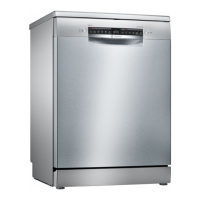
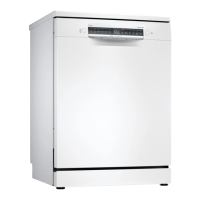
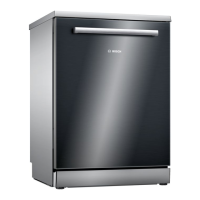
Bosch SMS4HVI31E - User Manual

Bosch SMS4HVI31E
60 pages
Print Icon
To Next Page IconTo Next Page
Loading...
Register your
new device on
MyBosch now and
get free benefits:
bosch-home.com/
welcome
Dishwasher
SMS4HVI31E
[en] Information for Use

Table of Contents

Question and Answer IconNeed help?

Do you have a question about the Bosch SMS4HVI31E and is the answer not in the manual?

Summary

Safety

General information

Read manual carefully and keep for future reference.

Intended use

Use for household tableware in private homes.

Restriction on user group

Use by children 8+ and those with reduced abilities under supervision.

Safe installation

Follow manual instructions for safe installation.

Preventing material damage

Safe installation

Avoid damage from improper installation near heat or under hob.

Safe use

Prevent damage from steam by allowing cooling before opening the door.

Environmental protection and saving energy

Saving energy

Use Eco 50° programme for less electricity and water.

AquaSensor

AquaSensor measures water turbidity to save water.

Installation and connection

Scope of supply

Check parts for damage and completeness after unpacking.

Installation and connection

Installing and connecting the appliance

Position built-under/integrable appliances in kitchens.

Drainage connection

Connect to drainage for dirty water discharge.

Installing the drainage connection

Connect wastewater hose to siphon outlet following instructions.

Drinking water connection

Connect appliance to a drinking water source.

Installation and connection

Electrical connection

Connect to AC power (220-240V, 50/60Hz) as per instructions.

Familiarising yourself with your appliance

Appliance

Overview of the dishwasher's components and parts.

Familiarising yourself with your appliance

Controls

Use control panel to configure functions and check operating status.

Programmes

Intensive 70°

For pots, pans, and heavily soiled items with starch/protein.

Auto 45-65°

For mixed tableware with light food residue.

Eco 50°

Economical cycle for mixed tableware with light residue.

Programmes

Silence 50

Quiet cycle for mixed tableware with light residue.

Express 65° - 1 h

Fast cycle for mixed tableware with light residue.

Machine Care

Programme for cleaning the appliance itself when empty.

Favourite

Save custom programme and function combinations to favourite button.

Additional functions

SpeedPerfect+

Shortens programme time by 15-75%, increasing energy/water use.

Half Load

Optimised for small loads, reducing run time and consumption.

ExtraDry

Improves drying, especially for plastics, by increasing final rinse temp.

Features

Features

Top basket

Arrange cups, glasses, small items. Adjustable height for larger items.

Bottom basket

Arrange pans and plates. Accommodates large plates up to 31cm.

Features

Cutlery drawer

Load cutlery with points/sharp edges down for safety.

Etagere

Utilise shelf and space for cups, glasses, or large cutlery items.

Folding prongs

Use prongs for secure plate placement; fold down for pans/bowls.

Before using for the first time

Performing the initial configuration

Initial setup requires configuring basic settings like water hardness.

Basket heights

Adjust basket heights for optimal loading based on appliance height.

Water softening system

Overview of water hardness settings

Table showing water hardness values and corresponding settings.

Setting the water softening system

Set appliance to match detected water hardness for optimal results.

Special salt

Use special salt to soften water and improve dishwashing results.

Water softening system

Switching off the water softening system

Option to switch off the salt refill indicator if it is irritating.

Rinse aid system

Rinse aid

Use rinse aid for better drying. Use only for dishwashers.

Adding rinse aid

Refill rinse aid dispenser when indicator lights up.

Regeneration of the water softening system

Appliance regenerates water softening system to ensure fault-free function.

Rinse aid system

Setting the amount of rinse aid

Adjust rinse aid amount to prevent streaks or water marks on dishes.

Switching the rinse aid system off

Turn off rinse aid system if indicator is irritating.

Detergent

Detergent

Combined detergent

Detergents with added rinse aid and salt replacement features.

Unsuitable detergents

Avoid detergents that can damage the appliance or pose health risks.

Powder detergent

Powder detergent suitable for shorter cycles; dosage adjustable by soiling.

Information on detergents

Follow manufacturer's instructions for everyday detergent use.

Detergent

Adding detergent

Add detergent to dispenser; one tablet is sufficient for loads.

Tableware

Damage to glass and tableware

Only wash dishwasher-safe items to prevent damage.

Tableware

Arrange tableware

Load tableware correctly for optimal results and to prevent damage.

Basic operation

Switching on the appliance

Press power button; Eco 50° programme is default.

Setting a programme

Select programme based on tableware soiling for best results.

Setting additional functions

Add functions like Half Load or ExtraDry to enhance programmes.

Basic operation

Starting the programme

Press Start to begin the wash cycle; check display for completion.

Terminate programme

Cancel programme early by pressing Reset 4 sec.

Switching off appliance

Press power button to switch off the appliance.

Interrupting programme

Open door slightly after heating to prevent pressure build-up.

Basic settings

Water hardness

Adjust water softening based on hardness; HOO disables the system.

Rinse aid dispensing

Adjust rinse aid level; r00 switches off the rinse aid system.

Intensive drying

Increase final rinse temperature for better drying, especially for plastics.

Basic settings

Wi-Fi

Control Wi-Fi connection; Cn0 disables it.

Remote Start

Activate/deactivate remote start; rc1 allows selection via button.

Factory setting

Reset all settings to their original factory defaults.

Home Connect

Home Connect quick start

Guide to quickly connect appliance to a mobile device.

Installing app

Download and install the Home Connect mobile application.

Connecting the appliance to WLAN home network (Wi-Fi)

Establish appliance connection to home Wi-Fi network for remote control.

Home Connect

Activating Remote Start

Activate Remote Start function from appliance controls after basic setup.

Remote Diagnostics

Allow Customer Service remote access for diagnosis if connected to Home Connect.

Software update

Update appliance software for optimisation or troubleshooting via Home Connect app.

Data protection

Initial data transmission to Home Connect server upon network registration.

Cleaning and servicing

Cleaning the tub

Clean interior with damp cloth and detergent; run high-temp programme.

Machine Care

Use Machine Care programme to remove deposits and prevent malfunctions.

Cleaning products

Use only approved cleaning products for appliance maintenance.

Tips on appliance care

Regular cleaning of seals, front, and control panel ensures hygiene.

Cleaning and servicing

Running Machine Care

Operate Machine Care without any dishes inside the dishwasher.

Filter system

Filter system removes coarse particles from wash water.

Cleaning filters

Check and clean filters after every wash cycle to prevent blockages.

Cleaning and servicing

Cleaning spray arms

Clean spray arms regularly to remove limescale and prevent nozzle blockages.

Troubleshooting

Error code; Fault display; Signal

Troubleshooting guide for error codes, fault displays, and signals.

Troubleshooting

Malfunctions

Addresses common malfunctions like water leaks or pump issues.

Troubleshooting

Washing results

Solutions for issues related to drying performance and programme settings.

Troubleshooting

Home Connect problem

Solutions for issues with appliance connectivity to home network and Home Connect.

Information on display panel

Explains display panel indicators for salt, rinse aid, and door status.

Troubleshooting

Mechanical damage

Troubleshooting steps for mechanical issues like door or dispenser problems.

Noise

Identifies causes of noise and suggests solutions like arranging tableware.

Clean wastewater pump

Transportation, storage and disposal

Removing the appliance

Steps to safely disconnect the appliance from power and water supplies.

Protect appliance from frost

Empty appliance completely if exposed to freezing temperatures.

Transportation, storage and disposal

Transporting the appliance

Procedures for safely transporting the appliance, including emptying and upright position.

Disposing of old appliance

Proper disposal methods for old appliances, encouraging recycling.

Customer Service

Customer Service

Product number (E-Nr.), production number (FD) and consecutive numbering (Z-Nr.)

Locate product identification numbers (E-Nr., FD, Z-Nr.) on the rating plate.

AQUA-STOP guarantee

Details of the Aqua-Stop guarantee for water damage compensation.

Technical specifications

Declaration of Conformity

Information regarding Free and Open Source Software

Information on free and open source software components used in the product.

Summary

Safety

General information

Read manual carefully and keep for future reference.

Intended use

Use for household tableware in private homes.

Restriction on user group

Use by children 8+ and those with reduced abilities under supervision.

Safe installation

Follow manual instructions for safe installation.

Preventing material damage

Safe installation

Avoid damage from improper installation near heat or under hob.

Safe use

Prevent damage from steam by allowing cooling before opening the door.

Environmental protection and saving energy

Saving energy

Use Eco 50° programme for less electricity and water.

AquaSensor

AquaSensor measures water turbidity to save water.

Installation and connection

Scope of supply

Check parts for damage and completeness after unpacking.

Installation and connection

Installing and connecting the appliance

Position built-under/integrable appliances in kitchens.

Drainage connection

Connect to drainage for dirty water discharge.

Installing the drainage connection

Connect wastewater hose to siphon outlet following instructions.

Drinking water connection

Connect appliance to a drinking water source.

Installation and connection

Electrical connection

Connect to AC power (220-240V, 50/60Hz) as per instructions.

Familiarising yourself with your appliance

Appliance

Overview of the dishwasher's components and parts.

Familiarising yourself with your appliance

Controls

Use control panel to configure functions and check operating status.

Programmes

Intensive 70°

For pots, pans, and heavily soiled items with starch/protein.

Auto 45-65°

For mixed tableware with light food residue.

Eco 50°

Economical cycle for mixed tableware with light residue.

Programmes

Silence 50

Quiet cycle for mixed tableware with light residue.

Express 65° - 1 h

Fast cycle for mixed tableware with light residue.

Machine Care

Programme for cleaning the appliance itself when empty.

Favourite

Save custom programme and function combinations to favourite button.

Additional functions

SpeedPerfect+

Shortens programme time by 15-75%, increasing energy/water use.

Half Load

Optimised for small loads, reducing run time and consumption.

ExtraDry

Improves drying, especially for plastics, by increasing final rinse temp.

Features

Features

Top basket

Arrange cups, glasses, small items. Adjustable height for larger items.

Bottom basket

Arrange pans and plates. Accommodates large plates up to 31cm.

Features

Cutlery drawer

Load cutlery with points/sharp edges down for safety.

Etagere

Utilise shelf and space for cups, glasses, or large cutlery items.

Folding prongs

Use prongs for secure plate placement; fold down for pans/bowls.

Before using for the first time

Performing the initial configuration

Initial setup requires configuring basic settings like water hardness.

Basket heights

Adjust basket heights for optimal loading based on appliance height.

Water softening system

Overview of water hardness settings

Table showing water hardness values and corresponding settings.

Setting the water softening system

Set appliance to match detected water hardness for optimal results.

Special salt

Use special salt to soften water and improve dishwashing results.

Water softening system

Switching off the water softening system

Option to switch off the salt refill indicator if it is irritating.

Rinse aid system

Rinse aid

Use rinse aid for better drying. Use only for dishwashers.

Adding rinse aid

Refill rinse aid dispenser when indicator lights up.

Regeneration of the water softening system

Appliance regenerates water softening system to ensure fault-free function.

Rinse aid system

Setting the amount of rinse aid

Adjust rinse aid amount to prevent streaks or water marks on dishes.

Switching the rinse aid system off

Turn off rinse aid system if indicator is irritating.

Detergent

Detergent

Combined detergent

Detergents with added rinse aid and salt replacement features.

Unsuitable detergents

Avoid detergents that can damage the appliance or pose health risks.

Powder detergent

Powder detergent suitable for shorter cycles; dosage adjustable by soiling.

Information on detergents

Follow manufacturer's instructions for everyday detergent use.

Detergent

Adding detergent

Add detergent to dispenser; one tablet is sufficient for loads.

Tableware

Damage to glass and tableware

Only wash dishwasher-safe items to prevent damage.

Tableware

Arrange tableware

Load tableware correctly for optimal results and to prevent damage.

Basic operation

Switching on the appliance

Press power button; Eco 50° programme is default.

Setting a programme

Select programme based on tableware soiling for best results.

Setting additional functions

Add functions like Half Load or ExtraDry to enhance programmes.

Basic operation

Starting the programme

Press Start to begin the wash cycle; check display for completion.

Terminate programme

Cancel programme early by pressing Reset 4 sec.

Switching off appliance

Press power button to switch off the appliance.

Interrupting programme

Open door slightly after heating to prevent pressure build-up.

Basic settings

Water hardness

Adjust water softening based on hardness; HOO disables the system.

Rinse aid dispensing

Adjust rinse aid level; r00 switches off the rinse aid system.

Intensive drying

Increase final rinse temperature for better drying, especially for plastics.

Basic settings

Wi-Fi

Control Wi-Fi connection; Cn0 disables it.

Remote Start

Activate/deactivate remote start; rc1 allows selection via button.

Factory setting

Reset all settings to their original factory defaults.

Home Connect

Home Connect quick start

Guide to quickly connect appliance to a mobile device.

Installing app

Download and install the Home Connect mobile application.

Connecting the appliance to WLAN home network (Wi-Fi)

Establish appliance connection to home Wi-Fi network for remote control.

Home Connect

Activating Remote Start

Activate Remote Start function from appliance controls after basic setup.

Remote Diagnostics

Allow Customer Service remote access for diagnosis if connected to Home Connect.

Software update

Update appliance software for optimisation or troubleshooting via Home Connect app.

Data protection

Initial data transmission to Home Connect server upon network registration.

Cleaning and servicing

Cleaning the tub

Clean interior with damp cloth and detergent; run high-temp programme.

Machine Care

Use Machine Care programme to remove deposits and prevent malfunctions.

Cleaning products

Use only approved cleaning products for appliance maintenance.

Tips on appliance care

Regular cleaning of seals, front, and control panel ensures hygiene.

Cleaning and servicing

Running Machine Care

Operate Machine Care without any dishes inside the dishwasher.

Filter system

Filter system removes coarse particles from wash water.

Cleaning filters

Check and clean filters after every wash cycle to prevent blockages.

Cleaning and servicing

Cleaning spray arms

Clean spray arms regularly to remove limescale and prevent nozzle blockages.

Troubleshooting

Error code; Fault display; Signal

Troubleshooting guide for error codes, fault displays, and signals.

Troubleshooting

Malfunctions

Addresses common malfunctions like water leaks or pump issues.

Troubleshooting

Washing results

Solutions for issues related to drying performance and programme settings.

Troubleshooting

Home Connect problem

Solutions for issues with appliance connectivity to home network and Home Connect.

Information on display panel

Explains display panel indicators for salt, rinse aid, and door status.

Troubleshooting

Mechanical damage

Troubleshooting steps for mechanical issues like door or dispenser problems.

Noise

Identifies causes of noise and suggests solutions like arranging tableware.

Clean wastewater pump

Transportation, storage and disposal

Removing the appliance

Steps to safely disconnect the appliance from power and water supplies.

Protect appliance from frost

Empty appliance completely if exposed to freezing temperatures.

Transportation, storage and disposal

Transporting the appliance

Procedures for safely transporting the appliance, including emptying and upright position.

Disposing of old appliance

Proper disposal methods for old appliances, encouraging recycling.

Customer Service

Customer Service

Product number (E-Nr.), production number (FD) and consecutive numbering (Z-Nr.)

Locate product identification numbers (E-Nr., FD, Z-Nr.) on the rating plate.

AQUA-STOP guarantee

Details of the Aqua-Stop guarantee for water damage compensation.

Technical specifications

Declaration of Conformity

Information regarding Free and Open Source Software

Information on free and open source software components used in the product.

Bosch SMS4HVI31E Specifications

General IconGeneral
BrandBosch
ModelSMS4HVI31E
CategoryDishwasher
LanguageEnglish

Related product manuals