AM183562_04_V.pdf October 30, 2001 7
Setting Up
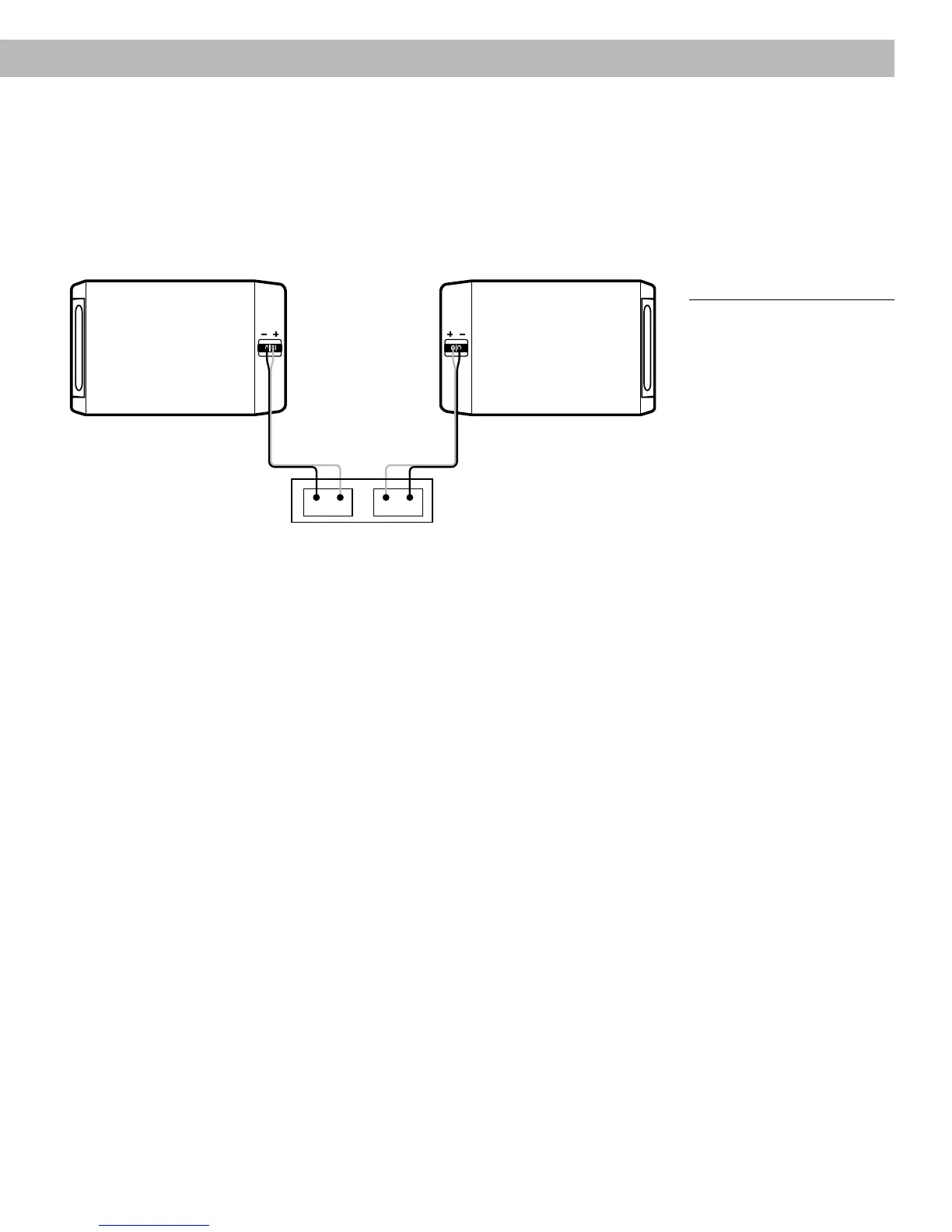
Check the connections
Check that all connections are made positive to positive (+ to +) and negative to negative
(– to –) (Figure 5). Make sure that no loose strands of wire touch across terminals. This
could damage your receiver or amplifier. Be sure the connections are secure before you
plug in the receiver or amplifier and turn it on.
L +R?? Rich Y.
– + –+
R
L
Receiver or Amplifier
Back of left speakerBack of right speaker
Figure 5
Completed connections
Test the speakers
To make sure your speakers operate correctly:
1. Place the speakers less than 6 inches (15 cm) apart, facing each other.
2. Turn on your receiver, and set it to MONO (monophonic), if that is an option on your
model.
3. Set the balance control to normal (center position).
4. Play some deep bass passages of music through the speakers.
The sound should seem to come from a point between the two speakers. The bass should
be full and natural. If it is not, one of the connections may be reversed, causing the speak-
ers to play out of phase. Refer to “Make the connections” on page 6. To correct the
problem, make sure all the wires are connected positive to positive (+ to +) and negative to
negative (– to –). Then repeat steps 1 through 4 to re-test the speakers.


 To Next Page
 Loading...