10:00 AM10:00 AM
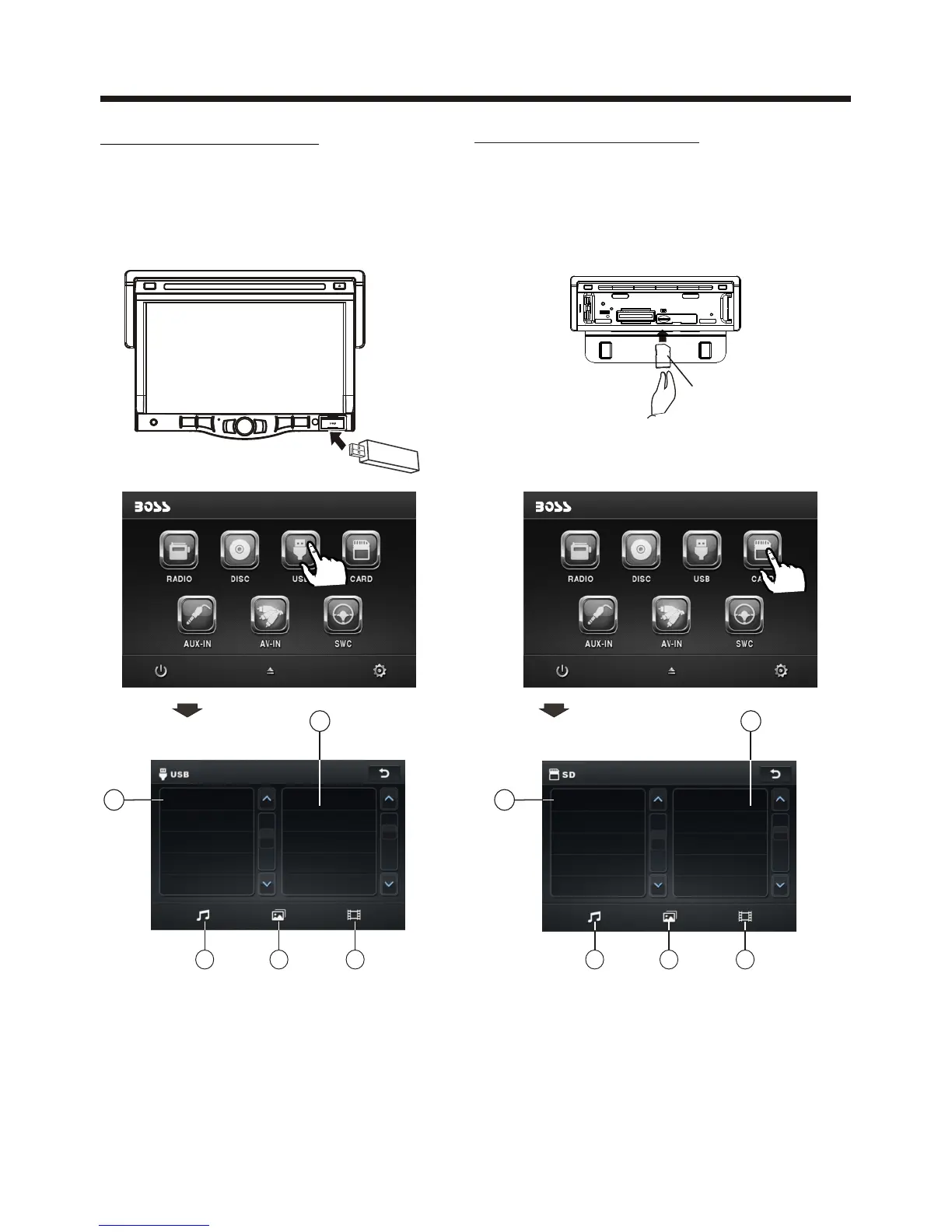
Following the diagram below, connect
your USB device to the front panel
USB port . If it is properly connected,
the device will be mounted and start
playing automatically.
USB OPERATION
Touch Screen Operation
1 Current type (highlighted bar) .
2 Audio play mode select.
3 Picture play mode select.
4 Movie play mode select,
5 Current play track .
1 Current type (highlighted bar) .
2 Audio play mode select.
3 Picture play mode select.
4 Movie play mode select,
5 Current play track .
Card OPERATION
The unit can support playback MP3/WMA/
JPEG/MP4 format which are stored on
SD memory cards .
Please read the following instructions
before you start using a memory card .
Inserting the card as follow:
Insert a card, push in till heard
a “CLICK”, then attach the
control panel again to play.
Label side
facing upward
1
SONG
001
002002
003
004
005
10:00AM
2 3 4
5
1
WEDDING MOV03247.MPG
CIMG3080.MOV
10:00AM
2 3 4
5
USB
10:00 AM10:00 AM



 To Next Page