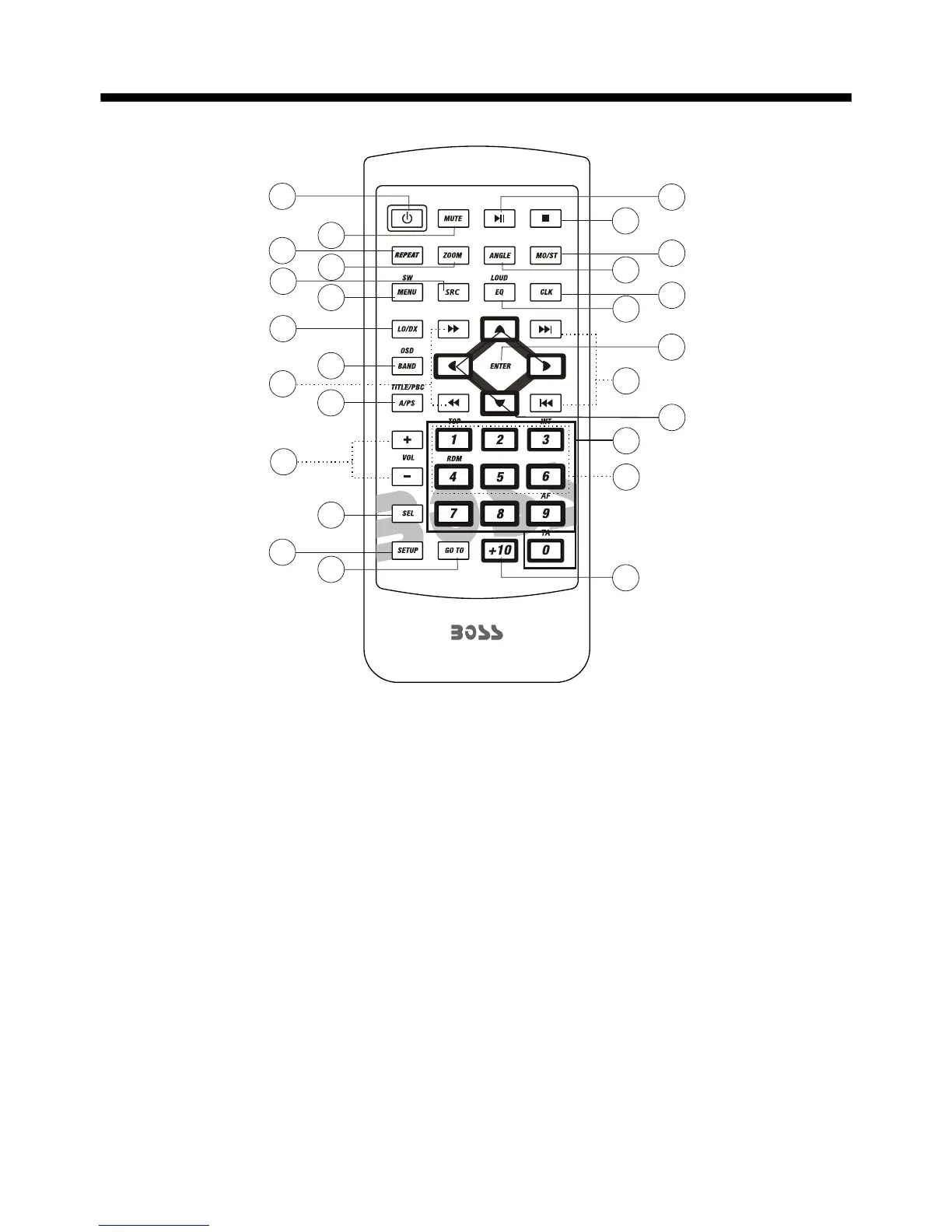
REMOTE CONTROL
-8-
1. CLK Press it briefly to show the clock
time .
2. SRC Press it to change between
RADIO ,DISC ,USB, SD , AUX IN and
AV IN mode.
3. STOP Press once to pause playback,
press PLAY/PAUSE to resume playback .
4. SETUP Press it to open the SETUP
menu.
5.MO/ST(AUDIO) In radio mode, press it
to select STEREO or MONO mode (when
a station is weak, sometimes switching
to Mono will improve sound quality ) .
In Disc playback mode, pressing it button
opens the AUDIO setup menu for making
changes to the way te soundtrack is
reproduced .
in video play mode
6. LO/DX(SUBTITLE) Changing of the
SUBTITLE language on multi-subtitle
language Digital Video disc. In radio mode,
Press this button for distance reception
when you are located at weak signal
location, depress it for stronger signal.
7. REPEAT/ Switch the Repeat mode
of DVD/VCD/CD/MP3 disc.
8.GOTO
Press this button to begin
playback at a moment in the program you
designate. Use the number buttons to
enter the data that is needed.
15
17
19
13
14
7
2
6
22
11
18
3
16
5
20
1
21
24
9
12
10
4
8
26
23
25



 To Next Page