BASIC OPERATION
-11-
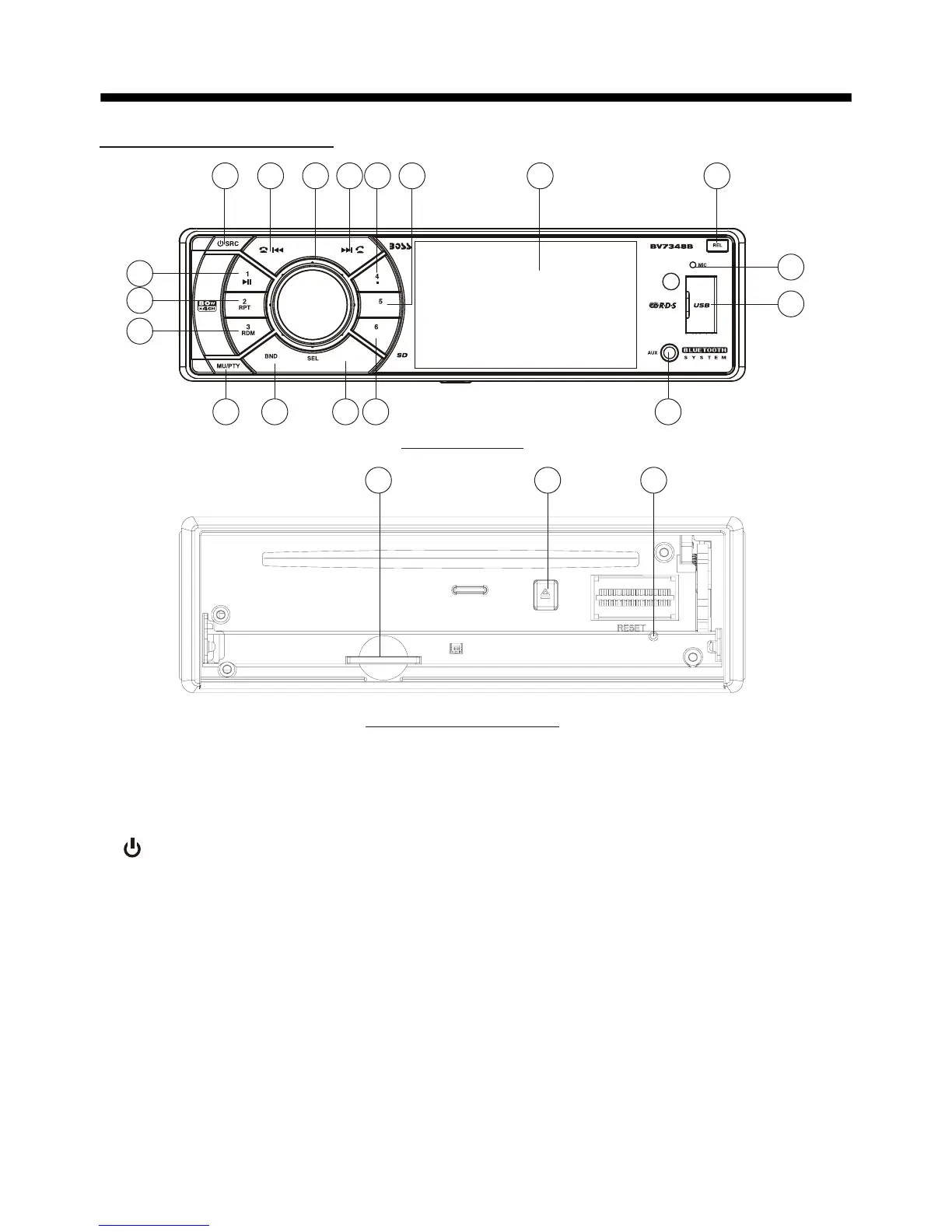
1. REL Button
Press it to flip down the front panel.
2. (POWER On/Off)/SRC Button
Press it to switch the device ON, press
and hold (approximately 2 seconds) to
switch the device OFF . During the
playback mode, you can press it to select
an input mode by pressing repeatedly
until proper one is found:
>RADIO >DISC >USB > CARD >AUX IN
>BT
3. SEL BUTTON
In normal mode, knob is used to
increase or decrease the volume.
and VOL KNOB
the VOL
2119 20
Control Panel
Control Panel
Base of Control Panel
1
17
18
15
13
16
3
6
9
11
10
8 12
4 14
7
5
2
MENU
HOME
+10
-10
In home interface, rotate the VOL knob
or press the </> button on remote to
do selection, then press SEL to enter.
During playing, press the SEL to back to
previous mode.
In SETUP or SWC mode, press and hold
the SEL button to back to previous mode;
During playing, press and hold to switch
between BASS,TREBLE,BALANCE,
FADE,SWF VOL and SWF FRE.
After switching on the desired mode
above, rotate VOL knob to set it.
4. HOME button
Press to back to home interface.



 To Next Page