BASIC OPERATION
-12-
5. BAND/MENU Button
In Radio mode, press the button repeat
edly (or the BAND button on the remote
control) to cycle through and select the
desired radio band, the designation of
the corresponding level- FM1, FM2,
FM3, AM1(MW1), AM2(MW2)- is shown
in the TFT.
Press to display the root menu for the
playing media.
6.MUTE/PTY Button
Press this button to turn off the audio.
Press again to restore the volume to the
prior level. You can also disable the
MUTE function by turning the VOL +/-
knob.
In Radio Mode, press this button and
hold for a bout 2 seconds to select the
PTY of the grogram type (examples of
such types of program are :
NEWS, POP.....)
7/8.>>|/ and |<</ Buttons
In radio mode, Long pressing |<< or >>|
button can automatically search down
or up for an available station beginning
from the current frequency; Briefly
pressing |<< or >>| button can manually
search down or up for a your desired
station beginning from the current
frequency.
In media mode, pressing |<< or >>|
button can play previous or next track;
continuously and long pressing |<< or
>>| button can fast backwards or
forwards at the following multiple of
normal speed: x2, x4, x8, x20.
9-14. PRESET STATION MEMORY
A)In RADIO mode
Go to any preset station by pressing one
of the 6preset station(1-6) ,if one of these
buttons is pressed for more than 2
seconds, the stations currently being
listened to will be memorized into the
selected preset button.
B) In DISC/USB/SD mode
During playing, press 1/>II button to
pause the current playback, press again
to continue play;
Press 2/RPT button to select repeat
function;
Press 3/RDM button to select random
function;
Press 4/STOP button to turn to previous
mode, press again to turn to home mode;
Press 5/+10 to turn to next ten tracks;
Press 6/-10 to turn to previous ten tracks.
15. AUX INPUT JACK
For information about using an AUX IN
audio source, refer to AUX operation.
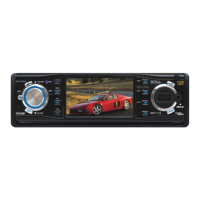
16. TFT Display
17. USB PORT
For information about connecting a
USB device.
18. MIC (Microphone position )
19. CARD SLOT
For information about connecting a
memory card device.
20. (EJECT) Button
In DISC playing ,Press the Open button
to flip down the front panel, then you
can press the this button to eject the disc .
21. RESET Button
Press this button to return to factory
settings.
* In BT MUSIC mode, the function of the
fast forwards or backwards is disabled.
In BT PHONE mode, for the function of
the and buttons, please refer to
the part of the BT Operation.


 To Next Page
 Loading...