INSTRUCTIONS INSTRUCTIONS
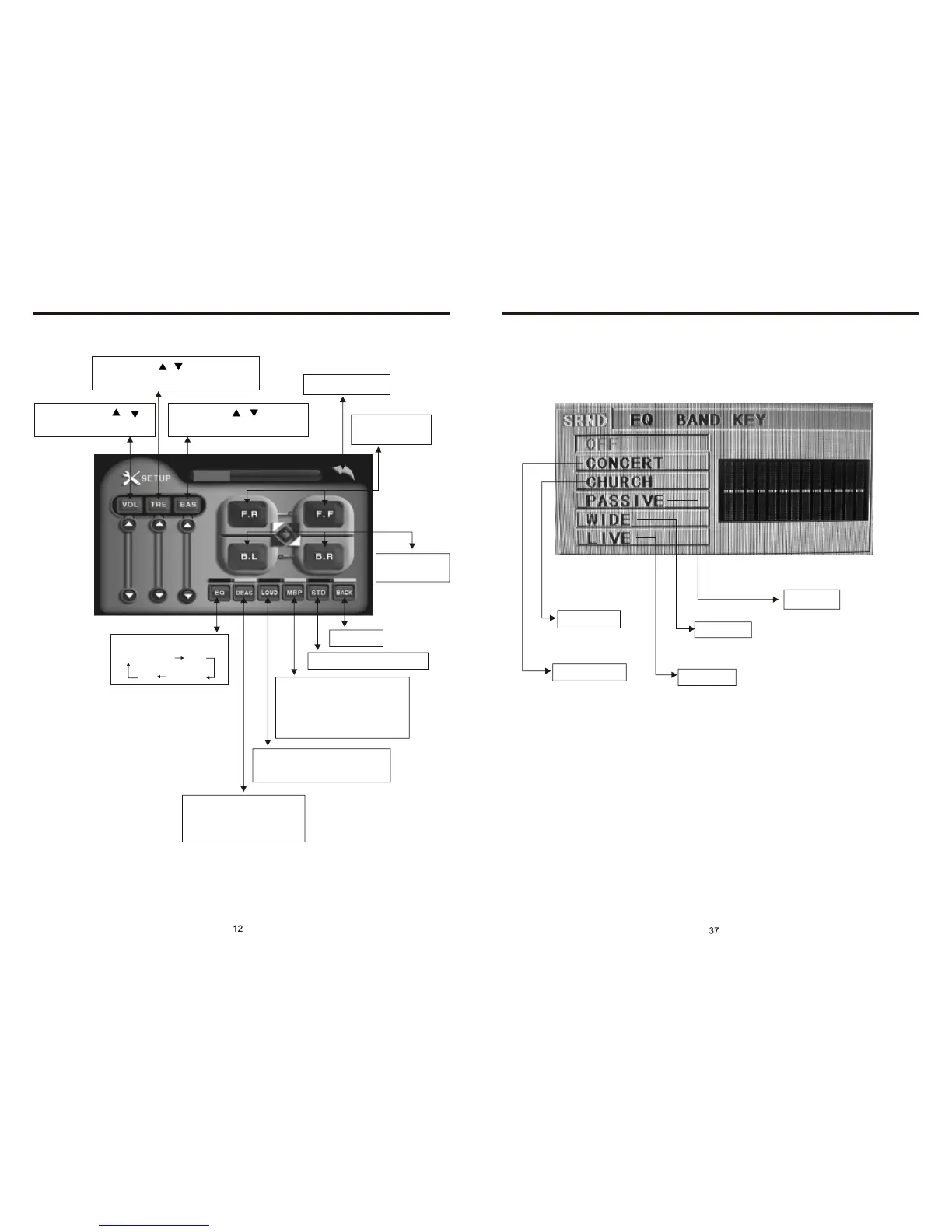
MUSIC SURROUNDINGS SETTING (PIC 7)
Church
Concert
Passive
Wide
Live
Note: This function only is used with the remote control in CD/MP3/USB/SD mode.
Once you have one of these settings on. You will no longer have Bass & Treble
adjustments until this feature is set to off.
ADJUST MODE (PIC 3)
Volume: press /
button to adjust volume
Sharp: press / button to adjust
sharp sound high and low
Bass: press / button to
adjust bass level
Back main menu
Adjust front and
rear speaker
Adjust left and
right speaker
EQ mode
From Rock
POP
Classic
Off
DBAS on/off: press
once to DBAS on, press
again to DBAS off
Loud: press once off LOUD
on, press again to turn off
Choose the best listening
place; this function will
make you enjoy the best
comfortable sound effects
Resume standard video
Exit setup



 To Next Page