EasyManua.ls Logo

Boss BX-800 - Operation Guide; Basic Setup and Controls; Using External Effect Units; Headphone Monitoring

Boss BX-800
6 pages
Print Icon
To Next Page IconTo Next Page
To Previous Page IconTo Previous Page
Loading...
OPERATION
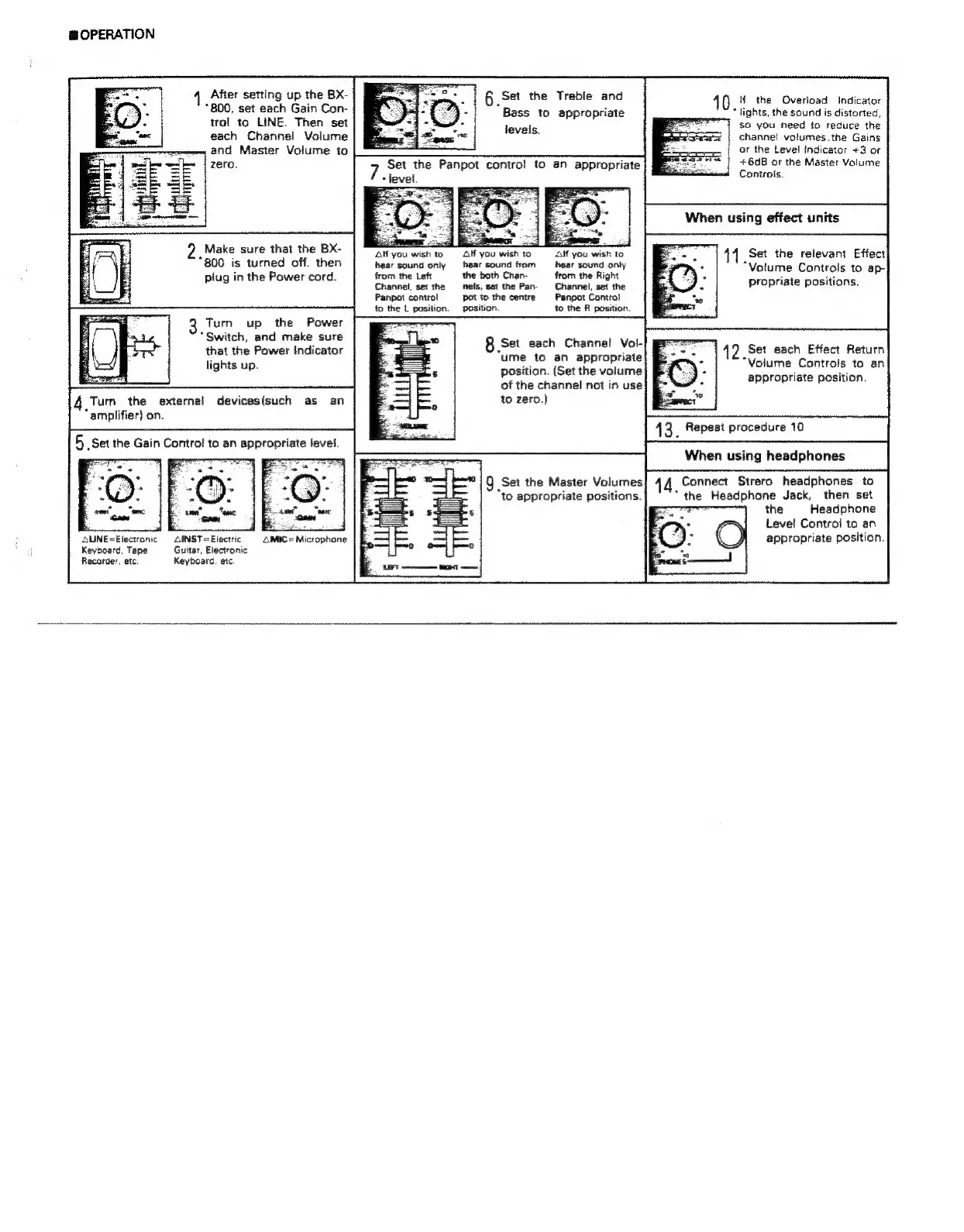
After
setting
up
the
Bx-
+
6
Set
the
Treble
and
40
H
the
Overload
Indicator
800,
set
each
Gain
Con-
d
Bass
to
appropriate
*
lights,
the
sound
is
distorted,
trol
to
LINE.
Then
set
so
you
need
to
reduce
the
each
Channel
Volume
channel
volumes,
the
Gains
and
Master
Volume
to
or
the
Level
indicator
+3
or
zero.
Set
the
Panpot
contro!
to
an
appropriate
+6dB
or
the
Master
Volume
7.
level.
Controls.
When
using
effect
units
„Make
sure
that
the
BX-
Alí
you
wish
to
GH
you
wish
to
AH
you
wish
to
Set the
relevant
Effect
lO
meee
da
"Volume
Controls
to
ap-
lug
in
the
Power
cord.
rom
the
L
han.
ym
the
Right
3 o
he
pee
Channel,
set
the
nels,
set
the
Par-
Channel,
set
the
propriate
positions.
Panpot
control
pot
to
the
centre
Panpot
Control
to
the
L
position.
position.
to
the
R
position.
levels.
3
Turn
up
the
Power
Switch,
and
make
sure
8
Set
each:
Channel
Vor
ume
to
an
appropriate
position.
(Set
the
volume
of
the
channel
not
in
use
Turn
the
external
devices(such
as
an
to
zero.)
*
amplifier)
on.
=
When
using
headphones
9
Set the
Master
Volumes
44
Connect
Strero
headphones
to
“to
appropriate
positions.
*
the
Headphone
Jack,
then
set
the
Headphone
E
S
E
E
Level
Control
to
an
QUNE=Electronic
INST=Electric
AMIC
=
Microphone
y
appropriate
position.
Keyboard,
Tape
Guitar,
Electronic
Recorder,
etc.
Keyboard,
etc.
that
the
Power
indicator
lights
up.
42
Set
each
Effect
Return
“Volume
Controls
to
an
appropriate
position.

Related product manuals