EasyManua.ls Logo

Boss DD-3 - Page 6

Boss DD-3
8 pages
Print Icon
To Next Page IconTo Next Page
To Previous Page IconTo Previous Page
Loading...
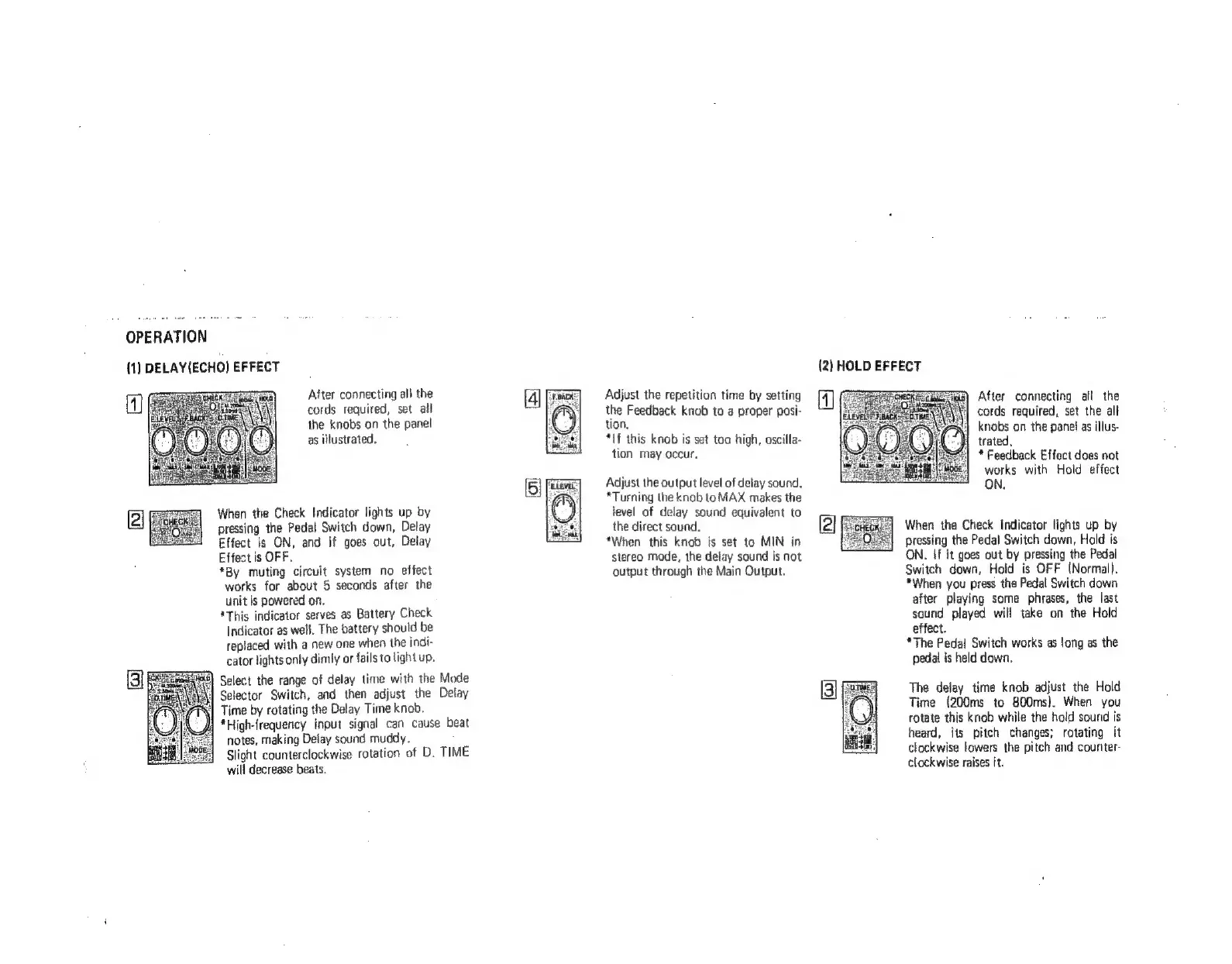
OPERATION
(1)
DELAY(ECHO)
EFFECT
After
connecting
all
the
cords
required,
set
all
the
knobs
on
the
panel
as
illustrated.
When
the
Check
Indicator
lights
up
by
pressing
the
Pedal
Switch
down,
Delay
Effect
is
ON,
and
if
goes
out,
Delay
Effect
is
OFF.
*By
muting
circuit
system
no
effect
works
for
about
5
seconds
after
the
unit
is
powered
on.
*This
indicator
serves
as
Battery
Check
Indicator
as
well.
The
battery
should
be
replaced
with
a
new
one
when
the
indi-
cator
lights
only
dimly
or
fails
to
light
up.
Time
by
rotating
the
Delay
Time
knob.
notes,
making
Delay
sound
muddy.
will
decrease
beats.
Select
the
range
of
delay
time with
the
Mode
Selector
Switch,
and
then
adjust
the
Delay
})
*High-frequency
input
signal
can
cause
beat
Slight
counterclockwise
rotation
of
D.
TIME
Adjust
the
repetition
time
by
setting
the
Feedback
knob
to
a
proper
posi-
tion.
*If
this
knob
is
set
too
high,
oscilla-
tion
may
occur.
Adjust
the
output
level
of
delay
sound.
*Turning
the
knob
to
MAX
makes
the
level
of
delay
sound
equivalent
to
the
direct
sound.
*When
this
knob
is
set
to
MIN
in
stereo
mode,
the
delay
sound
is
not
output
through
the
Main
Output.
(2)
HOLD
EFFECT
After
connecting
all
the
cords
required,
set
the
all
knobs
on
the
panel
as
illus-
i
trated.
*
Feedback
Effect
does
not
works
with
Hold
effect
ON.
When
the
Check
Indicator
lights
up
by
pressing
the
Pedal
Switch
down,
Hald
is
ON.
If
it
goes
out
by
pressing
the
Pedal
Switch
down,
Hold
is
OFF
(Normal).
*When
you
press
the
Pedal
Switch
down
after
playing
some
phrases,
the
last
sound
played
will
take
on
the
Hold
effect.
*The
Pedal
Switch
works
as
ong
as
the
pedal
is
held
down.
The
delay
time
knob
adjust
the
Hold
Time
(200ms
to
800ms).
When
you
rotate
this
knob
while
the
hold
sound
is
heard,
its
pitch
changes;
rotating
it
clockwise
fowers
the
pitch
and
couriter-
clockwise
raises
it.
[3]

Related product manuals